|

|
Processed through Paypal No account required. |








Buy our over-priced crap to help pay the bills.



|
|
Processed through Paypal No account required. |
| Files | ||||
| File Name | Rating | Downloads | ||
 |
Delete.On.Reboot v3.44 Delete.On.Reboot v3.44 A free program to delete locked files, directories and subfolders on Windows restart. Unlike the aggressive approach of deleting locked files with ThisIsMyFile, this is the regular procedure; provided by Microsoft on all Windows OS, but here you can still also move the files to a directory for example to check the possible culprits files. easy to use! Delete at restart key features: • Administrative Explorer • Administrative Explorer with System Rights • Move and Delete on Restart • Remove Windows Standard Delete Jobs • Very small program • Low CPU usage • Optional translation function • Portable • Multilanguage Optional Optionally, you can add the freeware tool to the Explorer context menu via the Extras menu, all objects in the list view will be deleted from the Windows PC when restarting. If necessary, objects that should not be deleted can be removed from the list view so that they are not deleted when the Windows PC restarts. Optionally in the download area is the installable and portable version. Changes: v3.44 12-03-25 • Optimization and various fixes for the Delete on Reboot app in Windows 11 and 10. • Language file updates in the Delete.On.Reboot Tool for MS Windows. Supported operating systems: Windows XP, Vista, 7, 8, 10, 11 Supported languages: German English French Russian Polish Korean Chinese-Traditional Greek Japanese Italian Swedish Norwegian Danish Irish Vietnamese Dutch Spanish Portuguese Afrikaans Hindi Hebrew Finnish Czech Persian Arabic Spanish-VE Malay Indonesian Filipino Simplified-Chinese Hungarian Bulgarian Bosnian This download is for the Windows 64bit version (very bottom of page). If you need the Windows 32bit version, download here. Click here to visit the author's website. |
 |
5,314 | Dec 04, 2025 Nenad Hrg 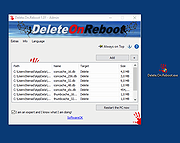 |
|
Print.Test.Page.OK v3.44 Print.Test.Page.OK v3.44 An alternative portable test page printout for all Windows operating systems. Features • Test page printout • Windows color palette as a print test • Customizable gradient test • Indirectly improves print quality Other options and specifications • Very small program • Low CPU usage • Optional translation function • Portable • Multilanguage A simple example of using the alternative test page printout Start the program. The first time you will be presented with the standard test page. Currently I have prepared two test pages, but I will expand it if requested by the user. The most important thing with color printers is, of course, the color, which can also be properly tested and assessed to quickly identify any deviations, to detect defective toner cartridges or ink / printer cartridges and to send them back with an existing warranty! You can also print high-resolution images, but clear colors and gradient tests are much better to detect any errors in the print. Sometimes there are also simple dust particles that can be quickly remedied on a laser printer or inkjet printer. Its equipped with two test pages and color gradients so that you can test the printer colors at any time, regardless of whether it is a color laser printer or a modern inkjet printer. You can quickly start the test page printout with the "Print" button. Changes v3.44 10-09-25 • Minor fixes in Print.Test.Page.OK for Windows 11 and 10 operating systems due to Smart Screen Lock. • Important language file update in Print.Test.Page.OK This download is for the 64bit version (very bottom of page). If you need the 32bit version, download here. Click here to visit the author's website. |
|
4,621 | Nov 17, 2025 Nenad Hrg 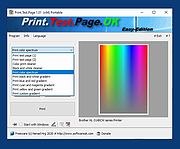 |
| Showing rows 1 to 2 of 2 | Showing Page 1 of 1 | 1 |
OlderGeeks.com Copyright (c) 2026
