|

|
Processed through Paypal No account required. |








Buy our over-priced crap to help pay the bills.



|
|
Processed through Paypal No account required. |
| Files | ||||
| File Name | Rating | Downloads | ||
 |
Stats v2.11.61 Stats v2.11.61 A free macOS system monitor for your Menu Bar. Stats is a simple, lightweight app that helps you monitor your mac's performance. Get a comprehensive view of your mac's health. Features: • CPU usage and processes monitoring. • GPU usage and processes monitoring. • RAM usage and processes monitoring. • Disk space and usage monitoring. • Sensors and fans monitoring. • Network I/O monitoring. • Battery level monitoring. • Bluetooth devices and their batteries monitoring. • Clock and calendar in your menu bar. Supported operating systems: macOS 10.14 (Mojave) macOS 10.13 (High Sierra) For macOS 10.15 (Catalina) and later Changes: v2.11.61 11-14-25 fix: reverted enabling macOS widget updates since there is still a problem with chronod (#2733) How to install: Manual install 1) Download the latest version for youe macOS version below. 2) Open it and move the app to the application folder. Homebrew Install 1) Open the Terminal app. 2) Type: brew install stats and hit ENTER. This download is for the macOS 10.15 (Catalina) and later version (very bottom of page). If you need the macOS 10.14 (Mojave) version, download here. If you need the macOS 10.13 (High Sierra) version, download here. Click here to visit the author's website. |
 |
666 | Nov 14, 2025 Serhiy Mytrovtsiy 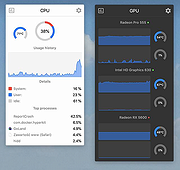 |
| Showing rows 1 to 1 of 1 | Showing Page 1 of 1 | 1 |
OlderGeeks.com Copyright (c) 2026
