|

|
Processed through Paypal No account required. |








Buy our over-priced crap to help pay the bills.



|
|
Processed through Paypal No account required. |
| Files | ||||
| File Name | Rating | Downloads | ||
 |
Clownfish Voice Changer v1.90 Clownfish Voice Changer v1.90 The ultimate system wide voice changer for Windows Clownfish Voice Changer is an application for changing your voice. It's installed on system level so every application that uses microphone or other audio capture device will be affected. In general - your voice will be modified in Steam, Skype, Hangouts, ooVoo, Viber, Ekiga, Jitsi, Ventrilo, TeamSpeak, Mumble, Discord, etc. Voice effects list: • Alien • Atari • Clone • Mutation • Fast Mutation • Slow Mutation • Male pitch • Silence • Female pitch • Helium pitch • Baby pitch • Radio • Robot • Custom pitch Music player with enhanced audio control and playlist. Various media formats supported. Sound player with build-in sounds and management. Virtual Studio Technology (VST) plugin support. . Supported operating systems: Windows Vista / 7 / 8 / 8.1 / 10 / 11 When you start the application Voice Changer logo icon will appear in Windows traybar. When you right click on this icon main control menu will appear. Double-clicking on icon turns on and off the application. When Hear microphone option is checked you will be able to hear your modified voice. From VST Effects menu you can manage and configure your VST plugins. Main Voice Changer Window - here you select active voice effect. When enabled the icon gets colored. If you want to stop all effect press Clear effect button. This window is opened from Set Voice Changer option in main menu. Music Playlist Window - here you can mange and control your background microphone's music. Supported commands - play, stop, pause, resume, next/prev track, volume ... |
 |
3,735 | Jan 28, 2025 Bogdan Sharkov 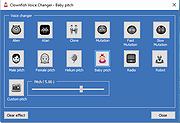 |
 |
USB Image Tool v1.90 USB Image Tool v1.90 Creates images of USB flash drives and MP3 players, that are mounted as USB drives. It allows you switch between images with different music styles on your MP3 Player or to make an exact backup image of your USB Stick. Features create image files of USB flash drives restore images of USB flash drives compressed image file format show USB device information manage favorite USB images command line utility Supported devices USB Image Tool works with any device, that implements the USB Mass Storage protocol. This includes flash drives, card readers and a lot of other devices, like digicams, cell phones and mobile music players. USB Image Tool supports the global secure mobile work environment. Changes USB Image Tool 1.90 – fixed: volumes following an unknown partition type were not shown – fixed: volume mode restore did not write to volume – fixed: exception while canceling operation for quitting program – added: task progess info (bytes/time written/remaining) – added: integrity check to detect fake size information – added: new option to show unknown partition types as hex code – changed: internal versioning harmonized – changed: log output in list view control Click here to visit the author's website. |
|
9,271 | Dec 11, 2022 alex's coding playground 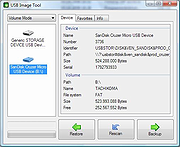 |
|
WhoisCL v1.90 WhoisCL v1.90 WhoisCL is a simple command-line utility that allows you to easily get information about a registered domain. It automatically connect to the right WHOIS server, according to the top-level domain name, and retrieve the WHOIS record of the domain. It supports both generic domains and country code domains. System Requirements Windows operating system: Windows 98/ME/2000/XP/2003/2008/7/8/10. Internet connection. On a firewall, you should allow outgoing connections to port 43. Versions History Version 1.90 - Added -s command-line option, which allows you to specify the WHOIS server to use instead of taking it from the servers list of WhoisCL. Usage WhoisCL [-r] [-n] [-socks4] [-socks5] Domain [-r] If you specify this option, the top remark lines of the WHOIS record are automatically removed. [-n] If you specify this option, WhoisCL will get the correct WHOIS server from xx.whois-servers.net, instead of using the internal WHOIS servers list. [-socks4] Specifies SOCKS4 proxy to use, in IPAddress:Port format [-socks5] Specifies SOCKS5 proxy to use, in IPAddress:Port format Domain Domain name. Examples: WhoisCL microsoft.com WhoisCL -r google.com WhoisCL -n w3c.org WhoisCL -socks4 192.168.0.55:1080 nirsoft.net WhoisCL -socks5 192.168.10.55:9980 facebook.com Example for WhoisCL output: WHOIS Server: whois.markmonitor.com Registrant: Google Inc. (DOM-258879) 2400 E. Bayshore Pkwy Mountain View CA 94043 US Domain Name: google.com Registrar Name: Markmonitor.com Registrar Whois: whois.markmonitor.com Registrar Homepage: https://www.markmonitor.com Administrative Contact: DNS Admin (NIC-1340142) Google Inc. 2400 E. Bayshore Pkwy Mountain View CA 94043 US dns-admin@google.com +1.6503300100 Fax- +1.6506181499 Technical Contact, Zone Contact: DNS Admin (NIC-1340144) Google Inc. 2400 E. Bayshore Pkwy Mountain View CA 94043 US dns-admin@google.com +1.6503300100 Fax- +1.6506181499 Created on..............: 1997-Sep-15. Expires on..............: 2011-Sep-14. Record last updated on..: 2005-Jul-25 20:14:20. Domain servers in listed order: NS3.GOOGLE.COM NS4.GOOGLE.COM NS1.GOOGLE.COM NS2.GOOGLE.COM MarkMonitor.com - The Leader in Corporate Domain Management ---------------------------------------------------------- For Global Domain Consolidation, Research & Intelligence, and Enterprise DNS, go to: ... |
|
9,870 | Apr 11, 2021 Nir Sofer 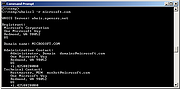 |
| Showing rows 1 to 3 of 3 | Showing Page 1 of 1 | 1 |
OlderGeeks.com Copyright (c) 2026
