|

|
Processed through Paypal No account required. |








Buy our over-priced crap to help pay the bills.



|
|
Processed through Paypal No account required. |
| Files | ||||
| File Name | Rating | Downloads | ||
 |
Dual Monitor Auto Mouse Lock v1.0.0.11 Dual Monitor Auto Mouse Lock v1.0.0.11 A free tool that helps you use dual and multiple monitors. The software automatically locks the mouse cursor to the screen according to your settings. Dual Monitor Auto Mouse Lock (DMAML) avoids certain unintentional operations and helps you use your computer quickly and efficiently. The way the software works is that if the foreground window is on full screen, the mouse cursor will be locked to that screen. The software runs in the background, displaying an icon in the system tray. The icon is used to access the settings, and its colour and appearance let you know about the software status: locked, unlocked, paused or disabled. You can also set sound notifications for status changes. The mouse cursor lock is automatically removed when a non-full-screen window appears in the foreground. It is also possible to exit the locked state by using the configurable hotkey and the system tray icon. It is possible to exclude certain software from automatically operating DMAML. You can make a list of these items and they will never cause a mouse cursor lock. By default, the main screen is the screen defined by Windows. The software monitors changes to the main screen and locks the mouse cursor to the main screen if necessary. DMAML allows you to change the main screen. Supported operating systems: Windows 10/11 Changes: v1.0.0.11 12-18-25 Add: Brazilian Portuguese language Click here to visit the author's website. |
 |
1,916 | Dec 18, 2025 Peter Panisz 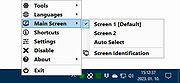 |
| Showing rows 1 to 1 of 1 | Showing Page 1 of 1 | 1 |
OlderGeeks.com Copyright (c) 2026
