|

|
Processed through Paypal No account required. |








Buy our over-priced crap to help pay the bills.



|
|
Processed through Paypal No account required. |
| Files | ||||
| File Name | Rating | Downloads | ||
 |
AMD Ryzen Master v3.1.1.5502 AMD Ryzen Master v3.1.1.5502 👉 Unlock, monitor, and tune AMD Ryzen processor performance. AMD Ryzen Master is AMD's official utility for controlling and monitoring supported AMD Ryzen processors. It provides access to overclocking, system telemetry, automatic tuning, performance profiles, CPU and RAM views, integrated Radeon graphics tuning, PBO and Curve Optimizer settings, and real-time monitoring for clock rates, temperatures, and voltages. Features: • Official AMD utility for supported Ryzen processors • Redesigned interface for essential controls and telemetry • Basic and Advanced modes • Automatic CPU and RAM overclocking • Real-time per-core clock monitoring • Temperature and voltage monitoring • Average and peak readings • Custom monitoring views • Multiple performance profiles • Tune Ryzen CPU settings • Adjust integrated Radeon graphics frequency • Adjust DDR5 memory timings • Workspace for immediate tuning adjustments • Integrated Radeon graphics overclocking on supported processors • PBO and Curve Optimizer adjustment options • CPU CCD monitoring views • RAM views focused on EXPO parameters Supported operating systems: • Windows 10 64-bit, Windows 11 64-bit Supported languages: English, German, French, Simplified Chinese Changes: v3.1.1.5502 07-22-26 Release Highlights Added support for the Curve Shaper feature – a fine‑grain voltage/frequency tuning capability that allows selective voltage adjustments across temperature and frequency bands; applicable to the AMD Ryzen™ 9000 Series. Known Issues The application may take a bit longer to load on systems with higher core count CPUs In certain scenarios, when Ryzen Master is launched from AMD Software: Adrenalin Edition™, Ryzen Master Dashboard may not display accurate metric values. As a workaround, restart your system, and then launch Ryzen Master before starting AMD Software: Adrenalin Edition™. This download is for the Ryzen 5000 Series processors and later version (very bottom of page). All other download assets are below: For Ryzen 3000 Series to 4000 Series processors version: amd_ryzen_master_2.14.3.5040.exe For Ryzen 2000 Series processors and earlier version: amd-ryzen-master-2-13-1-3097.exe Click here to visit the author's website. |
 |
24,023 | Sep 16, 2026 Advanced Micro Devices, Inc  |
 |
Intel Extreme Tuning Utility v7.14.2.14 Intel Extreme Tuning Utility (Intel XTU) v7.14.2.14 Overclock, monitor, and stress a system. Intel XTU is a Windows-based performance-tuning software that enables novice and experienced enthusiasts to overclock, monitor, and stress a system. The software interface exposes a set of robust capabilities common in most enthusiast platforms along with new features available on new Intel® application processors and Intel® motherboards. Supported operating systems: Windows 11* (23H2), Windows 11* (22H2), Windows 11* (21H2), Windows 10* (22H2) This download is valid for the product(s) listed below. Intel® Core™ i9-12950HX Processor (30M Cache, up to 5.00 GHz) Intel® Core™ i9 processor 14900KS (36M Cache, up to 6.20 GHz) Intel® Core™ i9 processor 14900HX (36M Cache, up to 5.80 GHz) Intel® Core™ i7 processor 14700HX (33M Cache, up to 5.50 GHz) Intel® Core™ i7 processor 14650HX (30M Cache, up to 5.20 GHz) Intel® Core™ i5 processor 14450HX (20M Cache, up to 4.80 GHz) Intel® Core™ i5 processor 14500HX (24M Cache, up to 4.90 GHz) Intel® Core™ i9 processor 14900KF (36M Cache, up to 6.00 GHz) Intel® Core™ i9 processor 14900K (36M Cache, up to 6.00 GHz) Intel® Core™ i7 processor 14700KF (33M Cache, up to 5.60 GHz) Intel® Core™ i7 processor 14700K (33M Cache, up to 5.60 GHz) Intel® Core™ i5 processor 14600KF (24M Cache, up to 5.30 GHz) Intel® Core™ i5 processor 14600K (24M Cache, up to 5.30 GHz) Intel® Core™ i7-12650HX Processor (24M Cache, up to 4.70 GHz) Intel® Core™ i7-12800HX Processor (25M Cache, up to 4.80 GHz) Intel® Core™ i7-12850HX Processor (25M Cache, up ... |
|
12,304 | Jul 23, 2024 Intel 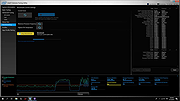 |
 |
Process Governor v1.3.1 Process Governor v1.3.1 👉 Automate Windows process and service priority, I/O priority, and CPU affinity rules. Process Governor is a free Python-based Windows utility that automates the management of processes and services by applying user-defined rules for priority, I/O priority, and CPU core affinity. It can be used to fine-tune system responsiveness, control how selected programs use CPU cores, and automatically apply preferred settings to matching processes or services. Features: • Adjust process and service priorities • Control I/O priorities for better resource management • Set CPU core affinity for selected processes • Create rules for processes by name, path, or command line • Create rules for Windows services by service name • Supports wildcards in process and service rules • Optional force mode for continuous rule application • Optional delay before applying rules • View running process details including PID, executable path, service name, and command line • Search, sort, and filter process and service lists • System tray menu with access to settings, config file, log file, updates, startup option, and quit • Open file locations, file properties, and service properties from the process list • Undo, redo, hotkeys, and inline rule editing • Error highlighting for invalid rule entries • Optional auto-start with Windows Supported operating systems: • Windows 10 • Windows 11 Supported languages: English Changes: v1.3.1 04-19-25 Bug Fixes Fixed error messages: Resolved occasional error messages in the garbage collection process. Click here to visit the author's website. |
|
1,030 | Jun 15, 2026 System X - Files 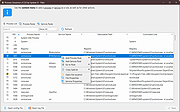 |
| Showing rows 1 to 3 of 3 | Showing Page 1 of 1 | 1 |
OlderGeeks.com Copyright (c) 2026
