|

|
Processed through Paypal No account required. |








Buy our over-priced crap to help pay the bills.



|
|
Processed through Paypal No account required. |
| Files | ||||
| File Name | Rating | Downloads | ||
 |
Microsoft Safety Scanner v1.457.193.0 Microsoft Safety Scanner v1.457.193.0 👉 On-demand malware scanner from Microsoft. Microsoft Safety Scanner is a free security tool designed to find and remove malware from Windows systems. It provides on-demand scanning with the latest malware definitions and is intended to complement, not replace, a full-time antivirus solution. The tool can be run directly after download, making it useful for quick system checks or emergency malware removal. Microsoft Safety Scanner uses the same detection engine as Microsoft Defender and allows users to perform quick scans, full system scans, or customized scans of specific folders and drives. Because it is updated frequently, users must download the latest version each time they want to run a scan, as older versions expire after a limited time. Features: • Uses Microsoft Defender malware detection engine • Quick scan, full scan, and custom scan options • Detects and removes viruses, spyware, and other malicious software • Simple interface for easy operation • Frequently updated definitions for current threats • Can be run alongside existing antivirus software • Ideal for troubleshooting infected systems Supported operating systems: • Windows 10, Windows 11, Windows Server 2016, Windows Server 2019, Windows Server 2022 Supported languages: All languages supported by Windows (uses system language) Changes: v1.457.193.0 08-16-26 Not Provided This download is for the Windows 64bit version (very bottom of page). If you need the Windows 32bit version, download here. Click here to visit the author's website. |
 |
6,794 | Aug 16, 2026 Microsoft Corp. 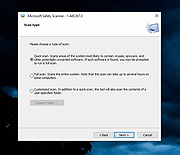 |
|
mssPortable (Microsoft Safety Scanner Portable) v1.457.164 mssPortable (Microsoft Safety Scanner Portable) v1.457.164 👉 Portable malware scanning tool from Microsoft for on-demand threat detection and removal. mssPortable is a portable version of the Microsoft Safety Scanner. It's a standalone security utility designed to scan for and remove malware from Windows systems without requiring installation. It provides a quick and reliable way to check a system for viruses, spyware, and other malicious software using the latest Microsoft threat definitions. Because it is portable, it can be run from a USB drive or other external media, making it ideal for troubleshooting infected systems or performing secondary scans alongside existing antivirus software. The tool does not offer real-time protection and is intended for manual, on-demand use. Features: • Fully portable with no installation required • Uses Microsoft’s latest malware definitions for accurate detection • Quick, full, and custom scan options • Detects and removes viruses, spyware, and other malicious software • Can be run alongside existing antivirus programs • Ideal for emergency cleanup and second-opinion scans • Simple interface for fast operation • Expires 10 days after download to ensure updated threat definitions Supported operating systems: • Windows 7, Windows 8, Windows 10, Windows 11 Supported languages: English Changes: v1.457.164 08-14-26 Not Provided Click here to visit the author's website. |
|
763 | Aug 16, 2026 Microsoft & PortableApps.com |
 |
Trellix GetSusp v6.0.0.141 Trellix GetSusp v6.0.0.141 👉 Find suspicious files and possible undetected malware using Trellix threat intelligence. Trellix GetSusp is a free, portable malware investigation tool designed for computers where undetected malware is suspected. It uses heuristics together with the Trellix Global Threat Intelligence (GTI) File Reputation database to identify suspicious files without requiring extensive technical knowledge. GetSusp runs as a single executable with no installation required and can operate through its graphical interface, command line or ePO mode. The graphical interface can also scan URLs, documents and PDF files and lets you review suspicious files before submitting selected samples to Trellix for further analysis. Features: • Uses heuristics to locate files that may contain undetected malware • Queries Trellix Global Threat Intelligence File Reputation to evaluate suspicious files • Runs as a single executable with no installation required • Supports graphical interface, command-line and ePO operation modes • Scans URLs, documents and PDF files from the graphical interface • Allows suspicious files to be reviewed before submission to Trellix • Lets you select which files are submitted for further analysis • Records system information and installed Trellix product information • Records the execution date and details about suspected files • Includes GetQuarantine integration with the ePO version • Can be used as an initial investigation tool when malware is suspected but has not been detected by installed security software Supported operating systems: • Windows 7, Windows 8, Windows 8.1, Windows 10 through 21H2, Windows 11 • Windows Server 2008 R2 SP1, Windows Server 2012, Windows Server 2016 Supported languages: • English Changes: Not Provided. This download is for the Windows 64bit version. If you need the Windows 32bit version, download here. Click here to visit the author's website. |
|
6,114 | Aug 16, 2026 Musarubra US LLC 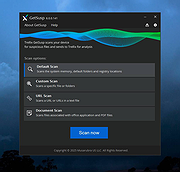 |
| Showing rows 1 to 3 of 3 | Showing Page 1 of 1 | 1 |
OlderGeeks.com Copyright (c) 2026
