|

|
Processed through Paypal No account required. |








Buy our over-priced crap to help pay the bills.



|
|
Processed through Paypal No account required. |
| Files | ||||
| File Name | Rating | Downloads | ||
 |
Metadata++ v3.00.2 Metadata++ v3.00.2 👉 View, edit, search, and manage metadata in thousands of file formats. Metadata++ is a powerful freeware metadata editor and browser for Windows built around ExifTool. It lets you inspect, edit, search, and organize metadata stored in photos, documents, audio, video, archives, and many other file types through a fast graphical interface. Designed to run locally without relying on the Windows registry, Metadata++ can also create sidecar files so metadata can be associated with formats that do not natively support it. It includes advanced search capabilities, batch editing, thumbnail viewing, ratings, tagging, and extensive support for industry-standard metadata formats, making it an excellent tool for photographers, archivists, content creators, and anyone who needs detailed control over file metadata. Features: • View, edit, and search metadata in thousands of supported file formats. • Built on the powerful ExifTool metadata engine. • Batch edit metadata across multiple files. • Create and use sidecar metadata files for unsupported formats. • Display image thumbnails and detailed file information. • Rate, tag, and organize files using metadata. • Fast folder navigation and high-performance directory browsing. • Export metadata in multiple formats. • Native Unicode support for international filenames and metadata. • Portable operation with all settings stored in the program folder. • No Windows registry entries required. • Runs entirely on your computer without transmitting personal data. Supported operating systems: • Windows 11 (64-bit), Windows 10 (64-bit) Supported languages: English, French, Spanish, Italian, Portuguese, Dutch, Polish Changes: v3.00.2 08-03-26 Changes since 3.00.1 Fixed the TreeView horizontal scrollbar. Added support for additional palette formats. Added GPR display support. Added conversions to JPEG, PNG and WebP. Added Save As and effects to fullscreen view. Added sidecar creation for any file format. Added the Ukrainian interface. Metadata++ can now use GDAL. Note: This file ... |
 |
2,179 | Aug 02, 2026 Jean Piquemal 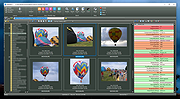 |
|
MP3tag v3.34.1 MP3tag v3.34.1 👉 Powerful and easy-to-use tag editor for managing audio file metadata. MP3tag is a popular and reliable tag editor designed to make organizing and managing your digital music collection simple and efficient. It supports batch editing of tags, import of metadata from online databases, and full Unicode support, making it suitable for both casual users and serious collectors. MP3tag works with a wide range of audio formats and allows you to rename files based on tag information or generate tags from filenames. The application is lightweight, fast, and focuses on doing one job extremely well: keeping your music library clean and properly tagged. Features: • Batch editing of audio file tags • Support for ID3v1, ID3v2, APEv2, MP4, Vorbis Comments, and more • Import tags from online databases such as Discogs and MusicBrainz • Automatic file renaming based on tag information • Create tags from filenames and directory structures • Full Unicode support for international music collections • Lightweight, fast, and portable-friendly design Supported operating systems: • Windows 7, Windows 8, Windows 10, Windows 11 Supported languages: English, German, French, Spanish, Italian, Portuguese, Dutch, Polish, Czech, Russian, Ukrainian, Chinese, Japanese, Korean, Hungarian, Romanian, Swedish, Turkish Changes: v3.34.1 05-07-26 FIX: large integer metadata values were truncated to the preferred storage width when writing MP4 atoms like `ITUNESCATALOGID`. (#71185) FIX: minor performance regression in the action groups dialog that could slow downloading or adding large numbers of action groups. (#71129) FIX: using 'Convert > Tag - Tag' changed the last used Quick Action to 'Format value'. (#71086) FIX: configuring or performing an action via a custom toolbar button also changed the last used Quick Action to this action type. LNG: updated French, Hungarian, and Traditional Chinese translations. This download is for the Windows 64bit version (very bottom of page). If you need the Windows 32bit version, download here. Click here to visit the author's website. |
|
6,341 | Jun 18, 2026 Florian Heidenreich 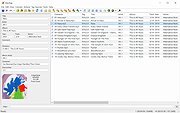 |
 |
QOwnNotes v26.9.11 QOwnNotes v26.9.11 👉 Open-source markdown note-taking application with Nextcloud and ownCloud integration. QOwnNotes is a free and open-source plain-text note-taking and to-do list manager designed for users who want full control over their notes and data. It stores notes as plain text Markdown files, making them easy to synchronize with services such as Nextcloud, ownCloud, Syncthing, Dropbox, and other cloud or local storage solutions. QOwnNotes includes powerful organization tools, note encryption, scripting support, tagging, searching, and customizable interface layouts for productivity-focused workflows. Features: • Plain-text Markdown note-taking with live preview • Integration with Nextcloud and ownCloud notes • Stores notes as standard text files without vendor lock-in • AES-256 encrypted notes support • Built-in scripting engine with QML support • Powerful note searching and filtering • Tagging and note organization tools • Multiple note folders and subfolder support • Customizable themes, fonts, and layouts • To-do list and task management support • Automatic note saving and backup support • External diff tool integration • Checkbox list creation and Markdown editing tools • Portable mode support • Cross-platform support for desktop operating systems Supported operating systems: • Windows 7, Windows 8, Windows 10, Windows 11 • macOS 13 Ventura or higher • Linux Supported languages: English, Arabic, Basque, Bulgarian, Catalan, Chinese Simplified, Chinese Traditional, Czech, Danish, Dutch, English, Finnish, French, German, Greek, Hebrew, Hungarian, Italian, Japanese, Korean, Norwegian, Persian, Polish, Portuguese, Portuguese Brazilian, Romanian, Russian, Slovak, Spanish, Swedish, Turkish, Ukrainian Changes: v26.9.11 09-25-26 Deprecated the non-GitHub Qt 5 release packages by removing the legacy Ubuntu Launchpad and OBS deployments from the release process, while retaining the Qt 5 artifacts built by the GitHub release workflow (for #3752) Added more French translation (thank you, jd-develop) 👉 This download is for the Windows version (very bottom of page). All other download assets are below: MacOS: QOwnNotes.dmg QOwnNotesQt5.dmg Linux: QOwnNotes-amd64.snap QOwnNotes-Qt5-amd64.snap QOwnNotes-x86_64.AppImage Click here to visit the author's website. |
|
6,865 | Sep 25, 2026 Patrizio Bekerle 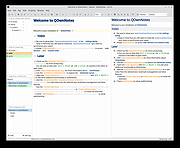 |
|
ResophNotes v1.8.1 ResophNotes v1.8.1 👉 A fast, lightweight Windows note-taking program with Simplenote synchronization, Markdown support, tags and powerful keyboard controls. ResophNotes is a free note-taking program for Windows designed to make creating, finding and managing text notes quick and uncomplicated. Notes can be kept locally or synchronized online with Simplenote, allowing them to be accessed from other devices using compatible Simplenote applications. It supports Markdown with HTML preview, tags, pinned notes, internal links, global keyboard shortcuts and optional storage of each note as an individual plain-text file. Deleted notes can be restored or permanently removed, and nearly every function can be controlled from the keyboard. A dark mode is also available. The developer warns that Simplenote may stop supporting synchronization with third-party applications, so Simplenote syncing should currently be used with caution. Features: • Simple, fast note creation and management • Synchronizes notes online with Simplenote • Access synchronized notes from other devices through Simplenote • HTTPS proxy support for Simplenote connections • Dark mode support • Global hotkey for quickly creating a new note • Global hotkey for restoring ResophNotes when minimized • Markdown text-to-HTML conversion with preview • Automatically recognizes HTTP links and email addresses • Internal note linking using wikilinks • Optional individual .txt files for storing notes • Complete keyboard control with numerous shortcuts • Single Note Mode for distraction-free note viewing and editing • Simplenote pinned-note support • Simplenote tag support • Search notes quickly from the keyboard • Import existing .txt files • Email notes directly from the program • Print notes • Insert the current timestamp with a keyboard shortcut • Restore deleted notes • Permanently delete unwanted notes • Free to use Supported operating systems: • Windows 10, Windows 11 (64-bit) Supported languages: English Changes: v1.8.1 08-14-26 Added Dark mode. Built using Microsoft Visual Studio Community 2026. Uses Qt 5.15.2. Updated OpenSSL library for connection issues. Click here to visit the author's website. |
|
80 | Sep 15, 2026 C.Y. Yen 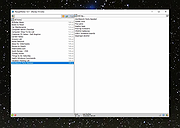 |
| Showing rows 1 to 4 of 4 | Showing Page 1 of 1 | 1 |
OlderGeeks.com Copyright (c) 2026
