|

|
Processed through Paypal No account required. |








Buy our over-priced crap to help pay the bills.



|
|
Processed through Paypal No account required. |
| Files | ||||
| File Name | Rating | Downloads | ||
 |
NextDiff v2.0 NextDiff v2.0 👉 Free file, text, and folder comparison tool for Windows. NextDiff is a freeware file and folder comparison utility that helps you quickly identify differences between two text files, source code files, documents, or folders. It displays content side-by-side with line-by-line and in-line highlighting, making it easy to spot added, removed, and modified text. NextDiff also supports folder synchronization tasks by identifying newer files and files that exist only on one side. Built-in editing and merge functions allow you to copy changes between files or make edits directly within the comparison window. For supported document formats, Apache Tika integration enables comparison of extracted text from files such as PDF, DOCX, XLSX, and PPTX. The program is free for both personal and commercial use. Features: • Side-by-side comparison of text files • Line-by-line and in-line difference highlighting • Compare source code, logs, scripts, configuration files, and documents • Compare folders and subfolders • Detect files that exist only on one side • Highlight newer files during folder comparison • Copy differences from left to right or right to left • Edit text directly within the comparison window • Undo recent merge and edit operations • Navigate to the first, previous, next, or last difference • Ignore case, whitespace, leading/trailing spaces, or blank lines • Supports ANSI, ASCII, UTF-8, UTF-8 BOM, and UTF-16 text encodings • Optional Apache Tika support for comparing PDF, DOCX, XLSX, PPTX, and other document formats • Customizable colors, fonts, line numbers, and grid display • Free for personal and commercial use Supported operating systems: • Windows 10, Windows 11 Supported languages: English, Czech, Dutch, French, German, Hungarian, Italian, Polish, Portuguese, Romanian, Russian, Slovak, Spanish, Turkish, Ukrainian Changes: v2.0 07-07-26 Added multilingual support. Note: This file has one hit on VirusTotal. We have confirmed this to be a false positive. The file is safe. Click here to visit the author's website. |
 |
391 | Jul 17, 2026 TkoSoft 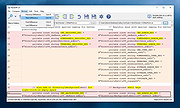 |
|
SourceDoc Pro v2.10 SourceDoc Pro v2.10 👉 Print, analyze, and document Visual Basic 6 source code projects. SourceDoc Pro is a free utility for Visual Basic 6 developers that creates professional printed documentation from VB6 source code projects. It reads VB6 project files (.VBP), displays project modules and procedures in organized lists, and allows users to selectively print individual routines, complete modules, dependency reports, or entire projects. Printed output includes customizable syntax highlighting, structured formatting, and visual loop bracket connectors that make nested code easier to follow on paper or in PDF form. SourceDoc Pro also generates procedure dependency reports showing which routines call a procedure and which routines are called by it, helping developers understand program flow, trace relationships between routines, and maintain legacy VB6 applications. The program provides extensive printing and formatting controls, including custom fonts, adjustable margins, portrait and landscape orientation, duplex printing, binding offsets, and printable tables of contents. An optional setting reproduces the appearance of source code as displayed in the VB6 IDE, while color customization makes it easier to distinguish comments, constants, variables, procedure names, and other code elements. SourceDoc Pro also includes multiple Developer Aids designed to help programmers structure their code for consistent, organized documentation. Its three-panel interface makes it easy to select project files, choose procedures, manage the print queue, and include dependency reports. Output can be directed to a physical printer or a file-based printer such as Microsoft Print to PDF, allowing documentation to be saved, shared, or archived. Whether documenting an older application, reviewing unfamiliar source code, preparing a project for maintenance, or creating a permanent printed reference, SourceDoc Pro provides a practical way to turn VB6 projects into readable, organized documentation. The program includes a complete User Manual and an installer that automatically supplies the required VB6 runtime components. Features: • Opens and analyzes Visual Basic ... |
|
582 | Oct 26, 2026 Michael W. Cetera 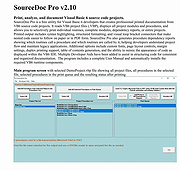 |
| Showing rows 1 to 2 of 2 | Showing Page 1 of 1 | 1 |
OlderGeeks.com Copyright (c) 2026
