|

|
Processed through Paypal No account required. |








Buy our over-priced crap to help pay the bills.



|
|
Processed through Paypal No account required. |
| Files | ||||
| File Name | Rating | Downloads | ||
 |
Better Windows Services v0.4.0 Better Windows Services v0.4.0 👉 Search, manage, and audit Windows services with a desktop app or command line tool. Better Windows Services gives administrators a searchable view of the local machine’s services and drivers. Its desktop app and command line tool use the same query language, so a search such as start:auto !status:running can find services set to start automatically that are currently stopped. Before starting, stopping, restarting, or changing a service’s startup type, the program shows a plan of the steps it will take, including affected dependent services. The command line can also save a snapshot of service settings and compare it with another snapshot or the live machine. The comparison separates configuration changes from ordinary changes in running state. Snapshots are available through the command line, not the desktop app. Features: • Search services and drivers by name, status, startup type, account, file, signature, publisher, dependencies, and other fields. • Preview service actions and their effects on dependent services before applying them. • Start, stop, restart, and change the startup type of services. • Offer a force stop that first requests a normal stop, then ends the process if necessary, with other services sharing that process identified in the preview. • Show details including triggers, required privileges, security descriptors, process information, and file signatures. • Export service lists from the desktop app. • Create and compare JSON snapshots with the command line tool to identify service configuration changes. • Provide JSON command output and exit codes for scripts. Supported operating systems: • Windows 10 version 1809 or later 64-bit, Windows Server 2019 or later 64-bit Supported languages: English Changes: v0.4.0 10-07-26 CHANGELOGBWS.txt Note: The GUI and CLI come in separate portable ZIP files. They include their own .NET runtime and work offline. Administrator rights are needed to make changes; viewing services without elevation may show fewer entries. 👉 This download is for the Windows 64bit GUI version (very bottom of page). All other download assets are below: Other ... |
 |
144 | Oct 08, 2026 DonislawDev 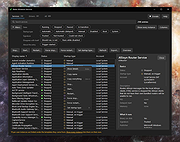 |
 |
Delta v0.1.8 Delta v0.1.8 👉 Disk space analyzer with historical snapshot comparison. Delta is a disk space analysis tool that allows you to scan your drives, save storage snapshots, and compare changes over time. It helps you quickly identify which folders and files have grown or shrunk between scans. Designed to work fully offline, Delta stores scan data locally and focuses on lightweight performance with a modern user interface. Features: • Scan drives and analyze folder and file size usage • Save disk usage snapshots for historical tracking • Compare past and current scans to detect size changes • Fully offline operation with no telemetry • Lightweight application built with Rust and Tauri • Modern interface powered by React Supported operating systems: • Windows 10, Windows 11, Linux Supported languages: English Changes: v0.1.8 05-31-26 • Bug fixes • Added sorting improvements • UI changes Note: This file has one hit on VirusTotal. We have confirmed this to be a false positive. The file is safe. This download is for the Windows 64bit setup version (very bottom of page). All other download assets are below: Other Windows: delta_0.1.8_x64_en-US.msi Linux: delta-disk-analyzer_0.1.8_amd64.deb delta-disk-analyzer-0.1.8-1.x86_64.rpm delta-disk-analyzer_0.1.8_amd64.AppImage Click here to visit the author's website. |
|
798 | Jul 11, 2026 Austin Bian 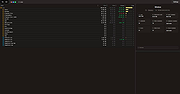 |
|
VirtualBox v7.2.20 VirtualBox v7.2.20 👉 Run multiple operating systems in virtual machines on a single computer. VirtualBox is a free, open-source virtualization program from Oracle that lets you create and run virtual computers inside your existing operating system. Each virtual machine can be configured with its own processors, memory, storage, display, networking and removable devices, allowing different operating systems to run without replacing or modifying the host system. It is useful for testing software, evaluating operating systems, running older applications, creating isolated development environments and experimenting with system configurations. Virtual machines can be paused, saved, cloned, exported or restored to an earlier snapshot. Features: • Create and run multiple virtual machines on one physical computer • Supports x86-64 virtualization and Arm virtualization on supported Apple silicon hosts • Configurable processors, memory, virtual disks, graphics and network adapters • Run Windows, Linux, BSD, Solaris and other supported guest operating systems • Take snapshots and restore virtual machines to earlier states • Clone, import and export virtual machines • Shared folders for exchanging files between host and guest systems • Shared clipboard and drag-and-drop integration on supported systems • NAT, bridged, internal, host-only and other virtual networking modes • USB device passthrough with the appropriate VirtualBox components • Guest Additions improve display, mouse, clipboard and folder integration • Command-line management through VBoxManage • Supports unattended installation for compatible guest operating systems • Save a running virtual machine and resume it later • Optional Extension Pack adds additional functionality under a separate license Supported operating systems: • Windows 8.1, Windows 10, Windows 11, Windows Server 2012, Windows Server 2012 R2, Windows Server 2016, Windows Server 2019, Windows Server 2022, Windows Server 2025 • macOS 13 Ventura, macOS 14 Sonoma, macOS 15 Sequoia, macOS 26 Tahoe • Supported 64-bit Linux distributions • Oracle Solaris 11 Supported languages: English, Indonesian, Catalan, Czech, Danish, German, Spanish, Basque, French, Croatian, Italian, Lithuanian, Hungarian, Dutch, Polish, Portuguese (Brazil), Portuguese (Portugal), Slovak, Slovenian, Swedish, Turkish, Greek, ... |
|
12,129 | Sep 23, 2026 Oracle 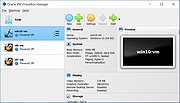 |
| Showing rows 1 to 3 of 3 | Showing Page 1 of 1 | 1 |
OlderGeeks.com Copyright (c) 2026
