|

|
Processed through Paypal No account required. |








Buy our over-priced crap to help pay the bills.



|
|
Processed through Paypal No account required. |
| Files | ||||
| File Name | Rating | Downloads | ||
 |
KeyTweak Portable v2.3.0 KeyTweak Portable v2.3.0 👉 Remap, disable or reassign keyboard keys through a simple visual interface. KeyTweak Portable is a free Windows keyboard-remapping utility that lets you change the function of individual keys without manually editing the Windows Registry. Its visual keyboard displays 126 numbered key positions, allowing you to select a key and assign it a different function or disable it entirely. KeyTweak writes changes to the Windows Scancode Map, making remappings available system-wide after Windows restarts. It can be used to disable unwanted keys, replace the function of a broken key, swap modifier keys or reassign multimedia and specialty buttons. Full Teach Mode and Half Teach Mode help identify keys that may not be easy to locate on the visual keyboard. The program does not need to remain running after changes are applied. Active mappings can be reviewed, undone individually or removed with the Restore All Defaults option. Remapping configurations can also be saved and loaded for later use. Features: • Visual keyboard with 126 numbered key positions • Remap individual keyboard keys • Disable unwanted or troublesome keys • Full Teach Mode for identifying and remapping physical keys • Half Teach Mode for quickly identifying a source key • Support for multimedia and specialty buttons • View currently active remappings • Undo the most recent remapping • Restore all keys to their default functions • Save and load remapping configurations • Applies remappings system-wide through the Windows Scancode Map • Does not require a background service after changes are applied • No install required • Manual included Note: A system restart is required after applying any remap for changes to take effect. Supported operating systems: • Windows 7, Windows 8, Windows 8.1, Windows 10, Windows 11 Supported languages: English Changes: v2.3.0 Not Provided Note: This file has two hits on VirusTotal. We have confirmed these to be false positives. The file is safe. Click here to visit the author's website. |
 |
432 | Jul 15, 2026 Travis Krumsick & OlderGeeks.com 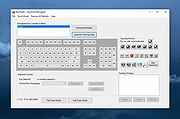 |
|
Scancode Map v1.11 Scancode Map v1.11 An easy, portable tool to re-map your keyboard keys. From the author: "It all stated by me getting annoyed with F1 key. As it is only a registry change, I did it manually; easy enough. But then I got another laptop that had no context key (damn you HP). So I remapped Right Alt to Context menu. But I also wanted F1. And for my media computer with a strange small keyboard, I wanted to do other mappings too. Quite soon it was obvious that I might as well create application instead of calculating mappings by hand. This application gives you ability to remap any hardware key to another using the Scancode Map registry value. Once configuration is written (and computer rebooted), application doesn’t need to be running for mapping to work. Additionally, if you want to use manual mapping, it is useful to get scancode information for a key and there is standalone Scancode Viewer included too." Changes: 1.11 (2019-11-17) Using TLS 1.3 for upgrade and feedback. Click here to visit the author's website. |
|
3,474 | Apr 12, 2021 Josip Medved 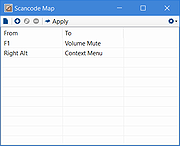 |
| Showing rows 1 to 2 of 2 | Showing Page 1 of 1 | 1 |
OlderGeeks.com Copyright (c) 2026
