|

|
Processed through Paypal No account required. |








Buy our over-priced crap to help pay the bills.



|
|
Processed through Paypal No account required. |
| Files | ||||
| File Name | Rating | Downloads | ||
 |
BATExpert v1.14.5.27 BATExpert v1.14.5.27 Monitor and evaluate the health of your laptop battery. BATExpert gives you a crystal-clear vision of your laptop battery health status right at your fingertips. Designed specifically for notebook and laptop computers, it displays important battery information in a simple interface and helps you monitor battery condition, usage, and performance. BATExpert decodes battery manufacturer information and provides real-time details about charge status, current power usage, battery chemistry, and other useful metrics. The program can also estimate the remaining time before a low-battery warning occurs and recommends a battery upgrade when appropriate. Features: • Clear laptop battery manufacturer data decoding • Displays current charge status • Shows current usage and charge rate • Displays battery type (chemistry) • Displays battery temperature when available • Estimates time remaining before low-level warning • User-friendly interface • Internationalization support • Battery upgrade recommendations when appropriate Supported operating systems: • Windows XP, Windows Vista, Windows 7, Windows 8, Windows 8.1, Windows 10, Windows 11 Supported languages: • English Changes: v1.14.5.27 04-23-23 • Updated ICS library to v8.70 • Updated OpenSSL to v3.1.0 • Added ReactOS detection in logs • Improved Windows Server 2003 detection Click here to visit the author's website. |
 |
10,984 | Jun 05, 2026 KC Softwares 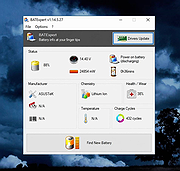 |
 |
Microsoft Visual Basic Runtime 6.0 SP6 Microsoft Visual Basic Runtime 6.0 SP6 👉 Provides the essential runtime files required to run applications developed with Microsoft Visual Basic 6.0. Many legacy and commercial programs written in VB6 depend on these components to function correctly on modern versions of Windows. This package installs the official Service Pack 6 runtime libraries released by Microsoft, resolving compatibility issues, stability problems, and known bugs present in earlier VB6 runtime versions. It is commonly required when older software fails to start due to missing or unregistered VB6 components such as MSVBVM60.DLL. The runtime does not include the Visual Basic development environment and is intended solely for end users who need to run existing VB6 applications. Features: • Official Microsoft Visual Basic 6.0 SP6 runtime files • Required for running many older Windows applications • Improves stability and compatibility over earlier VB6 runtimes • Does not install development tools • Lightweight and safe to install alongside modern Windows versions Note: This runtime is often needed on Windows 10 and Windows 11 systems when running legacy software originally designed for Windows XP, Vista, or Windows 7. Supported operating systems: Windows XP through Windows 11 (32-bit & 64-bit) Click here to visit the author's website. |
|
2,764 | Apr 10, 2026 Microsoft Corp. 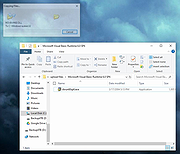 |
|
MultiPack .NET Windows Desktop Installer v2.2 MultiPack .NET Windows Desktop Installer v2.2 👉 “MPDNI” – A Simple GUI installer bundle for the latest .NET Desktop Runtime redistributables. MultiPack .NET Windows Desktop Installer is a simple GUI packaged installer for all the latest .NET Desktop Runtime redistributables. It bundles the newest .NET Desktop Runtimes 6 through 10 into a single installer package, making it easier to deploy the required Microsoft .NET desktop runtimes on supported Windows systems. Features: • Simple GUI packaged installer • Bundles .NET Desktop Runtime redistributables into one package • Includes Windows Desktop Runtime 6.0.36 (x64 only) • Includes Windows Desktop Runtime 7.0.20 (x64 only) • Includes Windows Desktop Runtime 8.0.28 (x64 only) • Includes Windows Desktop Runtime 9.0.17 (x64 only) • Includes Windows Desktop Runtime 10.0.9 (x64 only) Supported operating systems: • Windows 10, Windows 11 Supported languages: • Operating system language Changes: v2.2 07-10-26 MPDNI 2.2 July 2026 Edition (Win10+ supported) Updated Windows Desktop Runtime 8 from 8.0.26 to 8.0.28. Updated Windows Desktop Runtime 9 from 9.0.15 to 9.0.17. Updated Windows Desktop Runtime 10 from 10.0.7 to 10.0.9. Click here to visit the author's website. |
|
1,731 | Aug 26, 2026 BobSpwg 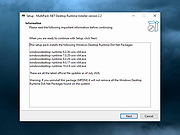 |
|
MultiPack Visual C++ Installer v4.2 MultiPack Visual C++ Installer v4.2 👉 Installs the latest Microsoft Visual C++ redistributable packages in one simple GUI installer. MultiPack Visual C++ Installer is a simple packaged installer for Microsoft Visual C++ redistributables, bundled into one easy-to-use setup for installing the commonly needed Visual C++ runtime packages from 2005 through 2022. Features: • Simple GUI-based installer • Installs Microsoft Visual C++ 2005 through 2022 redistributables • Includes x86 and x64 packages where available • Useful for fixing missing Visual C++ runtime errors • Designed for quick setup on Windows systems • Installer bundle includes all the newest VC++ 2005 – 2022 Packages: -Microsoft Visual C++ 2005 (x86 only) 8.0.61001 -Microsoft Visual C++ 2008 (x86/x64) 9.0.30729.6161 -Microsoft Visual C++ 2010 (x86/x64) 10.0.40219.473 -Microsoft Visual C++ 2012 (x86/x64) 11.0.61030.0 -Microsoft Visual C++ 2013 (x86/x64) 12.0.40664.0 -Microsoft Visual C++ 2015-2022 (x86/x64) *14.51.36247.0 Supported operating systems: • Windows 10, Windows 11 Supported languages: English Changes: v4.2 07-10-26 Not Provided Click here to visit the author's website. |
|
8,064 | Jul 11, 2026 BobSpwg 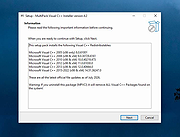 |
|
PearPass v2.1.0 PearPass v2.1.0 👉 Peer-to-peer password manager with private, device-to-device syncing. PearPass is an open-source password manager that prioritizes privacy and user control by avoiding centralized servers. Built on Pear Runtime, it uses peer-to-peer technology to sync your credentials directly between your devices, ensuring your data remains private, secure, and fully under your control. Instead of relying on cloud storage, PearPass keeps your information encrypted and shared only between your authorized devices. With a clean and minimal interface, it provides a straightforward way to manage passwords while maintaining modern security practices and full data ownership across desktop and mobile devices. Features: • Peer-to-peer syncing between devices with no central server • Built on Pear Runtime for decentralized application architecture • End-to-end encryption to protect all stored credentials • Local-first storage with no mandatory cloud dependency • Open-source codebase for transparency and independent auditing • Secure device-to-device authorization for syncing • No tracking, telemetry, or third-party data collection • Simple vault-style organization for managing credentials • Clean, minimal interface focused on ease of use • Fast access and retrieval of stored passwords • Designed for full user ownership and control of sensitive data • Lightweight application with low resource usage • Cross-platform support including desktop and mobile devices Supported operating systems: • Windows 10, Windows 11 • macOS • Linux • Android • iOS Supported languages: English Changes: v2.1.0 05-20-26 New features TOTP support: including OTP-to-login matching, duplicate-code warnings, and account search. Vault Deletion: Local vault removal with automatic cross-device syncing. Bitwarden Import: Support for encrypted vault imports. UI & UX Improvements UX improvements: Cleaned up core UI flows (Home, Settings, Autofill, Passkeys). Stability & Performance Faster Diagnostics: Optional local logs for monitoring for quicker bug fixes. Reliable Sync: Fixed Home screen vault name updates and improved cross-device syncing. This download is for the Windows 64bit version (very bottom of page). All ... |
|
860 | Sep 16, 2026 Tether Data, S.A. de C.V.  |
| Showing rows 1 to 5 of 5 | Showing Page 1 of 1 | 1 |
OlderGeeks.com Copyright (c) 2026
