|

|
Processed through Paypal No account required. |








Buy our over-priced crap to help pay the bills.



|
|
Processed through Paypal No account required. |
| Files | ||||
| File Name | Rating | Downloads | ||
 |
Alarm Stickies 3 v3.2.05.5 Alarm Stickies 3 v3.2.05.5 👉 Electronic sticky notes with alerts, recurrences, calendar, and phonebook. Alarm Stickies 3 is a freeware reminder utility that lets you create electronic sticky notes, save them to a database, and optionally set date/time alerts so the sticky appears when the reminder is due. It also includes recurring events, Windows notifications, a quarterly calendar, programmable shortcut keys, backup/restore, shared data folder support, and a phonebook/rubric. Features: • Create electronic sticky notes quickly from the tray icon, hotkey, menu, or quarterly calendar • Notes are saved to a database when closed • Set date and time alerts for stickies • Alerted stickies can jump to the screen position you choose • Optional alert sounds • Customize sticky size, color, font, and font size • Save a modified sticky layout as the default for new stickies • Choose from 9 date formats • Programmable shortcut keys • Print the shortcut key list for paper or PDF reference • Recurring events for birthdays, anniversaries, payment deadlines, and more • Supports annual, semi-annual, four-monthly, quarterly, bimonthly, and monthly recurrences • Recurrence notifications can appear through Windows notifications • Set a programmable notification range before recurrence expiration • Quarterly calendar highlights recurrences in different colors • Click future calendar dates to create a sticky already set to that date at 12:00 • Spacious phonebook/rubric with 21 tables and 40 lines each • Case-insensitive search in the phonebook/rubric • Choose the folder used for settings and data • Data folder can be placed in a shared folder, such as a cloud folder, for use across your own PCs • Backup and restore program data • Keeps the last three backups • Optional automatic start with Windows • Optional automatic update check at program startup • Freeware with no advertising and no donation popups Supported operating systems: • Windows 7 SP1 with Microsoft .NET Framework 4.8, Windows 8 with Microsoft .NET Framework 4.8, Windows 10, Windows 11 Supported languages: English, French, Spanish, Italian Changes: v3.2.05 12-16-25 Fixed ... |
 |
792 | Apr 24, 2026 eziogarr-coder 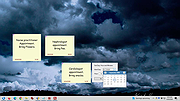 |
 |
Birthday Reminder v1.9.0 Birthday Reminder v1.9.0 Alerts you to birthdays you need to remember, in advance of those dates. The reminder box looks like this: Clicking the Options button allows you to manage the birthdays. Choose how far in advance you want to be reminded for each, which icon you'd like to use for that person, and set other options. You can sort the data by each of the columns below. Click here to visit the author's website. |
|
6,723 | May 28, 2024 Zhorn Software 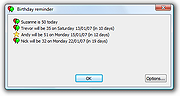 |
|
Date Reminder v3.38 Date Reminder v3.38 Reminds you of recurring or nonrecurring events, like birthdays, bills to pay, appointments etc... The program can be run from the Startup folder with an option to show only, if there are any alerts for this day. If Date Reminder is kept in the System Tray (optional), if will also alert you after standby or hibernation. The reminders are listed in chronological order, with recurring events showing only once (the next one). This gives you an instant view of the alerts (at top), as well as a full list of all reminders. Other view modes: Alerts only, History. Features: • Events may recur every year, month, week, day, or every 10 days, every 2 weeks, every 3 month etc. • For monthly or annual reminders you can preselect a specific day (e.g. "first monday") of the month • Reminders can be marked "done", i.e. "dealt with". Past events will remain in the list until they are marked "done". • A group symbol (column ::) is available to mark different types of events. • An advance notice marker can be set a number of days before an event. • An extra calendar box, sizable for one or more month, always highlights the date of the currently selected line. • Second text line with launching capability (shows in status bar): Double click to load a file, program, website etc., or just use it for additional text. • Date format according to the user's regional settings (a different format can be specified in the INI file). • The user interface is controlled by language files. English (default) and 20 other languages are included. Additional language files can be created. Unicode support. This download is for the 64bit version. If you need the 32bit version, download here. Click here to visit the author's website. |
|
6,006 | Feb 21, 2023 Horst Schaeffer 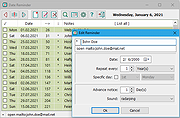 |
|
Workrave v1.10.54 Workrave v1.10.54 👉 Helps prevent repetitive strain injuries by reminding you to take healthy computer breaks. Workrave is a free and open-source program designed to help prevent and relieve Repetitive Strain Injury (RSI) and other computer-related health issues. It monitors keyboard and mouse activity and reminds users to take regular breaks from their computer to rest, stretch, and relax. The software provides configurable microbreaks, rest breaks, and daily usage limits to encourage healthier work habits. By tracking input activity and detecting idle time, Workrave can intelligently determine when breaks are needed and provide gentle reminders before enforcing them if necessary. During breaks, Workrave may display simple exercises or relaxation prompts to help reduce muscle tension and eye strain caused by prolonged computer use. Break timers and reminder behavior are fully customizable, allowing users to tailor break frequency, duration, and enforcement settings to their workflow. Workrave runs quietly in the background and integrates with the system tray, making it suitable for both home and workplace environments where long computer sessions are common. Features: • Monitors keyboard and mouse activity to detect continuous computer use • Reminds users to take microbreaks, rest breaks, and daily usage limits • Fully configurable break timers and durations • Gentle break reminders with optional enforced breaks • Microbreaks for short pauses and longer rest breaks for recovery • Tracks active and idle time to intelligently manage break timing • Optional exercises and stretching prompts during breaks • Postpone or skip options for break reminders • System tray integration and automatic startup options • Free and open-source software Supported operating systems: • Windows • Linux Supported languages: System language (Workrave uses the operating system's locale for its interface language). Changes: v1.10.54 10-16-25 Add support for GNOME Shell 49 (#636, Alessandro Astone) Note: This file has two hits on VirusTotal. We have confirmed these to be false positives. The file is safe. This download is for the Windows version (very bottom of ... |
|
4,490 | Mar 04, 2026 Raymond Penners & Rob Caelers 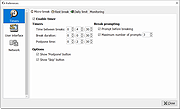 |
| Showing rows 1 to 4 of 4 | Showing Page 1 of 1 | 1 |
OlderGeeks.com Copyright (c) 2026
