|

|
Processed through Paypal No account required. |








Buy our over-priced crap to help pay the bills.



|
|
Processed through Paypal No account required. |
| Files | ||||
| File Name | Rating | Downloads | ||
 |
Dougi v1.0.672 Dougi v1.0.672 👉 Create high-quality JPEG images with realtime quality preview. Dougi is a lightweight portable JPEG optimization utility that lets you create high-quality JPEG images quickly and easily. Simply open, paste, or drag and drop an image, adjust the desired JPEG quality, and save. Its realtime WYSIWYG (What You See Is What You Get) preview lets you instantly see the effect of compression changes, eliminating the guesswork when balancing image quality and file size. Dougi also includes optional maximum file size limits, basic image adjustment tools, batch conversion, clipboard support, customizable appearance settings, and built-in help. Features: • Realtime WYSIWYG JPEG quality preview • Manual JPEG quality adjustment (5-100%) • Automatic quality presets: Low, Fair, Good, High, and Best • Optional maximum JPEG file size limit (5-4,000 KB) • Image adjustments including Mirror, Flip, Grey, Sepia, Noise, Invert, and Soften • Displays image dimensions, JPEG file size, and color count in realtime • Opens PNG, GIF, JPG, JIF, JPEG, TJ32, BMP, DIB, ICO, CUR, ANI, TEA, TGA, PPM, PGM, PBM, PNM, XBM, and IMG32 formats • Saves JPG, JIF, and JPEG formats • Copy images to the Clipboard as JPG or PNG • Batch conversion by dragging and dropping multiple images • Preview output in your default web browser • Customizable colors, fonts, and application settings • Portable - no installation required Supported operating systems: • Windows 7, Windows 8, Windows 8.1, Windows 10, Windows 11, Ubuntu Linux Supported languages: English Changes: v1.0.672 11-19-25 Not Provided. Click here to visit the author's website. |
 |
348 | Jul 17, 2026 Blaiz Enterprises 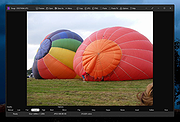 |
|
MP3 Quality Modifier v2.53 MP3 Quality Modifier v2.53 MP3 Quality Modifier is a straightforward program that is able to easily change the quality of your MP3’s in order to save disk space and/or to fit more music on your MP3 player while maintaining the desired level of audio quality and keeping all ID3 tags intact! The program is pretty simple to use: The first step is to drag and drop MP3 files or playlists on the file list, MP1 and MP2 files are supported as well. Various information such as the name, interpret, size and bitrate are displayed automatically. The next step is to select a preset which ranges from high quality over portable and compromise to low quality. More advanced users can choose from a variety of configurations such as bitrate mode and rate, sample frequency and the stereo modus. The process itself takes only a few seconds per song and is even able to adapt the folder structure (example: “Artist X” folder with “Album 1” and “Album 2” as subfolders) if that is wanted. Unlike other tools all ID3 tags like the title, artist etc. are automatically retained as well. Finally the result window allows to compare the original and created music files by listing their size differences. Main Features Easy and intuitive: Change quality and size of your MP3 files with just a few mouse-clicks Support for M3U and PLS playlist files Automatically keep all ID3 tags and the folder structure Advanced options: Detailed bitrate settings, mark as copyrighted etc. Quick quality comparison between original and created files Multilingual: DE, EN, ES, ET, FR, IT, KO, NL, PT, RU, SR, SV, TR Portable: Just one executable, no need for installation |
|
3,846 | Nov 01, 2020 Kevin Schneider 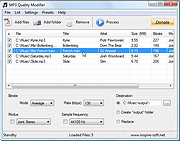 |
| Showing rows 1 to 2 of 2 | Showing Page 1 of 1 | 1 |
OlderGeeks.com Copyright (c) 2026
