|

|
Processed through Paypal No account required. |








Buy our over-priced crap to help pay the bills.



|
|
Processed through Paypal No account required. |
| Files | ||||
| File Name | Rating | Downloads | ||
 |
QOwnNotes v26.9.11 QOwnNotes v26.9.11 👉 Open-source markdown note-taking application with Nextcloud and ownCloud integration. QOwnNotes is a free and open-source plain-text note-taking and to-do list manager designed for users who want full control over their notes and data. It stores notes as plain text Markdown files, making them easy to synchronize with services such as Nextcloud, ownCloud, Syncthing, Dropbox, and other cloud or local storage solutions. QOwnNotes includes powerful organization tools, note encryption, scripting support, tagging, searching, and customizable interface layouts for productivity-focused workflows. Features: • Plain-text Markdown note-taking with live preview • Integration with Nextcloud and ownCloud notes • Stores notes as standard text files without vendor lock-in • AES-256 encrypted notes support • Built-in scripting engine with QML support • Powerful note searching and filtering • Tagging and note organization tools • Multiple note folders and subfolder support • Customizable themes, fonts, and layouts • To-do list and task management support • Automatic note saving and backup support • External diff tool integration • Checkbox list creation and Markdown editing tools • Portable mode support • Cross-platform support for desktop operating systems Supported operating systems: • Windows 7, Windows 8, Windows 10, Windows 11 • macOS 13 Ventura or higher • Linux Supported languages: English, Arabic, Basque, Bulgarian, Catalan, Chinese Simplified, Chinese Traditional, Czech, Danish, Dutch, English, Finnish, French, German, Greek, Hebrew, Hungarian, Italian, Japanese, Korean, Norwegian, Persian, Polish, Portuguese, Portuguese Brazilian, Romanian, Russian, Slovak, Spanish, Swedish, Turkish, Ukrainian Changes: v26.9.11 09-25-26 Deprecated the non-GitHub Qt 5 release packages by removing the legacy Ubuntu Launchpad and OBS deployments from the release process, while retaining the Qt 5 artifacts built by the GitHub release workflow (for #3752) Added more French translation (thank you, jd-develop) 👉 This download is for the Windows version (very bottom of page). All other download assets are below: MacOS: QOwnNotes.dmg QOwnNotesQt5.dmg Linux: QOwnNotes-amd64.snap QOwnNotes-Qt5-amd64.snap QOwnNotes-x86_64.AppImage Click here to visit the author's website. |
 |
6,856 | Sep 25, 2026 Patrizio Bekerle 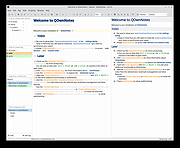 |
 |
Zim v0.77.0 Zim v0.77.0 A graphical text editor for maintaining a collection of wiki-style notes stored in plain text files. Zim is a desktop wiki application designed to help you organize notes, ideas, and documentation using a simple and flexible wiki-style structure. Pages are stored as plain text files in folders, making your data easy to back up, sync, and edit outside the program if needed. Zim supports linking between pages, attachments, tags, and powerful plugins, making it well suited for note taking, personal knowledge bases, project documentation, and journaling. The editor window with all widgets visible Features: • Wiki-style linking between pages using simple syntax • Plain text storage for easy backup, portability, and version control • Hierarchical page structure with automatic index generation • Rich text formatting including lists, tables, code blocks, and checkboxes • Full-text search across notebooks and pages • Tagging system for organizing and filtering notes • Built-in spell checking and word count • Attachment support for images and files • Plugin system for added functionality such as task lists, diagrams, and calendars • Export notes to HTML, LaTeX, or other formats Supported operating systems: • Windows 7, Windows 8, Windows 10, Windows 11 • Linux • macOS Supported languages: English, Afrikaans, Arabic, Bulgarian, Catalan, Chinese, Croatian, Czech, Danish, Dutch, Estonian, Finnish, French, German, Greek, Hebrew, Hungarian, Italian, Japanese, Korean, Latvian, Lithuanian, Norwegian, Polish, Portuguese, Romanian, Russian, Serbian, Slovak, Slovenian, Spanish, Swedish, Turkish, Ukrainian Changes: v0.77.0 06-11-26 Merge markdown support as source format for notebooks (experimental) Allow multiple source formats in one notebook Refactor page search to be extendable improve speed Support options for 'case sensitive' and 'word boundaries' in page search Let find match glob patterns like search Add search query support for tasklist filtering Add default page template to notebook properties Add input for alternate text in Insert Image Dialog Remove overruling window positioning Fix latex templates for working with pdflatex, xelatex and lualatex Fix bug with _object_widgets.remove() Zim can be used to: • Keep an archive ... |
|
4,517 | Jun 21, 2026 Brendan Kidwell 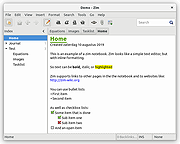 |
| Showing rows 1 to 2 of 2 | Showing Page 1 of 1 | 1 |
OlderGeeks.com Copyright (c) 2026
