|

|
Processed through Paypal No account required. |








Buy our over-priced crap to help pay the bills.



|
|
Processed through Paypal No account required. |
| Files | ||||
| File Name | Rating | Downloads | ||
 |
JMoveIt v1.00 JMoveIt v1.00 👉 A lightweight multi-monitor utility that moves windows between displays while preserving their relative size and position. JMoveIt is a multi-monitor utility designed to solve two common display-management problems: programs changing size when moved between monitors with different scaling or resolution settings, and Windows relocating open programs when a monitor’s power state changes. It can move programs to other monitors while maintaining the same relative size and position, and its optional Monitor Watcher feature can detect monitor power changes and restore windows to their original locations after Windows moves them. JMoveIt runs in the background, supports command line control, global hotkeys, and quick mouse-friendly interaction through a small window. Features: • Move program windows between monitors while preserving relative size and position • Helps prevent programs from growing or shrinking when moved to displays with different scaling or resolution settings • Optional Monitor Watcher detects monitor power state changes • Restores windows to their original monitor locations after Windows moves them • Supports command line options for moving programs • Includes global hotkeys for moving programs quickly • Runs in the background for convenient everyday use • Mouse-friendly interface with a single small window for quick interactions • No installation required, with an optional setup program included • Delphi XE2 source code included Supported operating systems: • Windows XP, Windows Vista, Windows 7, Windows 8, Windows 10 Supported languages: • English Changes: v1.00 04-02-26 First Release Note: This file has three hits on VirusTotal. We have confirmed these to be false positives. The file is safe. Click here to visit the author's website. |
 |
667 | Apr 08, 2026 joejoesoft.com 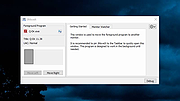 |
|
MagicMouseMove v1.0.3 MagicMouseMove v1.0.3 👉 Prevent idle time with automatic natural mouse movement. MagicMouseMove is a small Windows tool that performs minimal, natural-looking mouse movements after an adjustable period of inactivity. It is designed to help prevent unwanted idle states, connection drops, standby interruptions, and similar inactivity-related issues during tasks such as streaming, remote access, presentations, or long-running sessions. MagicMouseMove runs as a lightweight utility and is also available in a portable version, making it easy to use without a complicated setup. Its focus is simple automatic mouse activity simulation with natural movement behavior. Features: • Performs small, natural-looking mouse movements automatically • Helps prevent idle time and connection drops • Adjustable inactivity timing before movement begins • Small and lightweight utility • Available as a portable version for flexible use Instructions: • Download and run MagicMouseMove or the portable version • Set the idle time delay before automatic mouse movement starts • Let the program run while you need to avoid inactivity-related interruptions • Adjust settings as needed for your session or workflow Supported operating systems: • Windows XP, Windows Vista, Windows 7, Windows 8.1, Windows 10, Windows 11 • Windows Server 2016, Windows Server 2019 Supported languages: • German, English, Dutch, Traditional Chinese, Spanish, Russian, Simplified Chinese, Korean, French, Hebrew Changes: v1.0.3 05-10-2026 • Minor adjustments and general bug fixes • Updated MagicMouseMove language file and new languages: Korean, French, Hebrew • Many thanks to Venus Girl for the Korean translation. • Many thanks to Drake4478 for the French translation. • Many thanks to peterg for the Hebrew translation. Click here to visit the author's website. |
|
722 | Aug 04, 2026 Nenad Hrg  |
 |
Oculus Mover Free v2.0 Oculus Mover Free v2.0 Easily move all games in Oculus installation directory to another drive to release disk space for other usage, solving low disk space problem. Brief Introduction about Oculus Mover Oculus Mover aims at moving Oculus Rift games and applications from its original drive (usually system C Disk) to another drive with much free space. Thus, a lot of disk space will be spared out in source drive for other usage, maybe for saving future Oculus Rift VR games or Oculus Rift upcoming games. Apart from migrating games for Oculus Rift, Oculus Game Mover can also move other items out of original storage space, such as Oculus Rift videos, apps, pictures, music, etc, as long as these items were stored in ”Software” or ”Download” folder in Oculus. Tips: Oculus Mover ensures Oculus’ normal work once you move Oculus installation directory to another drive. What Can Oculus Mover Help You With The traditional way to move Oculus to another drive is to do it with mklink. In this way, however, we have to open “Command Promote (Admin)” and type in mklink commands. This might not be difficult for IT guys, but it is obvious too complicated for common users. But with Oculus Mover, you can simply select the source and target location from a windows type interface to migrate Oculus from one drive to another. How Does Oculus Mover Works? Before moving virtual reality PC games or applications, you should firstly get and install Oculus Mover on your PC. If the destination is an external device, please insert it into your computer. We suggest you to migrate VR supported games to local instead of external/removable drive. If you do have to do so, then make sure the external/removable disk is connected to your PC every time when you use Oculus. Step1. Open Oculus Mover. In its main interface, ... |
|
5,045 | Oct 16, 2021 AOMEI Tech Co., Ltd. 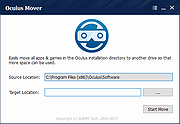 |
| Showing rows 1 to 3 of 3 | Showing Page 1 of 1 | 1 |
OlderGeeks.com Copyright (c) 2026
