|

|
Processed through Paypal No account required. |








Buy our over-priced crap to help pay the bills.



|
|
Processed through Paypal No account required. |
| Files | ||||
| File Name | Rating | Downloads | ||
 |
Endstate v3.10.0 Endstate v3.10.0 👉 Save your Windows apps and settings, then quickly rebuild them on a new PC. Endstate is a free, local-first Windows setup and recovery tool that records the applications installed on your computer along with settings for supported programs, then uses that information to rebuild your setup on a fresh Windows installation. Instead of copying installed program files from one PC to another, Endstate identifies your software and uses Windows Package Manager (winget) to reinstall available applications cleanly. You can scan an existing computer and save its setup to a portable file that you control. On a new or freshly installed Windows PC, load that saved setup and Endstate compares it with the new machine, shows which applications are missing and lets you choose what to install and which supported settings to restore. Scanning and saving can be performed offline, while reinstalling applications requires an internet connection to download their installers. No Endstate account is required. Features: • Automatically scans your Windows PC and detects installed applications • Detects traditional EXE/MSI-installed software and Microsoft Store applications • Uses winget to reinstall supported applications from their normal installation sources • Captures and restores settings for more than 300 supported applications • Settings support includes editors, IDEs, terminals, creative applications, media players, emulators, note-taking programs and more • Settings capture is optional and can be selected per application • Saves your setup to portable files that you control • Saved setups can be copied, backed up or moved to another computer • No mandatory cloud storage is required • No account is required for the free local product • Provides both a graphical interface and command-line interface • Supports capture, restore, profiles and manifests • Preview mode compares a computer against a saved setup without making changes • Shows which applications need to be installed and which are already present • Applications are installed individually rather than silently ... |
 |
283 | Aug 11, 2026 Substrate Systems 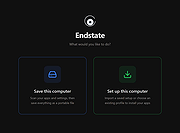 |
| Showing rows 1 to 1 of 1 | Showing Page 1 of 1 | 1 |
OlderGeeks.com Copyright (c) 2026
