|

|
Processed through Paypal No account required. |








Buy our over-priced crap to help pay the bills.



|
|
Processed through Paypal No account required. |
| Files | ||||
| File Name | Rating | Downloads | ||
 |
Alternate EXE Packer v2.340 Alternate EXE Packer v2.340 A program to pack executable files (EXE) and DLL-files in that way, that the unpack themselves at runtime. Freeware! Supported operating systems: Windows NT 4, 95, 98, Me, 2000, XP, Server 2003, Vista, Server 2008, 7, 8, 8.1, 10, 11 Languages included: English, German, Swedish, Russian, Slovenian, Chinese, Spanish, Arabic, Italian, Greek, Japanese, Hungarian, Turkish Changes in this version: - Installation updated |
 |
7,303 | Dec 21, 2021 Alternate Tools 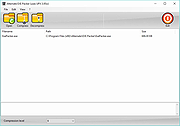 |
|
BatEx v1.0.1 BatEx v1.0.1 👉 Turn Windows batch scripts into EXE applications. BatEx is a modern Windows desktop app that converts .bat and .cmd scripts into runnable .exe applications. You can drop an existing batch or command script into the app, or write a new script directly inside BatEx, then choose output options such as folder, icon, metadata, admin mode, console mode, platform, and more. Features: • Convert .bat and .cmd files to .exe • Write scripts directly inside the app • Modern WinUI 3 interface • Drag and drop support • Show or hide the console window • Run generated EXE as administrator • Add a custom .ico icon • Add file metadata including description, product name, company name, copyright, version, internal name, and original filename • Choose target platform: x64, x86, or AnyCPU • Optional script obfuscation • Conversion history • Auto-open output folder after build Supported operating systems: • Windows 10, Windows 11 Supported languages: English Changes: v1.0.1 05-22-26 You can now add more files that your script needs into the new exe! Fixed script editor issues Now the software checks for updates Note: This file has one hit on VirusTotal. We have confirmed this to be a false positive. The file is safe. Click here to visit the author's website. |
|
623 | May 22, 2026 The Yali 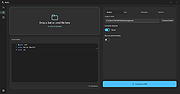 |
 |
Mitec EXE Explorer v3.7.4 Mitec EXE Explorer v3.7.4 Executable File Explorer for OS/2, NE, PE32, PE32+ and VxD file types. • It enumerates introduced classes, used units and forms for files compiled by Borland compilers. • It contains powerful Resource Viewer that is able to analyze and display all basic resource types and some extra ones as JPEG, PNG, GIF, AVI, REGISTRY. • It contains excellent Type Library viewer that enumerates all objects and creates import interface unit in Object Pascal language. Every type of resource can be saved to file. • EXE Explorer produces text report with all important information about selected file. • Searching capability is also available. It searches all resources that can be interpreted as text. Here are enumerated structures that are evaluated: • DOS, File, Optional, Rich and CLR headers • CLR Metadata streams • Sections • Directories • Imports • Exports • Resources • ASCII and Unicode Strings • .NET Metadata • Load Config • Debug • Thread Local Storage • Exceptions • Units • Forms • Packages • Classes • Certificates • Package Flags • Version Info • Hexadecimal File Content View • TypeLib Viewer • Form Preview • VirusTotal scan report • Compiler and installer/packer/protector identification Supported operating systems: Windows XP Windows 2003 Windows Vista Windows 7 Windows Server 2008 Windows 8 Windows 8.1 Windows Server 2012 Windows Server 2012 R2 Windows 10 Windows 11 Windows Server 2016 Windows Server 2019+ Changes: v3.7.4 17.12.2024 * Exceptions for 64bit fixed Click ... |
|
4,967 | Dec 17, 2024 MiTeC 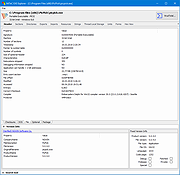 |
|
RisohEditor v6.1.4 RisohEditor v6.1.4 👉 Free Win32 resource editor for editing resources in RC, RES, EXE, and DLL files. RisohEditor is a free resource editor for Win32 development that can edit, extract, clone, and delete resource data in RC, RES, EXE, and DLL files. It supports common Windows resources such as dialogs, menus, icons, cursors, string tables, and message tables, with Unicode support for international resources. Features: • Edit, extract, clone, and delete resource data • Supports RC, RES, EXE, and DLL files • Edit dialogs, menus, icons, cursors, string tables, and message tables • Full Unicode support • Can read resource.h header files • Supports GUI editing • Exported resources can be read by Visual C++ • Supports window class libraries • 32-bit and 64-bit support • Portable version uses an INI file instead of the registry Supported operating systems: • Windows XP, Windows Server 2003, Windows Vista, Windows 7, Windows 8.1, Windows 10 • ReactOS Supported languages: English, Chinese, Italian, Russian, Japanese, Korean, Portuguese, Ukrainian Changes: v6.1.4 08-13-26 Made configuration a property sheet. Accelerated OnDeleteRes. Prevented the tree view's drop-down arrow from appearing twice. Fixed MRadWindow index labels. Supported resource compression by WonRes. Improved UPX handling. Enhanced support for Help IDs. Improved MEditMenuDlg. Supported zooming of code editor. Fixed word wrap. Note: This file has four hits on VirusTotal. We have confirmed these to be false positives. The file is safe. This download is for the Windows portable version (very bottom of page). If you need the Windows 32bit installer version, download here. If you need the Windows 64bit installer version, download here. Click here to visit the author's website. |
|
3,760 | Aug 18, 2026 Katayama Hirofumi 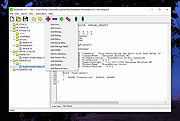 |
|
Vbs To Exe v3.0.9.0 Vbs To Exe v3.0.9.0 Vbs To Exe can convert VBS (.vbs) files to the EXE (.exe) format. Features Visible and invisible applications Executables with administrator priviliges Inclusion of additional files, folders, icon and version information Creation of 32-Bit and 64-Bit EXE files Commandline interface Portable Encryption Multilanguage support Free for commercial and non-commercial use Platform Windows Last updated 2019-04-30 MD5 cea28f5b6f1423ba6ce2603380185e85 License Freeware |
|
6,333 | May 05, 2019 Fatih Kodak 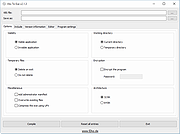 |
| Showing rows 1 to 5 of 5 | Showing Page 1 of 1 | 1 |
OlderGeeks.com Copyright (c) 2026
