|

|
Processed through Paypal No account required. |








Buy our over-priced crap to help pay the bills.



|
|
Processed through Paypal No account required. |
| Files | ||||
| File Name | Rating | Downloads | ||
 |
Exact Audio Copy v1.6 Exact Audio Copy v1.6 Exact Audio Copy is a so called audio grabber for audio CDs using standard CD and DVD-ROM drives. The main differences between EAC and most other audio grabbers are: It is free (for non-commercial purposes) It works with a technology, which reads audio CDs almost perfectly. If there are any errors that can’t be corrected, it will tell you on which time position the (possible) distortion occurred, so you could easily control it with e.g. the media player. With other audio grabbers you usually need to listen to every grabbed wave because they only do jitter correction. Scratched CDs read on CD-ROM drives often produce distortions. But listening to every extracted audio track is a waste of time. Exact Audio Copy conquer these problems by making use of several technologies like multi-reading with verify and AccurateRip. Features of EAC All kinds of CD and DVD drives are supported (including USB, Firewire, SATA and SCSI drives) Hidden sector synchronization (jitter correction) A secure, a fast and a burst extraction methods selectable. Fast extraction should run at the same speed as other grabbers with jitter correction, but is probably not exact anymore. Burst mode just grabs the audio data without any synchronization. Detection of read errors and complete losses of sync and correction in the secure mode, as far as possible Output of time positions of all non-exact corrections and the possibility to listen to these positions EAC is able to copy ranges of music data, not only tracks Automatic speed reduction on read errors and fallback to a higher speed afterwards (depends on the used drive) Volume normalization of extracted audio to a given percentage Usage of the Windows Audio Compression manager (ACM Codecs) for direct compression to e.g. MP3 waves Support for ... |
 |
6,201 | Jan 06, 2021 Andre Wiethoff 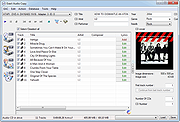 |
|
Sizer v4.0 dev673 Sizer v4.0 dev673 👉 Precisely resize and position application windows with customizable presets and hotkeys. Sizer is a lightweight window management utility that lets you instantly resize and reposition application windows to exact dimensions. Originally created for web designers and developers needing consistent browser sizes, it has evolved into a flexible productivity tool for anyone who regularly arranges windows on one or more monitors. Instead of manually dragging window borders, Sizer can snap windows to predefined sizes and positions with a click or keyboard shortcut. Sizer 4 has been completely rewritten for improved compatibility with modern Windows applications while reducing the intrusive techniques used by previous versions. It supports customizable hotkeys, advanced sizing macros and mathematical expressions, grouped menu layouts, portable operation, and easy import/export of configuration files. Power users can automate complex desktop layouts by positioning multiple windows simultaneously using macros and expressions. Features: • Resize any window to exact predefined dimensions • Move windows to precise screen locations • Assign global hotkeys to resizing actions • Launch the sizing menu with Ctrl+Win+Z or a custom shortcut • Create custom window size and position presets • Use mathematical expressions for dynamic sizing • Automate layouts with powerful window macros • Resize and reposition multiple windows simultaneously • Organize presets into cascading menu groups • Import and export configuration settings • Run as a portable application without installation • Improved compatibility with modern Windows applications • Supports high-DPI displays with DPI-aware rendering • Right-click window borders or restore buttons for quick access • Stable, lightweight design with minimal system impact Supported operating systems: • Windows 10, Windows 11 (64-bit) Supported languages: English Changes: v4.0 dev673 11-26-25 Introduced the special macro variable $_count that holds the number of wildcard matches. Note: This file has one hit on VirusTotal. We have confirmed this to be a false positive. The file is safe. Click here to visit the author's website. |
|
1,807 | Jul 27, 2026 Brian Apps 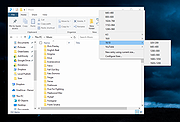 |
| Showing rows 1 to 2 of 2 | Showing Page 1 of 1 | 1 |
OlderGeeks.com Copyright (c) 2026
