|

|
Processed through Paypal No account required. |








Buy our over-priced crap to help pay the bills.



|
|
Processed through Paypal No account required. |
| Files | ||||
| File Name | Rating | Downloads | ||
 |
SmartSystemMenu v2.33.1 SmartSystemMenu v2.33.1 👉 Enhance Windows system menus with powerful window management features. SmartSystemMenu is a lightweight utility that extends the standard Windows system menu of application windows with a wide range of advanced window management tools. By right-clicking the title bar or using the system menu, users gain access to additional options that go far beyond the default Move, Size, Minimize, Maximize, and Close commands. SmartSystemMenu allows you to control window behavior, transparency, priority, alignment, and more, making it especially useful for power users who want finer control over their desktop environment. Features: • Adds extended options to the standard Windows system menu • Adjust window transparency levels • Set window priority (Real-time, High, Above normal, Normal, Below normal, Idle) • Resize and reposition windows with custom dimensions • Align windows to screen edges or predefined positions • Change window always-on-top state • Save and restore window positions • Take screenshots of application windows • Copy window text to clipboard • Multi-language interface • Portable version available Supported operating systems: • Windows 7, Windows 8, Windows 8.1, Windows 10, Windows 11 Supported languages: English, Russian, German, French, Spanish, Italian, Portuguese, Polish, Chinese (Simplified), Chinese (Traditional), Japanese, Korean, Turkish, Dutch, Czech, Hungarian, Ukrainian Changes: v2.33.1 03-20-26 Support of the SmartSystemMenu.xml file for previous versions Korean translation improvements Japanese translation improvements by @coolvitto Click here to visit the author's website. |
 |
5,810 | Mar 23, 2026 Alexander Illarionov 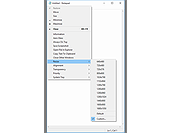 |
| Showing rows 1 to 1 of 1 | Showing Page 1 of 1 | 1 |
OlderGeeks.com Copyright (c) 2026
