|

|
Processed through Paypal No account required. |








Buy our over-priced crap to help pay the bills.



|
|
Processed through Paypal No account required. |
| Files | ||||
| File Name | Rating | Downloads | ||
 |
Better Windows Services v0.3.0 Better Windows Services v0.3.0 👉 Search, manage, and audit Windows services with a desktop app or command line tool. Better Windows Services gives administrators a searchable view of the local machine’s services and drivers. Its desktop app and command line tool use the same query language, so a search such as start:auto !status:running can find services set to start automatically that are currently stopped. Before starting, stopping, restarting, or changing a service’s startup type, the program shows a plan of the steps it will take, including affected dependent services. The command line can also save a snapshot of service settings and compare it with another snapshot or the live machine. The comparison separates configuration changes from ordinary changes in running state. Snapshots are available through the command line, not the desktop app. Features: • Search services and drivers by name, status, startup type, account, file, signature, publisher, dependencies, and other fields. • Preview service actions and their effects on dependent services before applying them. • Start, stop, restart, and change the startup type of services. • Offer a force stop that first requests a normal stop, then ends the process if necessary, with other services sharing that process identified in the preview. • Show details including triggers, required privileges, security descriptors, process information, and file signatures. • Export service lists from the desktop app. • Create and compare JSON snapshots with the command line tool to identify service configuration changes. • Provide JSON command output and exit codes for scripts. Supported operating systems: • Windows 10 version 1809 or later 64-bit, Windows Server 2019 or later 64-bit Supported languages: English Changes: v0.3.0 09-25-26 • Added Automatic (delayed) to the startup type menu and delayed to the command line. • Added an “Also stop it” option when setting a running service to Disabled. • Added an F1 Help button, startup type options to the row menu, and an entry count after exporting a list. • Updated startup type changes to set or clear delayed start ... |
 |
17 | Sep 27, 2026 DonislawDev 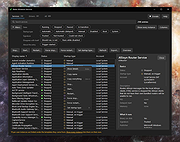 |
 |
Drift v0.1.1 Drift v0.1.1 👉 A free, open-source video editor for creating polished videos without subscriptions or watermarks. Drift is a beginner-friendly desktop video editor that combines a straightforward workflow with a full collection of creative tools. Import video clips, photographs and music, then arrange everything on a multi-track timeline with tools for trimming, splitting, snapping and ripple editing. Add effects, transitions, titles, shapes, stickers and emoji without leaving the editor. Drift can also generate editable captions from speech, isolate subjects, create masks, remove green-screen backgrounds, adjust playback speed and clean up noisy audio. The preview and export systems use the same compositor, helping the completed video match what you saw while editing. Drift is completely free and open source with no account, subscription, telemetry or watermark. Optional fonts, stickers, effects and speech-recognition models can be installed through the built-in Addon Manager as needed. Features: • Multi-track timeline for video, audio, text and shapes • Trim, split, snap and ripple editing tools • Mute or hide individual timeline tracks • Full undo and redo support • GPU-powered video effects • Adjustable transitions between overlapping clips • Reusable effect and appearance templates • Customizable titles with fonts, colors, outlines, shadows and alignment • Stickers, emoji and optional content packs • Speech-to-text caption generation • Edit caption wording and timing directly on the timeline • Subject cutout and masking tools • Green-screen background removal • Playback speed adjustment and reversing • Custom speed ramps, fades and beat-based animation • Audio mixing and effect chains • Background-noise cleanup • Project bundles that include associated media • Optional downloadable fonts, effects, stickers and speech models • Export quality and bitrate controls • H.264, H.265, AV1, ProRes and additional export formats • Preview and export use the same compositor • No account, subscription, telemetry or watermark Supported operating systems: • Windows • Linux • macOS, build from source only Supported languages: English Changes: v0.1.1 07-31-26 A small fix-up release on top of the first public version. Curves in the keyframe editor are now ... |
|
269 | Aug 03, 2026 CutWire Studios 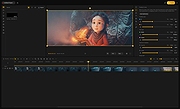 |
| Showing rows 1 to 2 of 2 | Showing Page 1 of 1 | 1 |
OlderGeeks.com Copyright (c) 2026
