|

|
Processed through Paypal No account required. |








Buy our over-priced crap to help pay the bills.



|
|
Processed through Paypal No account required. |
| Files | ||||
| File Name | Rating | Downloads | ||
 |
JSON Studio v1.0.0 JSON Studio v1.0.0 👉 A private, lossless desktop workspace for large JSON files. JSON Studio is a free, open source desktop application for working with large JSON files. It enables you to explore, search, query, compare, and inspect JSON, JSONL, and NDJSON files up to 500 MB entirely on your own machine. Designed for developers working with large, sensitive, or precision-critical data, JSON Studio keeps the original data intact by preserving big integers, high-precision decimals, key order, and the original source text without rounding, reordering, or reformatting. The application provides multiple ways to view and analyze JSON data, including tree, raw source, and table views. It features fast searching across keys and values, RFC 9535 JSONPath query support, structural document comparison, JSONL/NDJSON table inspection, inline image previews for supported embedded image formats, and automatic session restoration. Because it runs completely offline, there are no accounts, uploads, telemetry, analytics, or network calls, ensuring your files and settings remain private. Features: • Open JSON, JSONL, and NDJSON files up to 500 MB • Preserves big integers, high-precision decimals, key order, and original source text • Tree, raw source, and table views • Collapse and expand navigation with expand-to-depth support • Syntax highlighting, line numbers, wrapping, and parse error reporting • Fast searching with case-sensitive, whole-field, regular expression, and subtree search options • RFC 9535 JSONPath query support with history, execution timing, and result export • Structural JSON comparison with configurable array matching and optional key-order ignoring • Virtualized table view for JSONL and NDJSON files with field statistics and invalid-row highlighting • Inline preview of embedded PNG, JPEG, GIF, WebP, and SVG images • Multiple document tabs, scratch workspace, session restore, and live file reload • Fully offline operation with no uploads, analytics, telemetry, or network access Supported operating systems: • Windows • macOS • Linux Supported languages: • English Changes: v1.0.0 06-26-26 Initial release. Note: This file has two hits on VirusTotal. We have confirmed ... |
 |
462 | Jun 27, 2026 Anton Liberant 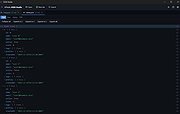 |
|
NextDiff v2.0 NextDiff v2.0 👉 Free file, text, and folder comparison tool for Windows. NextDiff is a freeware file and folder comparison utility that helps you quickly identify differences between two text files, source code files, documents, or folders. It displays content side-by-side with line-by-line and in-line highlighting, making it easy to spot added, removed, and modified text. NextDiff also supports folder synchronization tasks by identifying newer files and files that exist only on one side. Built-in editing and merge functions allow you to copy changes between files or make edits directly within the comparison window. For supported document formats, Apache Tika integration enables comparison of extracted text from files such as PDF, DOCX, XLSX, and PPTX. The program is free for both personal and commercial use. Features: • Side-by-side comparison of text files • Line-by-line and in-line difference highlighting • Compare source code, logs, scripts, configuration files, and documents • Compare folders and subfolders • Detect files that exist only on one side • Highlight newer files during folder comparison • Copy differences from left to right or right to left • Edit text directly within the comparison window • Undo recent merge and edit operations • Navigate to the first, previous, next, or last difference • Ignore case, whitespace, leading/trailing spaces, or blank lines • Supports ANSI, ASCII, UTF-8, UTF-8 BOM, and UTF-16 text encodings • Optional Apache Tika support for comparing PDF, DOCX, XLSX, PPTX, and other document formats • Customizable colors, fonts, line numbers, and grid display • Free for personal and commercial use Supported operating systems: • Windows 10, Windows 11 Supported languages: English, Czech, Dutch, French, German, Hungarian, Italian, Polish, Portuguese, Romanian, Russian, Slovak, Spanish, Turkish, Ukrainian Changes: v2.0 07-07-26 Added multilingual support. Note: This file has one hit on VirusTotal. We have confirmed this to be a false positive. The file is safe. Click here to visit the author's website. |
|
332 | Jul 17, 2026 TkoSoft 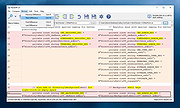 |
| Showing rows 1 to 2 of 2 | Showing Page 1 of 1 | 1 |
OlderGeeks.com Copyright (c) 2026
