|

|
Processed through Paypal No account required. |








Buy our over-priced crap to help pay the bills.



|
|
Processed through Paypal No account required. |
| Files | ||||
| File Name | Rating | Downloads | ||
 |
BitDefender Antivirus Free Edition v27.0.62.352 BitDefender Antivirus Free Edition v27.0.62.352 👉 Free real-time antivirus protection for Windows PCs. BitDefender Antivirus Free Edition provides lightweight, cloud-powered antivirus protection designed to defend Windows computers against viruses, malware, ransomware, phishing attacks, and other online threats. It uses Bitdefender’s award-winning security technologies while maintaining a simple “install and forget” approach that runs quietly in the background without slowing down your system. The program delivers real-time threat detection, automatic malware scanning, web attack prevention, anti-phishing protection, and malicious website blocking. It also includes integrated Bitdefender VPN access with limited daily encrypted traffic for safer browsing. BitDefender Antivirus Free Edition is optimized for gaming, multimedia editing, and other resource-intensive activities by minimizing system impact while maintaining continuous protection. Features: • Real-time antivirus and malware protection • Cloud-powered threat detection • Advanced anti-phishing protection • Malicious website and scam blocking • Automatic security updates • Lightweight system resource usage • Optimized for gaming and multimedia tasks • Integrated Bitdefender VPN with limited daily traffic • Automatic threat remediation and quarantine • Simple install-and-forget interface • Web traffic scanning • Protection against ransomware and online threats Supported operating systems: • Windows 7 SP1, Windows 8.1, Windows 10, Windows 11 Supported languages: English, German, French, Spanish, Italian, Romanian, Dutch, Swedish, Chinese Traditional, Chinese Simplified, Portuguese, English UK, English AU Changes: v27.0.62.352 08-20-26 Fixed an issue where protection review reports included monitored web and email activity even when the related protection features were disabled Fixed an issue where Bitdefender services were not responding at startup Fixed an issue where Bitdefender services could appear unresponsive while the product remained functional Fixed an issue where SecurePass could not remain disabled in Safepay Fixed an issue causing continuous notifications about webcam access Fixed an issue where the verified links counter reset to zero after rebooting on Windows 11 Fixed an issue causing multiple firewall notifications stating that an application had changed Note: BitDefender Antivirus Free Edition requires you to create a free account. Click here to ... |
 |
11,998 | Aug 27, 2026 BitDefender Labs 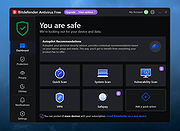 |
|
Cyber Prot v4.1.1.53 Cyber Prot v4.1.1.53 👉 Lightweight anti-ransomware protection that monitors system behavior to stop malicious encryption attacks before they damage your files. Cyber Prot is an anti-ransomware security tool designed to protect your system from file-encrypting malware and similar threats. It uses behavioral analysis and advanced algorithms to monitor system activity and detect suspicious operations that may indicate a ransomware attack. Instead of relying solely on signature databases like traditional antivirus software, Cyber Prot analyzes how programs behave. If a process begins performing suspicious actions such as rapid file encryption, mass file renaming, or unusual changes to file headers, the program can immediately intervene and terminate the offending process before it causes serious damage. Cyber Prot is designed to run alongside your existing antivirus solution, adding an additional layer of protection without significantly impacting system performance. The program runs quietly in the system tray and continuously monitors processes in the background. When a potential threat is detected, Cyber Prot can respond in several ways depending on your configuration. Possible actions include playing a warning sound, sending an email notification, shutting down the computer, or preventing the system from booting again until the issue is addressed. These flexible response options allow users to tailor the program’s behavior to their specific security needs. Features: • Behavioral monitoring of running processes to detect ransomware activity • Heuristic detection capable of identifying previously unknown threats • Real-time monitoring of file system activity • Ability to stop malicious processes before files are encrypted • Customizable actions when threats are detected • Email notification and sound alerts for detected attacks • Can shut down or lock the system to prevent further damage • Designed to run alongside existing antivirus solutions • Lightweight system tray operation with minimal performance impact Supported operating systems: • Windows 10, Windows 11 Supported languages: English Changes: v4.1.1.53 Not provided Click here to visit the author's website. |
|
778 | Mar 06, 2026 Cyberland 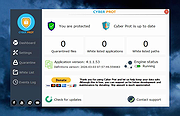 |
 |
DeepTaskScan v1.0.0 DeepTaskScan v1.0.0 👉 Portable Windows forensics tool for detecting hidden and persistent scheduled tasks. DeepTaskScan is an advanced Windows scheduled task viewer and forensics tool designed to uncover scheduled tasks that may be hidden from standard Windows utilities. Unlike Task Scheduler, schtasks, PowerShell and similar tools, it uses a different scanning method rather than relying on Windows API calls to discover scheduled tasks. This can help system administrators, technicians and security researchers identify tasks concealed through techniques involving deleted task files or registry keys. The developer notes that such techniques have been used by state-backed Advanced Persistent Threat (APT) groups. DeepTaskScan is completely portable, requires no installation and is available in both 32-bit and 64-bit versions. Features: • Deeply scans Windows for scheduled tasks using an alternative detection method • Detects scheduled tasks hidden through advanced techniques • Does not rely on Windows API calls for scheduled task detection • Helps uncover tasks that may not appear in Windows Task Scheduler • Can detect more scheduled task entries than Task Scheduler, PowerShell and other standard tools • Highlights hidden or persistent entries • Can help detect APT activity involving hidden Task Scheduler entries • Allows discovered information to be extracted to a file • Useful for system administration, troubleshooting and security forensics • Available as separate 32-bit and 64-bit executables • Completely portable with no installation required Supported operating systems: • Windows 7 or newer Supported languages: • English Changes: v1.0.0 08-16-26 Initial release. This download is for the Windows 64bit version (very bottom of page). If you need the Windows 32bit version, download here. Click here to visit the author's website. |
|
357 | Aug 20, 2026 Emir Alp Kocak  |
| Showing rows 1 to 3 of 3 | Showing Page 1 of 1 | 1 |
OlderGeeks.com Copyright (c) 2026
