|

|
Processed through Paypal No account required. |








Buy our over-priced crap to help pay the bills.



|
|
Processed through Paypal No account required. |
| Files | ||||
| File Name | Rating | Downloads | ||
 |
Cinecred v1.8.1 Cinecred v1.8.1 👉 Create beautiful film credits without the pain. Cinecred is a free and open source program for creating professional film credits from spreadsheet data. It reads credits from Excel, LibreOffice, Apple Numbers, CSV, or Google Sheets, then lets you interactively arrange, style, preview, and export title cards or rolling credits. Features: • Create title cards and rolling film credits • Reads Microsoft Excel, LibreOffice Calc, Apple Numbers, CSV, and Google Sheets credit data • Live visual preview while editing • Interactive styling with contextual controls and easy reverts • Default project template for quick setup • Flexible layouts and pixel-level customization • Use custom fonts, logos, images, and videos • Runtime fine adjustment for matching a desired credit roll length • Integrated real-time playback • DeckLink preview playout support • Export to video files, image sequences, stills, PDFs, and production formats • Supports ProRes, DNxHR, CineForm, H.264, H.265, Theora, PNG sequences, TIFF, and more • Free software licensed under GPLv3 Supported operating systems: • Windows • macOS • Linux Supported languages: English, German, Czech, Spanish, French, Chinese (China) Changes: v1.8.1 Not provided. This download is for the Windows version (very bottom of page). All other download assets are below: macOS: cinecred-1.8.1-arm64.pkg cinecred-1.8.1-x86_64.pkg Linux: cinecred-1.8.1-x86_64.deb cinecred-1.8.1-x86_64.rpm cinecred-1.8.1-x86_64.appimage Click here to visit the author's website. |
 |
468 | Jun 15, 2026 Felix Mujkanovic  |
|
Roll Credits 0.3 Roll Credits 0.3 Roll Credits takes a still image and makes a scrolling credits AVI out of it, by starting with all black and then scrolling the image from the bottom up at the specified rate, until the bottom of the image has scrolled past the top of the screen and then it stops. Most movie editors make this way harder than it has to be, so I wrote this utility to do the credits for a production I was involved in. I exported the AVI to DVD and played it on the big screen. The image is centered on the screen, the background is preset to black at the moment. PAL and NTSC are the only supported output formats at the moment. Changes: 0.3 Rewrote the front end after losing the code and binaries *sigh*. Added option for custom frame size and rate. Added a progress bar. |
 |
6,902 | Oct 30, 2015 Matthew Allen 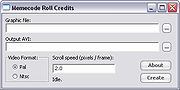 |
| Showing rows 1 to 2 of 2 | Showing Page 1 of 1 | 1 |
OlderGeeks.com Copyright (c) 2026
