|

|
Processed through Paypal No account required. |








Buy our over-priced crap to help pay the bills.



|
|
Processed through Paypal No account required. |
| Files | ||||
| File Name | Rating | Downloads | ||
 |
FontViewOK v9.33 FontViewOK v9.33 👉 A quick visual overview of all installed fonts. FontViewOK creates a quick visual overview of all installed fonts, or fonts from a specific folder, and helps you compare fonts side by side. Features: • Quick overview and comparison of all installed fonts • View fonts from a specific folder • Compare fonts in dual preview panes • Compare installed and non-installed fonts • Change font size, style, and color • Change background and font colors • Print fonts with print preview • Copy the selected font preview as an image to the clipboard • Save the selected font preview as an image • Open font locations in Windows Explorer • Portable use, installation is not required Supported operating systems: • Windows 11, Windows 10, Windows 8.1, Windows 7, Windows Server 2012 through Windows Server 2025, x64, x32, x86 Supported languages: English, German, Thai, Multilingual Changes: v9.33 05-06-26 General adjustments to the Front-View App; improved detection of the default system language; necessary adjustments and language file updates. This download is for the Windows 64bit version (very bottom of page). If you need the Windows 32bit version, download here. Click here to visit the author's website. |
 |
6,042 | May 15, 2026 Nenad Hrg 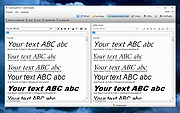 |
|
Horodruin v2026.07.841.0 Horodruin v2026.07.841.0 👉 Advanced file synchronizer for keeping two or more folders updated. Horodruin is a freeware file synchronizer designed to update folders by taking files from multiple different folders and synchronizing two or more sources with just a few clicks. It builds a virtual folder using the newest and missing files, then applies that result to each source so the folders contain the same updated files. The author notes that this tool is intended for advanced users and recommends reading the included documentation. Features: • Synchronizes two or more folders • Handles multiple folder sources in one project • Uses local full paths and UNC network paths • Analyzes folders to determine outdated or missing files • Builds a virtual folder from the newest and missing files • Lets you tune folder analysis to your needs • Saves and loads settings using project files • Export Delta feature saves source changes to a separate folder • Multi-threaded operation • Multi-threaded copy engine using temporary files and/or overwriting files • Can integrate with a text editor, hex editor, and diff viewer • Minimal registry usage, only for Explorer integration • Includes HTML Help • Small, fast, and clean • Freeware licensed under Creative Commons Attribution-NoDerivs 4.0 Supported operating systems: • Windows 10 or higher, 64-bit Supported languages: English Changes: v2026.07.841.0 07-19-26 • Now uses the new Visual Studio 2026 Segmented Heap, a faster and improved internal heap implementation. Click here to visit the author's website. |
|
6,377 | Sep 14, 2026 Stefano Bordoni 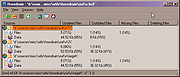 |
 |
NextDiff v2.0 NextDiff v2.0 👉 Free file, text, and folder comparison tool for Windows. NextDiff is a freeware file and folder comparison utility that helps you quickly identify differences between two text files, source code files, documents, or folders. It displays content side-by-side with line-by-line and in-line highlighting, making it easy to spot added, removed, and modified text. NextDiff also supports folder synchronization tasks by identifying newer files and files that exist only on one side. Built-in editing and merge functions allow you to copy changes between files or make edits directly within the comparison window. For supported document formats, Apache Tika integration enables comparison of extracted text from files such as PDF, DOCX, XLSX, and PPTX. The program is free for both personal and commercial use. Features: • Side-by-side comparison of text files • Line-by-line and in-line difference highlighting • Compare source code, logs, scripts, configuration files, and documents • Compare folders and subfolders • Detect files that exist only on one side • Highlight newer files during folder comparison • Copy differences from left to right or right to left • Edit text directly within the comparison window • Undo recent merge and edit operations • Navigate to the first, previous, next, or last difference • Ignore case, whitespace, leading/trailing spaces, or blank lines • Supports ANSI, ASCII, UTF-8, UTF-8 BOM, and UTF-16 text encodings • Optional Apache Tika support for comparing PDF, DOCX, XLSX, PPTX, and other document formats • Customizable colors, fonts, line numbers, and grid display • Free for personal and commercial use Supported operating systems: • Windows 10, Windows 11 Supported languages: English, Czech, Dutch, French, German, Hungarian, Italian, Polish, Portuguese, Romanian, Russian, Slovak, Spanish, Turkish, Ukrainian Changes: v2.0 07-07-26 Added multilingual support. Note: This file has one hit on VirusTotal. We have confirmed this to be a false positive. The file is safe. Click here to visit the author's website. |
|
385 | Jul 17, 2026 TkoSoft 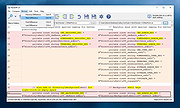 |
| Showing rows 1 to 3 of 3 | Showing Page 1 of 1 | 1 |
OlderGeeks.com Copyright (c) 2026
