|

|
Processed through Paypal No account required. |








Buy our over-priced crap to help pay the bills.



|
|
Processed through Paypal No account required. |
| Files | ||||
| File Name | Rating | Downloads | ||
 |
DevManView v1.81 DevManView v1.81 👉 Advanced alternative to the Windows Device Manager with enhanced device management tools. DevManView is a lightweight, portable utility that serves as an alternative to the standard Windows Device Manager. Instead of displaying hardware in a tree structure, it presents every installed device in a flat, sortable table with detailed information such as device name, manufacturer, service, driver version, install time, connection status, and more. It also allows you to enable, disable, uninstall, restart, and inspect devices with just a few clicks. DevManView can connect to remote computers (with administrative rights), load device information from an offline Windows installation, export device lists, and includes command-line options for automation and scripting. Features: • Displays all installed devices in a sortable table instead of a tree view • Shows detailed hardware and driver information • Enable, disable, uninstall, or restart devices • View devices on remote computers with administrator access • Load device information from an offline Windows installation • Export device lists to HTML, CSV, XML, or text • Open related Registry keys and INF files • Create desktop shortcuts to enable or disable devices • Powerful command-line support for scripting and automation • Portable application with no installation required Supported operating systems: • Windows XP, Windows Server 2003, Windows Vista, Windows 7, Windows 8, Windows 8.1, Windows 10, Windows 11 Supported languages: • Arabic, Basque, Bulgarian, Catalan, Chinese (Simplified), Chinese (Traditional), Croatian, Czech, Danish, Dutch, English, Finnish, French, German, Greek, Hebrew, Hungarian, Italian, Japanese, Korean, Polish, Portuguese (Brazil), Romanian, Russian, Slovak, Slovenian, Spanish, Swedish, Thai, Turkish, Ukrainian, Vietnamese Changes: v1.81 06-22-26 • Added 'Open Device In Registry Editor' option. • Added 'Open Device In RegEdit' to the right-click context menu. This download is for the Windows 64bit version (very bottom of page). If you need the Windows 32bit version, download here. Click here to visit the author's website. |
 |
7,314 | Jun 23, 2026 Nir Sofer 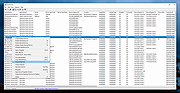 |
|
PropertySystemView v1.22 PropertySystemView v1.22 👉 View and edit Windows file and window properties with ease. PropertySystemView is a lightweight portable utility that allows you to view and modify the properties of files and Windows using the Windows Property System. It can edit metadata stored in media files, Office documents, images, and other supported file types, including fields such as Title, Comments, Authors, Tags, Date Taken, Media Created, Date Imported, Content Created Date, and many more. It also supports working with Windows properties, such as setting the System.AppUserModel.ID property of a window to customize taskbar behavior. The program supports both an easy-to-use graphical interface and a powerful command-line mode for automation. Features: • View and modify Windows Property System metadata for supported files. • Edit media, image, and Microsoft Office document properties. • Modify timestamps such as Media Created, Date Taken, and Date Imported. • View and edit Windows window properties. • Add, edit, and remove supported properties. • Drag-and-drop file loading. • Browse and display all properties available on your system. • Powerful command-line interface for scripting and automation. • Portable application with no installation required. • Available in both 32-bit and 64-bit versions. Supported operating systems: • Windows Vista, Windows 7, Windows 8, Windows 8.1, Windows 10, Windows 11 (32-bit and 64-bit) Supported languages: English, Brazilian Portuguese, Dutch, French, German, Hungarian, Italian, Japanese, Persian, Russian, Simplified Chinese, Slovak, Traditional Chinese, Turkish Changes: v1.22 07-11-26 Added 'Black Background' option (under the View menu). When enabled, the main table is displayed with a black background and white text instead of the default system colors. This download is for the Windows 64bit version (very bottom of page). If you need the Windows 32bit version, download here. Click here to visit the author's website. |
|
4,736 | Jul 17, 2026 Nir Sofer 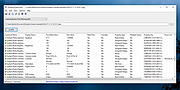 |
| Showing rows 1 to 2 of 2 | Showing Page 1 of 1 | 1 |
OlderGeeks.com Copyright (c) 2026
