|

|
Processed through Paypal No account required. |








Buy our over-priced crap to help pay the bills.



|
|
Processed through Paypal No account required. |
| Files | ||||
| File Name | Rating | Downloads | ||
 |
CHK v6.12 CHK v6.12 👉 Advanced portable file hashing and verification tool. CHK is an advanced file hashing and verification tool with a simple interface and a portable, no-install design. It can verify file integrity, find duplicate files, and compute checksums quickly, while also supporting full Unicode and drag-and-drop operation. Features: • Verify the integrity of downloaded or transferred files • Find and remove duplicate files • Supports a wide range of algorithms including CRC-32, MD5, SHA-256, BLAKE3, xxHash3, and more • Compute Shannon Entropy for files to help spot compressed or encrypted data • Portable design with no installation required • Full Unicode support • Drag-and-drop support • Free to use Supported operating systems: • Windows 32-bit • Windows 64-bit Supported languages: Chinese Simplified, Chinese Traditional, English, French, German, Greek, Hungarian, Italian, Japanese, Korean, Spanish Changes: v6.12 04-12-26 • Less strict rules for duplicate file searches. CHK now checks file size as well. • Improved sorting. • Bug fixes. This download is for the Windows 64bit version (very bottom of page). If you need the Windows 32bit version, download here. If you need the Language Packs, download here. The Language Packs includes the following languages: Chinese Simplified, Chinese Traditional, English, French, German, Greek, Hungarian, Italian, Japanese, Korean, Spanish Click here to visit the author's website. |
 |
1,342 | Aug 03, 2026 Ilya Muravyov 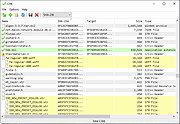 |
|
HashMyFiles v2.51 HashMyFiles v2.51 👉 Calculate and verify file hashes to confirm file integrity and authenticity. HashMyFiles is a lightweight, portable utility that calculates the hash values of one or more files or folders, making it easy to verify file integrity, compare downloaded files against published checksums, detect duplicate content, and confirm that files have not been modified. It supports multiple hashing algorithms including CRC32, MD5, SHA-1, SHA-256, SHA-384, and SHA-512. Hashes can be copied to the clipboard or exported to text, HTML, XML, CSV, JSON, or tab-delimited formats. HashMyFiles also integrates with the Windows Explorer context menu for quick access and requires no installation. Features: • Calculate CRC32, MD5, SHA-1, SHA-256, SHA-384, and SHA-512 hashes • Hash individual files, multiple files, or entire folders • Portable application requiring no installation • Drag-and-drop support • Windows Explorer context menu integration • Compare copied hashes with calculated values • Highlight identical hashes • Export results to TXT, HTML, XML, CSV, JSON, and tab-delimited formats • Command-line support for automation • Display file information including size, timestamps, version, and attributes Supported operating systems: • Windows 2000, Windows XP, Windows Server 2003, Windows Vista, Windows 7, Windows 8, Windows 8.1, Windows 10, Windows 11 Supported languages: English, Arabic, Basque, Belarusian, Bulgarian, Catalan, Chinese (Simplified), Chinese (Traditional), Croatian, Czech, Danish, Dutch, Finnish, French, Galician, German, Greek, Hebrew, Hungarian, Italian, Japanese, Korean, Lithuanian, Norwegian, Persian, Polish, Portuguese (Brazil), Portuguese (Portugal), Romanian, Russian, Serbian, Slovak, Slovenian, Spanish, Swedish, Thai, Turkish, Ukrainian, Vietnamese Changes: v2.51 07-16-26 Added the 'Hashing Duration' option to display the total hashing time in the status bar. Added 'Show Hashing Duration In Milliseconds' option. Added 'Hashes Per Second' column. This download is for the 64bit version (very bottom of page). If you need the 32bit version, download here. Click here to visit the author's website. |
|
10,386 | Jul 17, 2026 Nir Sofer 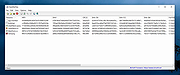 |
 |
TeraCopy Free v4.0.3 TeraCopy Free v4.0.3 👉 Fast and reliable file copy and move utility for Windows. TeraCopy Free is a Windows file transfer utility designed to replace the standard Windows copy and move functions with a faster, more reliable alternative. The free version improves large file transfers, verifies copied files to ensure data integrity, automatically retries failed transfers, and integrates directly into Windows Explorer for seamless everyday use. It also supports checksum generation and verification, secure file deletion, and copying locked files. This listing is for the free Windows edition intended for home and non-profit use only. Features: • Faster file copy and move operations than Windows Explorer • Verify copied files to ensure data integrity • Automatically retry failed file transfers • Skip problematic files without stopping the entire transfer • Preserve original file date and time stamps • Copy locked files • Integrates with Windows Explorer context menus • Run shell scripts (CMD or PowerShell) when transfers complete • Generate and verify checksum files including CRC32, MD5, SHA-1, SHA-256, SHA-512, Panama, Tiger, RipeMD, Whirlpool, and xxHash • Securely delete files • Keeps a history of recently used folders for quicker navigation • Free for home and non-profit use Supported operating systems: • Windows 7, Windows 8, Windows 8.1, Windows 10, Windows 11 • Windows Server 2003–2025 Supported languages: • Arabic, Bengali, Bulgarian, Catalan, Chinese Simplified, Chinese Traditional, Croatian, Czech, Danish, Dutch, English, Estonian, Finnish, French, Georgian, German, Greek, Hebrew, Hindi, Hungarian, Indonesian, Italian, Japanese, Korean, Lithuanian, Malay, Norwegian, Persian, Polish, Portuguese, Portuguese (Brazilian), Romanian, Russian, Santali, Serbian, Slovak, Slovenian, Spanish, Spanish (Argentina), Spanish (Mexico), Swedish, Thai, Turkish, Ukrainian, Vietnamese Changes: v4.0.3 07-14-26 Fixed file enumeration on macOS SMB shares: worked around a bug in Apple’s SMB server that truncates large directory listings. Fixed issue with file sizes on Macrium tbFAT. Per-user installation no longer requires elevation. ... |
|
10,220 | Jul 16, 2026 Code Sector 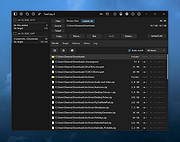 |
| Showing rows 1 to 3 of 3 | Showing Page 1 of 1 | 1 |
OlderGeeks.com Copyright (c) 2026
