|

|
Processed through Paypal No account required. |








Buy our over-priced crap to help pay the bills.



|
|
Processed through Paypal No account required. |
| Files | ||||
| File Name | Rating | Downloads | ||
 |
caffeinate & disablesleep v1.0.0 caffeinate & disablesleep v1.0.0 👉 Keep your Mac awake with simple menu bar controls, including optional closed-lid operation. caffeinate & disablesleep is a free, open-source macOS menu bar utility that provides an easy graphical interface for Apple's built-in caffeinate command along with quick access to the disablesleep power setting. Instead of remembering Terminal commands, you can start timed keep-awake sessions, prevent display sleep, or allow your Mac to continue running after the lid is closed with just a few clicks. The application offers preset timers ranging from 15 minutes to 8 hours, plus an unlimited mode. A live status display shows the current power settings, and a right-click shortcut lets you quickly enable or disable sleep prevention without opening the main window. The optional closed-lid feature securely configures the required macOS power setting and only requires administrator authorization the first time it is enabled. The developer recommends ensuring adequate ventilation whenever operating a Mac with the lid closed. Features: • Simple menu bar interface for Apple's built-in caffeinate utility • Prevents your Mac from sleeping • Timer presets from 15 minutes to 8 hours • Unlimited keep-awake mode • Optional "Keep Screen On" mode • Optional closed-lid operation using disablesleep • Right-click menu bar toggle • Live power command status display • Visual indicators showing active sleep settings • Automatically detects Terminal changes • Optional launch at login • Optional automatic keep-awake on startup • Native Swift application • No external dependencies • Open source (MIT License) Usage instructions: • Launch the application and click its menu bar icon. • Select a timer (15 minutes through 8 hours) or choose Infinite. • Click the moon button to start or stop the keep-awake session. • Enable Keep Screen On if you do not want the display to sleep. • Enable Stay Awake With Lid Closed to continue running after closing the lid. • The first time you enable closed-lid mode, enter your administrator password when prompted. • Right-click ... |
 |
286 | Aug 04, 2026 Demiao Chen 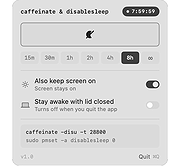 |
| Showing rows 1 to 1 of 1 | Showing Page 1 of 1 | 1 |
OlderGeeks.com Copyright (c) 2026
