|

|
Processed through Paypal No account required. |








Buy our over-priced crap to help pay the bills.



|
|
Processed through Paypal No account required. |
| Files | ||||
| File Name | Rating | Downloads | ||
 |
adb-tools-mac v1.1 adb-tools-mac v1.1 👉 A handy macOS menu bar app for common Android ADB tools. adb-tools-mac is a lightweight macOS menu bar app written in SwiftUI that gives Android users quick access to common ADB functions without needing to run commands manually in Terminal. It can connect to Android devices over TCP, take screenshots, record the screen, open deeplinks and capture logcat output. The app includes the adb executable internally, helping avoid common ADB setup and installation problems. Features: • Runs from the macOS menu bar • Connect Android devices over TCP • Take screenshots from connected devices • Record Android device screens • Open deeplinks for testing apps and links • Capture logcat output • Includes adb internally to reduce setup problems • Written in SwiftUI • Free and open source under the GPL Supported operating systems: • macOS Supported languages: English Changes: v1.1 03-12-21 Moved adb commands to background thread to avoid adb daemon stalling the app process. Click here to visit the author's website. |
 |
3,539 | Jun 14, 2026 Naman Dwivedi 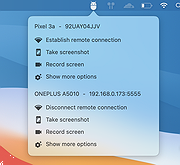 |
 |
BAR (Beyond All Reason) v1.2988.0 BAR (Beyond All Reason) v1.2988.0 The Epic scale RTS experience you've been waiting for, Unmatched Scale and Realism All units and projectiles are simulated in real-time. The game offers fully simulated projectile ballistics, explosion physics and terrain deformation. Enjoy an immersive RTS experience, whether you are commanding individual units, or armies of thousands. Take control as you engage in an epic struggle for domination! Strategic Importance of Terrain The shape of every battlefield in-game imposes which strategies work and which units are effective. No two maps will play the same. Radar cannot penetrate mountains and nuclear warfare will physically alter the terrain. Utilize over 10 different unit classes, including all-terrain Experimental units, to work your way to victory. Countless Possible Strategies Your power lies in the careful balance of exponentially growing your resource income and the production of devastating war machines. You decide if you want to disarm your enemies with a few precise early strikes or to build a thousand bombers and obliterate them. Immerse yourself in a violent world where tactical and strategical supremacy are needed in your fight towards victory. Over 400 Units... Unique and With a Purpose Each and every unit in the game has a role to fill. Mix-and-match units to create infinite possible tactics. Experiment with your own combinations and show off the new strategies you develop in battle. Minimum Requirements CPU: Dual core 2.7ghz CPU & newer than 2010 GPU: GTX950 and up RAM: 8gb and up Requirements may change due to upgrades we are working on. Recommended: Install BAR on a SSD (4 GB free disc space) We advise keeping at least 20GB of available space to accommodate the downloading of extra maps and storing replays and screenshots. Download a map-pack Currently there's only a few maps included in the download. You can download the full map-pack, used on the servers. • Unpack/download all ... |
|
2,544 | Apr 12, 2024 BAR Team  |
|
caffeinate & disablesleep v1.0.0 caffeinate & disablesleep v1.0.0 👉 Keep your Mac awake with simple menu bar controls, including optional closed-lid operation. caffeinate & disablesleep is a free, open-source macOS menu bar utility that provides an easy graphical interface for Apple's built-in caffeinate command along with quick access to the disablesleep power setting. Instead of remembering Terminal commands, you can start timed keep-awake sessions, prevent display sleep, or allow your Mac to continue running after the lid is closed with just a few clicks. The application offers preset timers ranging from 15 minutes to 8 hours, plus an unlimited mode. A live status display shows the current power settings, and a right-click shortcut lets you quickly enable or disable sleep prevention without opening the main window. The optional closed-lid feature securely configures the required macOS power setting and only requires administrator authorization the first time it is enabled. The developer recommends ensuring adequate ventilation whenever operating a Mac with the lid closed. Features: • Simple menu bar interface for Apple's built-in caffeinate utility • Prevents your Mac from sleeping • Timer presets from 15 minutes to 8 hours • Unlimited keep-awake mode • Optional "Keep Screen On" mode • Optional closed-lid operation using disablesleep • Right-click menu bar toggle • Live power command status display • Visual indicators showing active sleep settings • Automatically detects Terminal changes • Optional launch at login • Optional automatic keep-awake on startup • Native Swift application • No external dependencies • Open source (MIT License) Usage instructions: • Launch the application and click its menu bar icon. • Select a timer (15 minutes through 8 hours) or choose Infinite. • Click the moon button to start or stop the keep-awake session. • Enable Keep Screen On if you do not want the display to sleep. • Enable Stay Awake With Lid Closed to continue running after closing the lid. • The first time you enable closed-lid mode, enter your administrator password when prompted. • Right-click ... |
|
228 | Aug 04, 2026 Demiao Chen 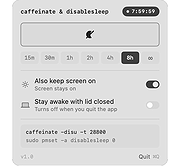 |
|
FineTune v1.7.0 FineTune v1.7.0 👉 Per-app volume control, audio routing, multi-device output and EQ for macOS. FineTune is a free and open-source macOS menu bar app that lets you control the volume of individual apps, boost quiet apps up to 4x, route apps to different speakers, use multi-device output, adjust input and output devices, and shape sound with a 10-band EQ and headphone correction. Features: • Per-app volume sliders and mute controls • Per-app volume boost with 2x, 3x and 4x gain presets • Global hotkeys for app volume up, app volume down, app mute and popup toggle • Configurable volume step size • Keyboard navigation for the menu bar popup • Multi-device output support • Route apps to different audio outputs • Auto-restore app volume, routing and EQ when devices reconnect • 10-band EQ with presets • Custom user EQ presets • AutoEQ headphone correction support • Loudness compensation using ISO 226:2023 equal-loudness contours • Input device and microphone level control • macOS alert volume control • Bluetooth device management from the menu bar • External monitor speaker control via DDC • Dynamic menu bar icon styles • Light and Dark theme support • Adjustable popup size: Compact, Comfortable or Spacious • URL schemes for automation Supported operating systems: • macOS 15.0 Sequoia or later Supported languages: English, Simplified Chinese Changes: v1.7.0 05-14-26 New Features: Global Hotkeys Volume Step Keyboard-Navigate the Popup Theme Scroll-Wheel Volume Settings, Rebuilt Popup Size Improvements: Visual refresh across the popup. Popup fits a 13" MacBook Air screen. Tap anywhere on a device row to select it. Multi-output count badge on the app-row picker. Mute button speaker glyph tracks the slider. EQ panel moved to a lifted card. Input device row aligned with output. Bug Fixes: F10–F12 media keys no longer step in raw gain. HDMI / DisplayPort monitor volume sliders no longer stay dead for the first few seconds after launch. Labels stop looking faded after switching from forced Light back to System appearance. The multi-output count reflects only devices currently attached. The Settings window no longer fights macOS for its scene state. This download is ... |
|
770 | May 31, 2026 Ronit Singh 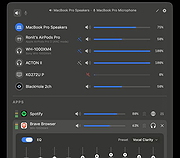 |
|
Resource Progress Bar v1.3.0.44 Resource Progress Bar v1.3.0.44 The Resource Progress Bar visualizes the load of the four most important resources defining user experience (CPU, RAM, network, HDD) in real time. The tool is useful when setting up the computer, and when installing programs. It helps to identify at once if the system is overloaded due to incorrect software or settings. Overload states may occur during general computer use as well. These could be either normal loads generated by operations that require high computing power, or abnormal loads caused by program errors and malicious background tasks. In such cases, the Resource Progress Bar effectively provides system status information. In case of overload, the Resource Progress Bar sends a warning via the tray icon. The actual data transfer speed of the network is displayed according to the pre-set limits. It also informs about the data transfer activity if the network or HDD usage is low (HDD Led and Network Led). The Resource Progress Bar can be set up to start automatically so that is loads together with the operating system according to the last saved status. Program size and other display options can be set, and the settings saved. The Resource Progress Bar is capable of operating with full functionality while running in the background. Benefits of the Resource Progress Bar: Effectively informs about the state of system resources Sends a warning in case of overload Can be set to start automatically Display options (position, size, Opacity, Show/Hide, Top) can be set, and the settings saved; the program will launch next time with the saved settings Limits can be set for the network process display Support for low network traffic and low HDD usage display (HDD LED and Network LED) ... |
|
5,946 | Feb 05, 2020 WinTools  |
| Showing rows 1 to 5 of 5 | Showing Page 1 of 1 | 1 |
OlderGeeks.com Copyright (c) 2026
