|

|
Processed through Paypal No account required. |








Buy our over-priced crap to help pay the bills.



|
|
Processed through Paypal No account required. |
| Files | ||||
| File Name | Rating | Downloads | ||
 |
Brightness.Manager.OK v1.77 Brightness.Manager.OK v1.77 👉 Adjust screen brightness and individual RGB levels in Windows. Brightness.Manager.OK is a small freeware utility for adjusting your display when Windows brightness controls or monitor buttons are unavailable. Separate red, green, and blue adjustments help compensate for unwanted color casts. You can apply saved settings at startup and launch the program automatically when you sign in. Note: Closing the window moves it to the notification area. Use the Exit button to quit. Features: • Overall brightness adjustment. • Independent RGB controls. • Apply saved values at startup. • Optional automatic startup with Windows. • Notification area access. • Shortcuts to related system settings. • Portable operation. • Low processor and memory usage. • Built-in self-delete option. Supported operating systems: • Windows 7, Windows 8.1, Windows 10, Windows 11 • Windows Server 2012 through Windows Server 2025 Supported languages: Arabic, Brazilian Portuguese, Dutch, English, French, German, Italian, Japanese, Korean, Portuguese, Russian, Simplified Chinese, Spanish, Traditional Chinese Changes: v1.77 05-31-26 Updates to the language files in the Brightness.Manager.OK application. Minor improvements and new languages: Spanish and Portuguese Click here to visit the author's website. |
 |
1,383 | Oct 04, 2026 Nenad Hrg 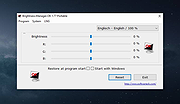 |
| Showing rows 1 to 1 of 1 | Showing Page 1 of 1 | 1 |
OlderGeeks.com Copyright (c) 2026
