|

|
Processed through Paypal No account required. |








Buy our over-priced crap to help pay the bills.



|
|
Processed through Paypal No account required. |
| Files | ||||
| File Name | Rating | Downloads | ||
 |
LANIPScanner v1.11 LANIPScanner v1.11 👉 Scans your local network and displays the IP and MAC address of all connected devices. LANIPScanner is a lightweight network scanning utility that quickly detects computers and devices connected to your local area network (LAN). It works by scanning a specified IP address range and listing all active devices it finds, including useful details such as IP address and MAC address. This makes it easy to identify computers, printers, routers, and other network-enabled devices currently active on your network. LANIPScanner requires no installation and runs as a simple portable application. It is designed for speed and simplicity, allowing users to quickly view the devices on their LAN without complicated configuration. The tool is especially useful for troubleshooting network connectivity, identifying unknown devices, or verifying which systems are currently active on a network. Features: • Scans a specified IP address range on your local network • Displays detected devices with their IP and MAC addresses • Fast scanning engine for quick device discovery • Simple, lightweight, and portable utility with no installation required • Ideal for identifying active devices and troubleshooting LAN connections Supported operating systems: • Windows Vista, Windows 7, Windows 8, Windows 10, Windows 11 Supported languages: English, Dutch, French, German, Greek, Hungarian, Italian, Japanese, Polish, Russian, Simplified Chinese, Slovak, Traditional Chinese, Ukrainian Changes: v1.11 08-21-26 Added option to change the sorting column from the menu (View -> Sort By). Added 'Sort By' toolbar button. Note: This file has twenty two hits on VirusTotal. We have confirmed these to be false positives. The file is safe. Note from The Older Geeks: Some antivirus programs may flag LANIPScanner because of the way it scans your local network for computers and other connected devices. Network discovery and scanning techniques are also used by legitimate system administration and diagnostic tools, so heuristic antivirus engines can occasionally classify utilities like this as potentially unwanted or suspicious. Click ... |
 |
1,524 | Sep 04, 2026 Nir Sofer 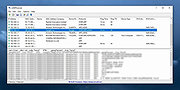 |
|
MAC Address Changer v1.0 32bit MAC Address Changer v1.0 32bit MAC Address or Media Access Control Address is a unique address or identifier assigned to network interfaces by the manufacturers. Some Internet service providers may require authentication with a MAC address or only allow a device from the specific range of MAC addresses to connect to a network. In this case you need to change your PC's MAC address to connect. MAC Address Changer is a free utility that can change Media Access Control (MAC) address on any network interface in the system. Using Just run this utility and choose required Network Connection, enter or generate desired MAC address, and then click Change MAC. Additionally, this utility allows you to restore factory default MAC address. License This utility is released as freeware. You are allowed to freely distribute this utility via floppy disk, CD-ROM, Internet, or in any other way, as long as you don't charge anything for this. If you distribute this utility, you must include all files in the distribution package, without any modification! Disclaimer The software is provided "AS IS" without any warranty, either expressed or implied, including, but not limited to, the implied warranties of merchantability and fitness for a particular purpose. The author will not be liable for any special, incidental, consequential or indirect damages due to loss of data or any other reason. Feedback If you encounter a problem while running this utility or you have any suggestions, comments, you can send a message to support (at) itsamples.com |
|
6,073 | Dec 31, 2018 Igor Tolmachev 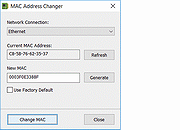 |
|
MAC Address Changer v1.0 64bit MAC Address Changer v1.0 64bit MAC Address or Media Access Control Address is a unique address or identifier assigned to network interfaces by the manufacturers. Some Internet service providers may require authentication with a MAC address or only allow a device from the specific range of MAC addresses to connect to a network. In this case you need to change your PC's MAC address to connect. MAC Address Changer is a free utility that can change Media Access Control (MAC) address on any network interface in the system. Using Just run this utility and choose required Network Connection, enter or generate desired MAC address, and then click Change MAC. Additionally, this utility allows you to restore factory default MAC address. License This utility is released as freeware. You are allowed to freely distribute this utility via floppy disk, CD-ROM, Internet, or in any other way, as long as you don't charge anything for this. If you distribute this utility, you must include all files in the distribution package, without any modification! Disclaimer The software is provided "AS IS" without any warranty, either expressed or implied, including, but not limited to, the implied warranties of merchantability and fitness for a particular purpose. The author will not be liable for any special, incidental, consequential or indirect damages due to loss of data or any other reason. Feedback If you encounter a problem while running this utility or you have any suggestions, comments, you can send a message to support (at) itsamples.com |
|
6,125 | Dec 31, 2018 Igor Tolmachev |
|
MAC Address Scanner 1.5 MAC Address Scanner 1.5 MAC Address Scanner is the free desktop tool to remotely scan and find MAC Address of all systems on your local network. It allows you to scan either a single host or range of hosts at a time. During the scan, it displays the current status for each host. After the completion, you can generate detailed scan report in HTML/XML/TEXT/CSV format. Note that you can find MAC address for all systems within your subnet only. For all others, you will see the MAC address of the gateway or router. On certain secure WiFi configurations with MAC filtering enabled, this tool can help pentesters to find out active MAC addresses and then use them to connect to such wireless network. Being GUI based tool makes it very easy to use for all level of users including beginners. It is fully portable and works on all platforms. Features: Quickly find MAC address of all systems on the Network Scan single or multiple systems Ability to stop the scanning operation at any time Color based representation for successful and failed hosts Save the scan report to HTML/XML/TEXT/CSV file Free and easy to use tool with cool GUI interface Fully Portable and can be run on any Windows system Support for local Installation & Un-installation Change Info: New feature to generate MAC address scanner report in CSV (Comma-Seperated Values) File Format. |
 |
9,513 | Jan 27, 2014 SecurityXploded |
| Showing rows 1 to 4 of 4 | Showing Page 1 of 1 | 1 |
OlderGeeks.com Copyright (c) 2026
