|

|
Processed through Paypal No account required. |








Buy our over-priced crap to help pay the bills.



|
|
Processed through Paypal No account required. |
| Files | ||||
| File Name | Rating | Downloads | ||
 |
Xlideit Image Viewer v1.0.200127 Xlideit Image Viewer v1.0.200127 A lightweight image viewer with basic image processing. A thumbnail bar is shown at the bottom of the window with all the images in the folder. The name of the current image and the toolbar are shown at the top of the window. Use the toolbar to access basic commands like: image slideshow, adjust zoom, rotate, delete, crop or resize the image, sort the list or access the program settings. Move the mouse near the left or right side of the window to show the arrows and select the next or previous image. Move the mouse over the buttons to see a short description or over the thumbnails to see more information. By default, the viewer starts in full screen mode but it can be switched to windowed mode by pressing F11. Also, you can press Enter to hide or show the toolbars, Space to start the slideshow or Escape to exit the program. To use this program as the default viewer for any image file, right click on the file and use the "Open with" option in the context menu. Changes: 1.0.200127 Fixed a bug when exiting slideshow with solid color background Click here to visit the author's website. |
 |
5,848 | Jan 28, 2020 picorover3 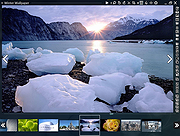 |
| Showing rows 1 to 1 of 1 | Showing Page 1 of 1 | 1 |
OlderGeeks.com Copyright (c) 2026
