|

|
Processed through Paypal No account required. |








Buy our over-priced crap to help pay the bills.



|
|
Processed through Paypal No account required. |
| Files | ||||
| File Name | Rating | Downloads | ||
 |
FastStone Image Viewer v8.5 FastStone Image Viewer v8.5 👉 Fast, stable image browser, editor and batch converter. FastStone Image Viewer is a fast, stable, user-friendly image browser, converter and editor. It includes image viewing, management, comparison, red-eye removal, emailing, resizing, cropping, retouching and color adjustments. Its full-screen mode gives quick access to EXIF information, thumbnail browsing and major tools through hidden edge toolbars. It also includes a high quality magnifier, musical slideshow with 150+ transition effects, lossless JPEG transformations, drop shadows, image annotation, scanner support, histogram display, batch conversion and batch renaming. Features: • Windows Explorer-like image browser and viewer • Supports BMP, JPEG, HEIC, WEBP, GIF, PNG, PCX, PDF, PSD, EPS, TIFF, WMF, ICO, CUR, TGA and many RAW camera formats • Full-screen viewer with zoom support and fly-out menu panels • Resize, rotate, crop, sharpen, blur, color correction, curves and levels tools • Clone Stamp, Healing Brush and red-eye removal • Draw text, lines, highlights, rectangles, ovals and callouts • Compare up to 4 images side-by-side • Batch convert and batch rename files • Slideshow with music and 150+ transition effects • Scanner support with batch scanning to PDF, TIFF, JPEG and PNG • Contact sheet creation, printing tools and image emailing • Portable version available Supported operating systems: • Windows XP, Windows Vista, Windows 7, Windows 8, Windows 10, Windows 11 Supported languages: Bulgarian, Chinese (Simplified), Chinese (Traditional), Czech, Danish, Dutch, Finnish, French, German, Hungarian, Italian, Japanese, Korean, Norwegian (Norsk bokmεl), Polish, Portuguese, Russian, Spanish, Swedish, Ukrainian Changes: v8.5 06-24-26 Added support for SVG format Added Start importing automatically and Handle duplicate file names automatically options to the Import Photos and Videos tool WebP files can now be rotated and saved with a single click Enhanced dark theme support in the PDF viewer Fixed a bug where some links in PDF files were not clickable Other improvements and bug fixes 👉 This download is for the Windows portable version (very bottom of page). All other download ... |
 |
11,648 | Oct 07, 2026 FastStone Soft 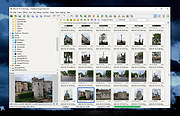 |
 |
XL Converter v1.0.2 XL Converter v1.0.2 Free, easy-to-use image converter for modern formats. Supports multithreading, drag 'n drop, and downscaling. Available for Windows and Linux. Supported Formats Encode to JPEG XL, AVIF, WebP, and JPEG. Convert from HEIF, TIFF, and more Features JPEGLI Generate fully compatible JPEGs with up to 35% better compression ratio. JPEG XL and AVIF Achieve exceptional quality at a modest size with JPEG XL and AVIF. Parallel Encoding Encode images in parallel to speed up the process. Control how many threads to use for encoding. Lossless JPEG Recompression Losslessly transcode JPEG to JPEG XL, and reverse the process when needed. Downscaling Scale down images to resolution, percent, shortest (and longest) side, or even file size. Changes: v1.0.2 07 Aug 20:39 Added tooltips Added an option to copy original when output is larger (#45) Added an option to prevent deleting original when output is larger (#45) Added logging to file Added custom ExifTool arguments Added low RAM mode (#49) Fixed UTF-8 support in ExifTool (Windows) (#47) Fixed ExifTool handling of JPEG XL (Linux) Fixed menu entry disappearing after an update (Linux) Fixed UI bug with multiple chroma subsampling options appearing Set Windows installer to always show dir page Improved sound handling Improved settings tab scaling Switched to the system-provided ExifTool on Linux Updated ExifTool on Windows to 12.92 Updated libavif to 1.1.1 Updated libaom to 3.9.1 Updated OxiPNG to 0.9.2 This download is for the Windows version (very bottom of page). All other download assets are below: Linux: xl-converter-linux-1.0.2-x86_64.AppImage xl-converter-linux-1.0.2-x86_64.7z Click here to visit the author's website. |
|
1,008 | Aug 08, 2024 JacobDev1 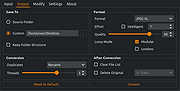 |
| Showing rows 1 to 2 of 2 | Showing Page 1 of 1 | 1 |
OlderGeeks.com Copyright (c) 2026
