|

|
Processed through Paypal No account required. |








Buy our over-priced crap to help pay the bills.



|
|
Processed through Paypal No account required. |
| Files | ||||
| File Name | Rating | Downloads | ||
 |
WizTreeMac v1.00 WizTreeMac v1.00 👉 Find the files and folders taking up space on your Mac. WizTreeMac scans your Mac and shows where storage space is being used. Browse the results as a folder tree, inspect a visual treemap, or search the file list for large files. It can also locate duplicate files and import or export file data as CSV. Scanning uses macOS’s native directory enumeration API with multiple threads. WizTreeMac is free for personal use; commercial use requires a license. Features: • Scan drives and folders to see what is using storage space. • Browse file sizes in a folder tree or visual treemap. • Search the file view to find large files. • Locate duplicate files. • Import and export file data as CSV. • Scan network drives. • Use Full Disk Access to read protected folders, with a separate administrator mode for root-level access. • Run from a removable drive with settings stored alongside the app. Supported operating systems: • macOS 12 or later Supported languages: English, Arabic, Belarusian, Bulgarian, Catalan, Chinese Simplified, Chinese Traditional, Czech, Danish, Dutch, Estonian, Finnish, French, German, Greek, Hebrew, Hungarian, Indonesian, Italian, Japanese, Korean, Latvian, Lithuanian, Norwegian, Polish, Portuguese, Portuguese Brazilian, Romanian, Russian, Serbian, Slovak, Slovenian, Spanish, Swedish, Thai, Turkish, Ukrainian, Vietnamese Changes: v1.00 09-16-26 Initial WizTreeMac release for macOS 12 or later. Includes most of the functionality of WizTree 4.33. Click here to visit the author's website. |
 |
7 | Sep 23, 2026 antibody-software.com 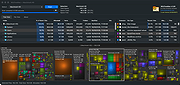 |
| Showing rows 1 to 1 of 1 | Showing Page 1 of 1 | 1 |
OlderGeeks.com Copyright (c) 2026
