|

|
Processed through Paypal No account required. |








Buy our over-priced crap to help pay the bills.



|
|
Processed through Paypal No account required. |
| Files | ||||
| File Name | Rating | Downloads | ||
 |
Winslopr v26.04.04 Winslopr v26.04.04 (Formerly Winslop) 👉 Lightweight open-source Windows debloat & optimization utility. Winslopr is an open-source utility designed to “de-slop” Windows, meaning it helps remove unnecessary, forced, or opaque features, bloatware, telemetry, and AI-driven components from modern Windows installations so users gain more control over their system. It emphasizes transparency, local execution, and reversible, user-selected actions rather than automated scripts or cloud-based operations. Features: • Inspect and display installed Windows components, apps, and features before applying changes. • Remove or disable optional Windows 11 features such as AI integrations (e.g., Copilot UI & buttons) and other pre-installed packages. • Uninstall inbox Appx/MSIX packages and remove telemetry, ads, and UI clutter. • Provide a clear, classic interface (WinForms/retro aesthetic) that stays small and unobtrusive. • Present changes as checkboxes with previews and allow review before applying. • Offer optional extensions/tools (e.g., Windows 11 media creation helper) through PowerShell extensions while keeping core app lightweight. • Focus on local, deterministic operations with no cloud telemetry, AI, or automatic uploads. Supported operating systems: • Windows 10 • Windows 11 Supported languages: English, Italian, Polish, Spanish, Turkish, Chinese (Simplified) Changes: v26.04.04 04-06-26 [New] Unified Plugins & Scripts management: Plugins and Tool Scripts are now managed in a single dialog (PluginsDialog) instead of two separate places (Plugins and Scripts/Extensions). Routing is based on the manifest type= field: type=tool --> Scripts/ folder, Default --> Plugins/ Folder [Improved] Reduced unnecessary resource usage and made the app feel smoother in daily use, which is saying something given that WinUI 3 still behaves like a small monster now and then [Fix;Critical] Fix winget source agreements on fresh Windows installs. winget list and winget upgrade now run with --accept-source-agreements --disable-interactivity, so the Install tab works out of the box without needing a prior manual winget interaction in the terminal #77 [Improved] UI has been refined across the app to feel lighter, cleaner, and more modern [Added] "Plugins" entry ... |
 |
883 | Apr 09, 2026 Builtbybel 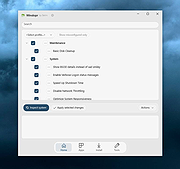 |
| Showing rows 1 to 1 of 1 | Showing Page 1 of 1 | 1 |
OlderGeeks.com Copyright (c) 2026
