|

|
Processed through Paypal No account required. |








Buy our over-priced crap to help pay the bills.



|
|
Processed through Paypal No account required. |
| Files | ||||
| File Name | Rating | Downloads | ||
 |
BatEx v1.0.1 BatEx v1.0.1 👉 Turn Windows batch scripts into EXE applications. BatEx is a modern Windows desktop app that converts .bat and .cmd scripts into runnable .exe applications. You can drop an existing batch or command script into the app, or write a new script directly inside BatEx, then choose output options such as folder, icon, metadata, admin mode, console mode, platform, and more. Features: • Convert .bat and .cmd files to .exe • Write scripts directly inside the app • Modern WinUI 3 interface • Drag and drop support • Show or hide the console window • Run generated EXE as administrator • Add a custom .ico icon • Add file metadata including description, product name, company name, copyright, version, internal name, and original filename • Choose target platform: x64, x86, or AnyCPU • Optional script obfuscation • Conversion history • Auto-open output folder after build Supported operating systems: • Windows 10, Windows 11 Supported languages: English Changes: v1.0.1 05-22-26 You can now add more files that your script needs into the new exe! Fixed script editor issues Now the software checks for updates Note: This file has one hit on VirusTotal. We have confirmed this to be a false positive. The file is safe. Click here to visit the author's website. |
 |
623 | May 22, 2026 The Yali 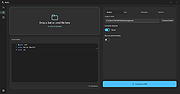 |
 |
FluentCleaner Modern v26.09.01 FluentCleaner Modern v26.09.01 👉 A modern Windows cleanup tool built with WinUI 3 and powered by winapp2.ini. FluentCleaner is an open-source Windows desktop cleaner designed to reclaim disk space, clean application leftovers, remove cache files, and give users clear control over what gets deleted. It uses the community-maintained winapp2.ini ecosystem for specific, inspectable cleaning rules instead of broad, unsafe guessing. FluentCleaner also includes terminal control, multi-database support, optional AppX/bloatware database support, and a modern WinUI 3 interface with no tracking, no upsells, no scareware, and no fake registry-cleaner tricks. Features: • Modern WinUI 3 interface • Open source and donation-supported • Uses winapp2.ini cleaning rules • Supports custom winapp2-compatible databases • Multi-database loading with deduplication • Optional Winappx AppX/bloatware database • Category-based cleaning • Detail view for file and registry targets • Explorer integration for locating file paths • Command-line auto-clean support • Silent cleaning with saved selections • Optional auto-shutdown after cleaning • Detailed auto-clean log saved to AppData • Saved window size across sessions • Saved navigation pane state • No telemetry, no bundled offers, no fake registry cleaner Supported operating systems: • Windows 10, Windows 11 Supported languages: English, German, French, Indonesian, Italian, Lithuanian, Norwegian, Portuguese (BR), Russian, Ukrainian, Chinese Simplified/Traditional Changes: v26.09.01 09-17-26 [Added] [Classic] Introduced command-line automation for scripts, batch files, PowerShell, and third-party tools. Classic can now analyze or clean the saved selection silently, optionally target a specific cleaner category, and shut down the PC after cleaning #52 [Added] [Classic] Added command-line documentation and ready-to-copy examples under Options > Handoff / CLI [Changed] [Classic] Development of the built-in Mini mode has been paused for now. It may return later as a separate add-on or as part of a future plugin system. [Improved] [Classic] Deleting a cookie no longer throws the user back to the beginning of the list. FluentCleaner still refreshes the real browser databases, but now keeps the working position and selects the nearest remaining entry #185 [Added] [Classic] Added ... |
|
2,114 | Sep 30, 2026 Builtbybel 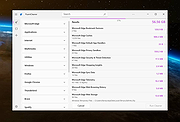 |
| Showing rows 1 to 2 of 2 | Showing Page 1 of 1 | 1 |
OlderGeeks.com Copyright (c) 2026
