|

|
Processed through Paypal No account required. |








Buy our over-priced crap to help pay the bills.



|
|
Processed through Paypal No account required. |
| Files | ||||
| File Name | Rating | Downloads | ||
 |
Desktop Clock Widget v1.0.0 Desktop Clock Widget v1.0.0 A minimalist, transparent, and undraggable clock widget for your Windows desktop, built with Electron. Desktop Clock Widget is designed to blend seamlessly with your wallpaper, just like a Rainmeter skin, without interfering with your workflow. Features: 🖥️ Seamless Desktop Integration: Appears directly on your desktop wallpaper, not as an overlay on top of other windows. 🪟 Transparent & Frameless: No visible window borders or backgrounds, just your clock content. 🖱️ Undraggable & Non-Interactive: Clicks pass through the widget, allowing you to interact with desktop icons and windows behind it without interference. 🖋️ Customizable Font: Easily change the font to match your desktop aesthetic. 📍 Fixed Position: Configured to appear at a specific, non-intrusive position (20% from the top, horizontally centered). 🧊 Resource Friendly: Optimized to have minimal impact on your PC's resources. Usage: • Launch the "Desktop Clock" application from your Start Menu or desktop shortcut. • The clock widget will appear on your desktop, centered horizontally and positioned 20% from the top of your screen. • It will automatically update every minute. • Clicks will pass through the widget to your desktop icons. • To quit the clock, right-click the tray icon and select Quit Clock. Click here to visit the author's website. |
 |
1,801 | Jul 25, 2025 nicocodes9 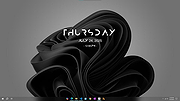 |
| Showing rows 1 to 1 of 1 | Showing Page 1 of 1 | 1 |
OlderGeeks.com Copyright (c) 2026
