|

|
Processed through Paypal No account required. |








Buy our over-priced crap to help pay the bills.



|
|
Processed through Paypal No account required. |
| Files | ||||
| File Name | Rating | Downloads | ||
 |
WAU Manager v3.8.7.0 WAU Manager v3.8.7.0 👉 Choose when Windows updates run and which updates get installed. WAU Manager is a free Windows update management tool from Carifred. It provides its own interface and schedule for finding and installing updates. You can run an update check whenever you choose, schedule automatic checks, select individual updates, remove installed updates, and hide updates you do not want offered again. It also includes update history maintenance and a module for updating installed applications. Features: • Check for Windows updates manually or on a schedule you set. • Choose whether updates are downloaded and installed automatically. • Select individual recommended and optional updates for installation. • Search for driver updates, software updates, or both. • Run update sessions with Normal, Passive, or Quiet interaction. • Create a desktop shortcut for starting an update session. • Uninstall multiple installed updates in one operation. • Hide updates and unhide them later. • View update history and clear history or downloaded update files. • Check for updates to installed applications. • See whether a selected update requires a system reboot. Supported operating systems: • Windows 10 and 11 Supported languages: English Changes: v3.8.7.0 06-25-26 Windows update history dates are now displayed in local time. Previously they were displayed in universal time format. Minor bug fixes. Click here to visit the author's website. |
 |
1,571 | Sep 24, 2026 Carifred 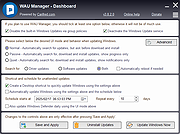 |
| Showing rows 1 to 1 of 1 | Showing Page 1 of 1 | 1 |
OlderGeeks.com Copyright (c) 2026
