|

|
Processed through Paypal No account required. |








Buy our over-priced crap to help pay the bills.



|
|
Processed through Paypal No account required. |
| Files | ||||
| File Name | Rating | Downloads | ||
 |
Alternate Pic View 2.061 Alternate Pic View 2.061 A simple picture viewer and manipulator. Open source (CBuilder 5). Features: - Slideshow - Thumbnails - Drawing operations - Several picture formats - Tile pictures - Combine pictures - Size pictures/extend - Batchconversation/Sizing - Icon extraction from DLL- and EXE-files - Save selection to file - File properties - EXIF/IPTC information is not lost while saving a picture - Red eye reduction - Scale colors - Rotate colors - Drawing arrows - Size display correction for saving JPEGs compressed - Rectangle selection enhanced - Multipage TIFFs - Compare pictures - Create/edit animated GIFs - Search for pictures - Print all pages or a range of multipage GIFs/TIFs - Autosave - Startup folder option - JPEG 2000/IFF - Save/store ASCII TXT-files Supported operating systems: 98, Me, 2000, XP, Server 2003, Vista, Server 2008, 7, 8, 8.1 Languages included: English, german, french, spanish, polish, slovak, danish, czech, italian, chinese, russian, japanese, hungarian, swedish - Changes in this version: - Added JPG quality to options |
 |
7,238 | Jul 20, 2015 Alternate Tools 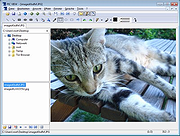 |
|
Depeche View 1.7.2 Depeche View 1.7.2 Depeche View loads all text files from a folder, showing all content in one window. It is used to search, analyze and edit huge amounts of text (source code, CSV data, log files or documentation) at high speed with the smallest possible effort. Depeche View Lite is portable freeware, use it without installation! *loads all ASCII text files in one window. *fly over all text by dragging the mouse. *instant search as you type, without dialogues. *search a word just by clicking on it. *copy a line, create bookmarks with one click. *Load and search up to 100 files, or 30 MB of text. *Filter text in realtime, as you type. *Fly over text by dragging the mouse. *Deluxe soft scrolling by the mouse wheel. *Highlight words for fastest reading. *No Installation, Instant Use. *Freeware. Changelog 1.7.2 - rel: 15.04.2017, Major Update - sum: improved open dialog to load folder or file content with auto select of the most recent folder used. multi file select with append file(s). dview lite can now reload editable files by F5. - add: Load or Append file now allows multi file selection, so several files can be loaded in one go. - chg: Open or Append dialogue now shows the recent selected folder, or the current working dir, or the folder loaded on startup. - add: command line option -browse mypath to use mypath as the initial starting point for Open or Append dialogue to load folders or files. - add: dview lite: single file reload on F5 key, ... |
 |
8,108 | Oct 23, 2019 StahlWorks 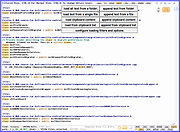 |
 |
FontViewOK v9.33 FontViewOK v9.33 👉 A quick visual overview of all installed fonts. FontViewOK creates a quick visual overview of all installed fonts, or fonts from a specific folder, and helps you compare fonts side by side. Features: • Quick overview and comparison of all installed fonts • View fonts from a specific folder • Compare fonts in dual preview panes • Compare installed and non-installed fonts • Change font size, style, and color • Change background and font colors • Print fonts with print preview • Copy the selected font preview as an image to the clipboard • Save the selected font preview as an image • Open font locations in Windows Explorer • Portable use, installation is not required Supported operating systems: • Windows 11, Windows 10, Windows 8.1, Windows 7, Windows Server 2012 through Windows Server 2025, x64, x32, x86 Supported languages: English, German, Thai, Multilingual Changes: v9.33 05-06-26 General adjustments to the Front-View App; improved detection of the default system language; necessary adjustments and language file updates. This download is for the Windows 64bit version (very bottom of page). If you need the Windows 32bit version, download here. Click here to visit the author's website. |
|
6,042 | May 15, 2026 Nenad Hrg 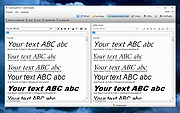 |
| Showing rows 1 to 3 of 3 | Showing Page 1 of 1 | 1 |
OlderGeeks.com Copyright (c) 2026
