|

|
Processed through Paypal No account required. |








Buy our over-priced crap to help pay the bills.



|
|
Processed through Paypal No account required. |
| Files | ||||
| File Name | Rating | Downloads | ||
 |
UninstallView v1.52 UninstallView v1.52 👉 View, manage, and uninstall installed Windows software with advanced details. UninstallView is a lightweight portable utility that displays detailed information about every installed application on your Windows system in a single, easy-to-read table. It gathers uninstall information from the Windows Registry and supplements it with additional details such as installation folder, uninstall command, registry location, install date, publisher, version, and more. It can also display Microsoft Store apps, making it a more comprehensive alternative to the standard Windows Apps & Features interface. UninstallView supports scanning the local computer, remote computers on your network, external drives, offline Windows installations, and shadow copies. It also supports standard and quiet uninstall operations when available, making it especially useful for technicians and advanced users. Lists can be sorted, filtered, searched, and exported in multiple formats for documentation or inventory purposes. Features: • Displays all installed desktop applications in a single table • Optionally displays installed Microsoft Store apps • Shows detailed uninstall information including registry entries and uninstall strings • Supports local computers, remote computers, external drives, and offline Windows installations • Quiet uninstall support when provided by the application's installer • View software installed for all users or individual user profiles • Sort, search, filter, and customize displayed columns • Export lists to TXT, CSV, HTML, XML, and other formats • Portable application requiring no installation • Save all displayed items to a file • Supports command-line operation for automation and scripting Supported operating systems: • Windows XP, Windows Vista, Windows 7, Windows 8, Windows 8.1, Windows 10, Windows 11 (32-bit and 64-bit) Supported languages: Arabic, Basque, Bulgarian, Catalan, Chinese Simplified, Chinese Traditional, Croatian, Czech, Danish, Dutch, English, Finnish, French, German, Greek, Hebrew, Hungarian, Italian, Japanese, Korean, Norwegian, Persian, Polish, Portuguese, Portuguese (Brazil), Romanian, Russian, Slovak, Slovenian, Spanish, Swedish, Thai, Turkish, Ukrainian, Vietnamese Changes: v1.52 06-23-26 Added the 'Save All Items' option (Shift+Ctrl+S). This download is for the Windows 64bit version ... |
 |
6,684 | Jun 30, 2026 Nir Sofer 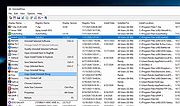 |
| Showing rows 1 to 1 of 1 | Showing Page 1 of 1 | 1 |
OlderGeeks.com Copyright (c) 2026
