|

|
Processed through Paypal No account required. |








Buy our over-priced crap to help pay the bills.



|
|
Processed through Paypal No account required. |
| Files | ||||
| File Name | Rating | Downloads | ||
 |
FontViewOK v9.33 FontViewOK v9.33 👉 A quick visual overview of all installed fonts. FontViewOK creates a quick visual overview of all installed fonts, or fonts from a specific folder, and helps you compare fonts side by side. Features: • Quick overview and comparison of all installed fonts • View fonts from a specific folder • Compare fonts in dual preview panes • Compare installed and non-installed fonts • Change font size, style, and color • Change background and font colors • Print fonts with print preview • Copy the selected font preview as an image to the clipboard • Save the selected font preview as an image • Open font locations in Windows Explorer • Portable use, installation is not required Supported operating systems: • Windows 11, Windows 10, Windows 8.1, Windows 7, Windows Server 2012 through Windows Server 2025, x64, x32, x86 Supported languages: English, German, Thai, Multilingual Changes: v9.33 05-06-26 General adjustments to the Front-View App; improved detection of the default system language; necessary adjustments and language file updates. This download is for the Windows 64bit version (very bottom of page). If you need the Windows 32bit version, download here. Click here to visit the author's website. |
 |
6,050 | May 15, 2026 Nenad Hrg 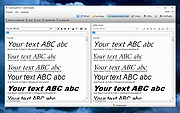 |
|
Microsoft TrueType Core Font Collection v1.0 Microsoft TrueType Core Font Collection v1.0 👉 A collection of classic Microsoft TrueType fonts for documents, desktop publishing, and web design. Microsoft TrueType Core Font Collection brings together the original Windows installers for 11 classic font families: Andale Mono, Arial, Arial Black, Comic Sans MS, Courier New, Georgia, Impact, Times New Roman, Trebuchet MS, Verdana, and Webdings. The collection was compiled by OlderGeeks.com from Microsoft’s original font packages. Font styles vary by family and include regular, bold, italic, and bold italic faces. Installation instructions: Windows: Extract the ZIP file and run the installer for the font you want. On Windows 10 and 11, extract a .TTF file from an installer, then right-click the font file and select Install. Other platforms: The included .EXE files are Windows installers. Use an archive utility that can open self-extracting Windows installers to extract the .TTF font files. Then install the fonts using your operating system’s font manager. Features: • Includes 11 font families: Andale Mono, Arial, Arial Black, Comic Sans MS, Courier New, Georgia, Impact, Times New Roman, Trebuchet MS, Verdana, and Webdings • Includes a selection of regular, bold, italic, and bold italic styles, depending on the font family • Use the fonts in compatible applications for documents, correspondence, desktop publishing, and printed output • Provides character coverage for Western, Central, and Eastern European writing systems, Greek, and Turkish Supported operating systems: • Windows 3.1, Windows 3.11, Windows 9x, Windows NT, Windows 2000 (use original Microsoft installers) • Windows XP, Windows Vista, Windows 7, Windows 8, Windows 8.1, Windows 10, Windows 11 (install extracted .TTF files) • Linux, macOS and other platforms (install extracted .TTF files using the platform’s font manager) Credit: Fonts and original installers by Microsoft Corporation. Collection compiled by OlderGeeks.com. Changes: v1.0 10-29-25 Initial release. Click here to ... |
|
29 | Oct 29, 2026 Microsoft Corp. 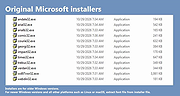 |
 |
PhotoSuite v0.9.7 PhotoSuite v0.9.7 👉 A desktop image editor for layered photo editing, digital artwork, and native PSD files. PhotoSuite is a desktop image editor built around a familiar Photoshop-style workspace. It uses PSD as its native document format, preserving layers, masks, blending modes, text, vector paths, and other document data when opening and saving files. It also supports PSB for large documents. The editor brings photo retouching, painting, vector drawing, typography, filters, and document layout into one workspace. You can work with layers and masks, make selections, paint or repair parts of an image, add text and shapes, and revisit earlier work through the History palette. Smart Objects and Smart Filters provide options for editing without permanently changing the original layer. PhotoSuite runs locally as a desktop application. According to the developer, it requires no cloud account and collects no telemetry. Features: • Open, edit, and save layered PSD documents as a native format • Work with PSB files for large documents • Create raster layers, vector layers, layer groups, clipping masks, and layer masks • Use blending modes and layer styles such as Drop Shadow, Inner Shadow, glows, overlays, Bevel & Emboss, and Stroke • Edit with Smart Objects and Smart Filter stacks • Save different document arrangements with layer comps • Make selections with Marquee, Lasso, and Magic Wand tools • Paint and retouch with Brush, Clone Stamp, Healing Brush, Eraser, Blur, Sharpen, Dodge, and Burn tools • Crop images and apply gradients • Draw paths and shapes with the Pen and shape tools • Add text with support for text along a path, text warp, ligatures, and kerning • Pan, zoom, and rotate the canvas; use rulers, guides, and a pixel grid • Revisit edits with the History palette and snapshots • Apply filters, use Liquify, and make lens corrections • Open and export formats including PNG, APNG, JPEG, WebP, AVIF, TIFF, GIF, BMP, TGA, SVG, and ... |
|
149 | Sep 24, 2026 eolix 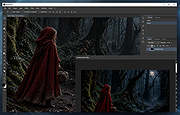 |
| Showing rows 1 to 3 of 3 | Showing Page 1 of 1 | 1 |
OlderGeeks.com Copyright (c) 2026
