|

|
Processed through Paypal No account required. |








Buy our over-priced crap to help pay the bills.



|
|
Processed through Paypal No account required. |
| Files | ||||
| File Name | Rating | Downloads | ||
 |
Twinkle Tray v1.17.0 Twinkle Tray v1.17.0 Easily manage the brightness of your monitors in Windows from the system tray. Twinkle Tray lets you easily manage the brightness levels of multiple monitors. Even though Windows is capable of adjusting the backlight on most monitors, it typically doesn't support external monitors. Windows 10 and 11 also lack any ability to manage the brightness of multiple displays. This app inserts a new icon into your system tray, where you can click to have instant access to the brightness levels of all compatible displays. Features • Adds brightness sliders to the system tray, similar to the built-in Windows volume flyout. • Seamlessly blends in with Windows 10 and Windows 11. Uses your Personalization settings to match your taskbar. • Can automatically change monitor brightness depending on the time of day or when idle. • Bind hotkeys to adjust the brightness of specifical or all displays. • Normalize backlight across different monitors. • Control DDC/CI features such as contrast. • Starts up with Windows. Design and Personalization Twinkle Tray will automatically adjust the look and feel to match your Windows version and preferences. Additional options are available to select the Windows version and theme of your choice. Supported operating systems: Windows 10 and Windows 11 Changes: v1.17.0 08-23-25 New features & improvements: Implemented SDR brightness control on HDR displays. Requires HDR to be enabled for the display in Windows. By default it will display as an additional slider in the flyout, labeled "SDR". You can have the main slider automatically switch to use the SDR slider using the "SDR Replaces ... |
 |
2,969 | Nov 22, 2025 Xander Frangos 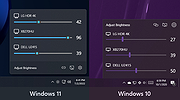 |
| Showing rows 1 to 1 of 1 | Showing Page 1 of 1 | 1 |
OlderGeeks.com Copyright (c) 2026
