|

|
Processed through Paypal No account required. |








Buy our over-priced crap to help pay the bills.



|
|
Processed through Paypal No account required. |
| Files | ||||
| File Name | Rating | Downloads | ||
 |
CloneScan v2.1 CloneScan v2.1 👉 Find, review, and safely remove duplicate files and folders. CloneScan is a free Windows utility designed to help you find, review, and safely remove duplicate files and duplicate folders from your computer. Features: • Find duplicate files and folders • Compare by file name, size, file name and size, or SHA-1 hash • Filter scans by file type • Set a minimum file size for scanning • Fast content scanning with parallel hashing • Grouped duplicate results • Move deleted items to the Recycle Bin • Export results to CSV Supported operating systems: • Windows 10, Windows 11 Supported languages: English Changes: v2.1 09-09-26 New scan options. Minor fixes. Click here to visit the author's website. |
 |
690 | Sep 10, 2026 TkoSoft 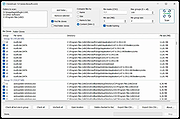 |
|
FileBricks v2.2 FileBricks v2.2 👉 Visual disk space analyzer and duplicate file finder. FileBricks is a free Windows tool for discovering what takes up space on your drives. It turns files, folders, and duplicates into colorful visual bricks, making it easier to spot large files, heavy folders, repeated copies, and common file types at a glance. Features: • Visual disk space analysis using proportional colorful bricks • Files in Folders view shows files within their folder structure • Only Files view displays individual files from largest to smallest • Only Folders view provides a graphical comparison of folder sizes • Duplicates view visually groups repeated files • Smart color coding displays files with the same extension in the same color • Scan all drives or choose a specific folder • Exclude files based on modified date • Ignore files smaller than a selected minimum size • Exclude files using wildcard filename patterns • Hover over bricks to see file or folder details and paths • Select a brick to locate its corresponding item in the tree • Tree views provide size, percentage and file-count information • Helps locate large videos, archives, installers, backups, images and other space-consuming files • Freeware for Windows Supported operating systems: • Windows 10, Windows 11 Supported languages: English Changes: v2.2 09-09-26 Improved sorting in the Duplicates section. Improved visualization of the Only Files section. Click here to visit the author's website. |
|
948 | Sep 10, 2026 TkoSoft 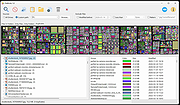 |
|
NextDiff v2.0 NextDiff v2.0 👉 Free file, text, and folder comparison tool for Windows. NextDiff is a freeware file and folder comparison utility that helps you quickly identify differences between two text files, source code files, documents, or folders. It displays content side-by-side with line-by-line and in-line highlighting, making it easy to spot added, removed, and modified text. NextDiff also supports folder synchronization tasks by identifying newer files and files that exist only on one side. Built-in editing and merge functions allow you to copy changes between files or make edits directly within the comparison window. For supported document formats, Apache Tika integration enables comparison of extracted text from files such as PDF, DOCX, XLSX, and PPTX. The program is free for both personal and commercial use. Features: • Side-by-side comparison of text files • Line-by-line and in-line difference highlighting • Compare source code, logs, scripts, configuration files, and documents • Compare folders and subfolders • Detect files that exist only on one side • Highlight newer files during folder comparison • Copy differences from left to right or right to left • Edit text directly within the comparison window • Undo recent merge and edit operations • Navigate to the first, previous, next, or last difference • Ignore case, whitespace, leading/trailing spaces, or blank lines • Supports ANSI, ASCII, UTF-8, UTF-8 BOM, and UTF-16 text encodings • Optional Apache Tika support for comparing PDF, DOCX, XLSX, PPTX, and other document formats • Customizable colors, fonts, line numbers, and grid display • Free for personal and commercial use Supported operating systems: • Windows 10, Windows 11 Supported languages: English, Czech, Dutch, French, German, Hungarian, Italian, Polish, Portuguese, Romanian, Russian, Slovak, Spanish, Turkish, Ukrainian Changes: v2.0 07-07-26 Added multilingual support. Note: This file has one hit on VirusTotal. We have confirmed this to be a false positive. The file is safe. Click here to visit the author's website. |
|
384 | Jul 17, 2026 TkoSoft 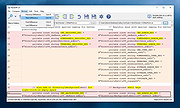 |
| Showing rows 1 to 3 of 3 | Showing Page 1 of 1 | 1 |
OlderGeeks.com Copyright (c) 2026
