|

|
Processed through Paypal No account required. |








Buy our over-priced crap to help pay the bills.



|
|
Processed through Paypal No account required. |
| Files | ||||
| File Name | Rating | Downloads | ||
 |
caffeinate & disablesleep v1.0.0 caffeinate & disablesleep v1.0.0 👉 Keep your Mac awake with simple menu bar controls, including optional closed-lid operation. caffeinate & disablesleep is a free, open-source macOS menu bar utility that provides an easy graphical interface for Apple's built-in caffeinate command along with quick access to the disablesleep power setting. Instead of remembering Terminal commands, you can start timed keep-awake sessions, prevent display sleep, or allow your Mac to continue running after the lid is closed with just a few clicks. The application offers preset timers ranging from 15 minutes to 8 hours, plus an unlimited mode. A live status display shows the current power settings, and a right-click shortcut lets you quickly enable or disable sleep prevention without opening the main window. The optional closed-lid feature securely configures the required macOS power setting and only requires administrator authorization the first time it is enabled. The developer recommends ensuring adequate ventilation whenever operating a Mac with the lid closed. Features: • Simple menu bar interface for Apple's built-in caffeinate utility • Prevents your Mac from sleeping • Timer presets from 15 minutes to 8 hours • Unlimited keep-awake mode • Optional "Keep Screen On" mode • Optional closed-lid operation using disablesleep • Right-click menu bar toggle • Live power command status display • Visual indicators showing active sleep settings • Automatically detects Terminal changes • Optional launch at login • Optional automatic keep-awake on startup • Native Swift application • No external dependencies • Open source (MIT License) Usage instructions: • Launch the application and click its menu bar icon. • Select a timer (15 minutes through 8 hours) or choose Infinite. • Click the moon button to start or stop the keep-awake session. • Enable Keep Screen On if you do not want the display to sleep. • Enable Stay Awake With Lid Closed to continue running after closing the lid. • The first time you enable closed-lid mode, enter your administrator password when prompted. • Right-click ... |
 |
275 | Aug 04, 2026 Demiao Chen 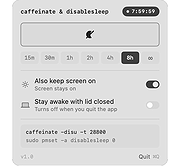 |
 |
Easy Timer v2.6 Easy Timer v2.6 Simple yet intuitive combination of best desktop clock and alarm timer features. Main Features Easy & intuitive: Set up an alarm timer with just a few clicks Separate, customizable analog desktop clock Over 35 pre-installed alarm sounds Multilingual: CA, 🇩🇪, 🇺🇸, 🇪🇸, 🇫🇷, 🇮🇹, 🇵🇹, 🇸🇪, 🇹🇷 Portable: Just one executable, no need for installation Easy Timer is an easy-to-use alarm clock. It has a very simple and minimalistic interface: Just set in how many minutes or at what time it should alert and press activate – done! It is fully customizable as well. You can set up the alarm sound by choosing from over 35 pre-installed or selecting your own audio file. Furthermore you can change the appearance like colors, position or size. Also the alarm type can be set to alert for a specified number of times or until deactivated. There is even an option to repeat it in certain minutes. Other features include custom actions after the alarm like displaying a self-chosen alert message. Helpful are the separate analog desktop clock and the systray balloontips which display a lot of useful information such as the current time, alarm time and progress. This timer is designed as a quick and easy solution to remind you for an upcoming event. Even as a simple desktop clock it does a truly beautiful job! Changes: 2.6 (2013-04-22) --------------------- Added: Option to display countdown on clock Added: Preview for systray balloontip message Added: Visual progress bar on taskbar for Windows 7 and higher Added: High resolution program icon for Windows Vista and higher Changed: Many small improvements for timer setup window: Automatically select duration ... |
|
3,416 | Jun 10, 2021 Kevin Schneider 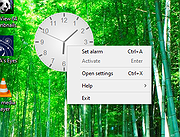 |
|
FluentTaskScheduler v1.9.0 FluentTaskScheduler v1.9.0 👉 A modern, fluent UI-based task scheduler for Windows. FluentTaskScheduler is a Windows task scheduling utility that provides a clean and modern interface for creating, managing, and monitoring scheduled tasks. Built with a fluent design approach, it simplifies interaction with the Windows Task Scheduler by offering an intuitive graphical interface while still exposing advanced configuration options. It is designed for both casual users and advanced users who want more control over automation without navigating the default Windows scheduler. Features: • Create, edit, and delete scheduled tasks with ease • Modern fluent UI design for improved usability • View detailed task information and status • Support for triggers, actions, and conditions • Simplified interface compared to Windows Task Scheduler • Lightweight and easy to use Supported operating systems: • Windows 10, Windows 11 Supported languages: English Changes: v1.9.0 07-26-26 New Features Task Chaining (Completion Actions): Chain tasks together and configure a task to automatically start other tasks when it succeeds or fails, right from a new "Completion Actions" section in the task editor. FluentTaskScheduler watches the Task Scheduler event log in real time (no polling) and includes built-in loop protection so you can't accidentally chain a task into itself. Global & Per-Task Snooze: Need a break? Hit "Snooze All Tasks" to pause task execution app-wide for 30 minutes, 1 hour, 3 hours, until your next reboot, or a custom time. You can also now snooze individual tasks (including a working custom time option). Optionally suspends scheduled triggers at the OS level too, and un-suspends exactly what it suspended when the snooze ends. Dashboard Analytics: The Dashboard got a serious upgrade: a 24-hour execution heatmap, a health-score ring, average/longest run duration, and a live, filterable execution log (Success / Failed / Snoozed). Task Template Library: 17 ready-to-deploy templates (temp cleanup, restore points, ... |
|
1,091 | Sep 16, 2026 TRGamer-tech 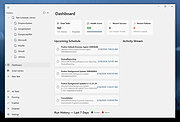 |
|
Free Meditation Timer v1.0 Free Meditation Timer v1.0 A free meditation program for Windows. Supports multiple user profiles and includes a collection of chimes and background sounds to control your meditation. Click here to visit the author's website. |
|
4,810 | Jan 01, 2023 mediafreeware(dot)com 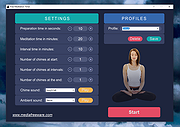 |
|
Marxio Timer v1.11.1 Marxio Timer v1.11.1 A timer, reminder and scheduling tool to turn off PC, restart, lock screen, display text, run selected application, send keystrokes and more. Each creates an individual configuration file that can be loaded as needed or automatically launched when computer starts. The task then displays a progress windows that keeps track of the time until launch and other options to pause or cancel the task. Schedule tasks to run at certain times, after a countdown or dynamically, based on PC idle time and CPU usage. |
|
4,357 | Jul 02, 2020 Marxio Tools 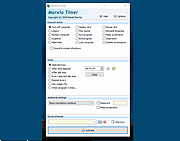 |
|
OpenPets-3.1.0-win-x64-portable.exe OpenPets v3.1.0 👉 An open source desktop companion with AI coding agent integration and an expandable plugin platform. OpenPets is an open source desktop companion that places an animated pet on your desktop while providing an extensible plugin platform for productivity, reminders, focus sessions, mini games, launch shortcuts, hydration nudges, and virtual pet interactions. It can optionally integrate with AI coding agents through the Model Context Protocol (MCP), allowing your pet to react to coding activity while keeping prompts, code, logs, URLs, secrets, and other sensitive information private through local sanitization and filtering. The application is designed with a sandboxed plugin system that enables developers to create custom companion behaviors using the OpenPets Plugin SDK. Features: • Animated desktop companion with idle animations and interactive behaviors • Extensible plugin platform with official and third-party plugins • Plugin SDK for developing custom companion features • Built-in focus timers, reminders, mood check-ins, mini games, hydration nudges, and virtual pet stats • Optional integration with Claude Code, Cursor, OpenCode, Pi, and other MCP-compatible AI coding agents • Sandboxed plugin runtime with permissions, quotas, storage, scheduling, notifications, and audio support • Local-only communication with AI integrations for improved privacy • Dynamic filtering that redacts file paths, URLs, secrets, and code snippets from generated speech • Tray-based desktop application • Multiple desktop pet support Supported operating systems: • Windows 10, Windows 11 • macOS • Linux Supported languages: • English Changes: v3.1.0 06-13-26 Fixed desktop install flow regressions for catalog plugin installs. Catalog installs no longer fail because of stale catalog hashes. Improved catalog and manifest validation for more reliable plugin installation. Improved install failure handling with clearer error messages and redaction of local filesystem paths. Plugin install prompts now display translated plugin names correctly. Newly installed plugins are automatically enabled after approval. Added XS pet scale support. Updated Wayland and desktop validation to fix compositor and desktop integration regressions. This download is for the Windows portable version (very bottom of page). All ... |
|
478 | Jun 19, 2026 Boring Dystopia Development  |
|
Reliak Timer v1.0 Reliak Timer v1.0 Reliak Timer is a small timer tool that supports the Pomodoro Techniqueฎ. Some of its features are: - Simple and clean design - Snap window to the boundaries of the desktop - Notifications when work or break unit is over (e.g. play sound or flash window) - Automatically restart timer - Autostart timer on application start - Can stay on top of windows - Customizations (e.g. color or font) Click here to visit the author's website. |
|
4,480 | Dec 06, 2019 reliak 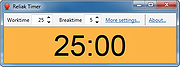 |
|
Shut IT - Shutdown Timer v2.0.0.1 Shut IT - Shutdown Timer v2.0.0.1 Shut IT can schedule system power-down commands like Shutdown, Reboot, Log-off, Standby and Hibernate. The user sets a time upon which these commands must be actioned and when the time is up, the system shuts down or reboots and so on. Available timer modes: COUNTDOWN: i.e. shutdown in 30 minutes. SPECIFIC i.e. shutdown at exactly 14h35. The built-in options dialog will allow the user access to some additional features included in the program like system cleaning, idle task processing and shutdown optimizing tweaks. Shut IT runs in stand-alone mode and does not need any special installation. Install Support: No installation needed OS Requirements: Windows XP, Vista, 7, 8, 8.1, 10 OS Bits: 32 and 64-bit System Requirements: CPU 1.6 GHz, RAM 512MB, Any GPU Language: English License: Free CHANGES (AUGUST 2015) Version 2.0.0.1: 1.) Minor code chages: Added compatibility for Windows 8.1. 2.) Website changes: Updated website address and contact details. Click here to visit the author's website. |
|
9,672 | Jul 02, 2020 MetalloSoft 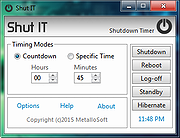 |
|
Shutdown Timer Classic v1.3.2 Shutdown Timer Classic v1.3.2 👉 Simple shutdown timer for Windows with tray controls and optional command-line use. Shutdown Timer Classic is a small Windows application that lets you set a countdown to shut down, restart, hibernate, sleep, or lock your PC. It includes a compact UI, a handy tray menu for controlling an active timer, and a “graceful” option when you don’t want apps to be force-closed. It also supports launching with command-line arguments for scripted or automated use. Features: • Countdown to Shutdown, Restart, Hibernate, Sleep, or Lock • Tray menu controls (stop/restart/view timer, show/hide countdown window) • “Run in background” option while keeping tray/menu access • Graceful mode option to avoid force-closing apps (when appropriate) • Command-line arguments for launching with preset actions/timers and modes • CLI “time of day” target mode (added in v1.3.2) Supported operating systems: • Windows 10 (Version 1709 / Build 15063) or later (minimum recommended) • Windows 11 Supported languages: • English Changes: v1.3.2 02-03-26 • Introduces: "Time of day"-mode for CLI • Fixes: Restarting a paused timer causing time skip (#54) • Fixes: Cancelling the countdown update dialog causing an exception (#55) • Fixes: Tab order of UI elements (#57) • Fixes: Fallback to CJK-compatible font causing incorrect form layout (#56) • Fixes: Application crashing on Windows 7 (#48) • Plus: Smaller code refinements and UI polishes Click here to visit the author's website. |
|
670 | Mar 05, 2026 Lukas Langrock 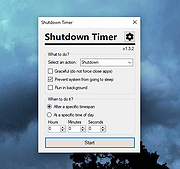 |
|
Timer v1.7 Timer v1.7 A simple, free stopwatch timer. Timer can start, pause and reset a timer, take round times, that are fully customizable via arithmetic expressions, and optionally save them to text files. On start, the tool will create an icon in the system tray. Click it to bring the main window to the top. Click on the top-down arrow in the top right of the main window to select whether the timer should count in milliseconds (1s = 1000ms) or centiseconds (1s = 100cs). In the settings you can configure the final output string of the taken round, the global hotkeys to start, pause, reset a timer, and the notification sound volume. Read the help in the settings on any questions on arithmetic expressions, additional variables and the output of the final string. Supported operating systems: Windows XP or higher Click here to visit the author's website. |
|
5,975 | Apr 20, 2025 2xDSoft 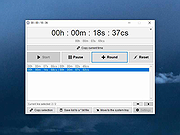 |
|
Workrave v1.10.54 Workrave v1.10.54 👉 Helps prevent repetitive strain injuries by reminding you to take healthy computer breaks. Workrave is a free and open-source program designed to help prevent and relieve Repetitive Strain Injury (RSI) and other computer-related health issues. It monitors keyboard and mouse activity and reminds users to take regular breaks from their computer to rest, stretch, and relax. The software provides configurable microbreaks, rest breaks, and daily usage limits to encourage healthier work habits. By tracking input activity and detecting idle time, Workrave can intelligently determine when breaks are needed and provide gentle reminders before enforcing them if necessary. During breaks, Workrave may display simple exercises or relaxation prompts to help reduce muscle tension and eye strain caused by prolonged computer use. Break timers and reminder behavior are fully customizable, allowing users to tailor break frequency, duration, and enforcement settings to their workflow. Workrave runs quietly in the background and integrates with the system tray, making it suitable for both home and workplace environments where long computer sessions are common. Features: • Monitors keyboard and mouse activity to detect continuous computer use • Reminds users to take microbreaks, rest breaks, and daily usage limits • Fully configurable break timers and durations • Gentle break reminders with optional enforced breaks • Microbreaks for short pauses and longer rest breaks for recovery • Tracks active and idle time to intelligently manage break timing • Optional exercises and stretching prompts during breaks • Postpone or skip options for break reminders • System tray integration and automatic startup options • Free and open-source software Supported operating systems: • Windows • Linux Supported languages: System language (Workrave uses the operating system's locale for its interface language). Changes: v1.10.54 10-16-25 Add support for GNOME Shell 49 (#636, Alessandro Astone) Note: This file has two hits on VirusTotal. We have confirmed these to be false positives. The file is safe. This download is for the Windows version (very bottom of ... |
|
4,490 | Mar 04, 2026 Raymond Penners & Rob Caelers 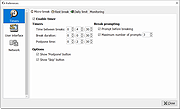 |
| Showing rows 1 to 11 of 11 | Showing Page 1 of 1 | 1 |
OlderGeeks.com Copyright (c) 2026
