|

|
Processed through Paypal No account required. |








Buy our over-priced crap to help pay the bills.



|
|
Processed through Paypal No account required. |
| Files | ||||
| File Name | Rating | Downloads | ||
 |
Textify v1.10.4 Textify v1.10.4 Have you ever wanted to copy some text from a dialog box which doesn’t provide such functionality? Textify was created to solve this problem: you can point your mouse over the text, click on the mouse shortcut (Shift + Middle click by default), and get a selectable view of the text. Demonstration Textify and Google Chrome Here are the steps to make Google Chrome work with Textify: Open Google Chrome, and navigate to the following URL: chrome://accessibility/. Check the checkboxes under Global accessibility mode. To keep accessibility always enabled for Chrome, add the following command line parameter to your Chrome shortcut: --force-renderer-accessibility Changes: v1.10.4 (September 1, 2023) Icons are now reloaded on DPI change to prevent blurry icons. Added Swedish translation by Sopor. Click here to visit the author's website. |
 |
6,962 | Jan 12, 2024 RaMMicHaeL 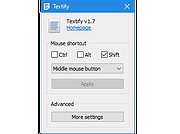 |
| Showing rows 1 to 1 of 1 | Showing Page 1 of 1 | 1 |
OlderGeeks.com Copyright (c) 2026
