|

|
Processed through Paypal No account required. |








Buy our over-priced crap to help pay the bills.



|
|
Processed through Paypal No account required. |
| Files | ||||
| File Name | Rating | Downloads | ||
 |
SwitchExplorer v2.2.0 SwitchExplorer v2.2.0 Switch Explorer and Context Menu between the Windows 11 version and the Windows 10 version. With SwitchExplorer, you can: • Set the default Explorer in Windows 11 to the Windows 10 version (the same one you can access via the Control Panel). • Set the Windows 11 context menu (right-click menu) to the Windows 10 (classic) layout. • You can also use the tool to undo the changes & switch back to the Windows 11 defaults. SwitchExplorer does not install any software. It only sets some user profile registry entries and closes Explorer windows (so the change can take effect). It can be used by both Standard and Administrator users and can be run from a flash drive. There is nothing to install. Just download and run. Changes: v2.2.0 12-08-25 Added an option to Restart Explorer because sometimes Explorer does not switch correctly without killing and restarting it. Click here to visit the author's website. |
 |
833 | Dec 09, 2025 LesFerch 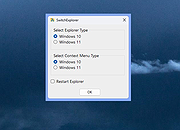 |
| Showing rows 1 to 1 of 1 | Showing Page 1 of 1 | 1 |
OlderGeeks.com Copyright (c) 2026
