|

|
Processed through Paypal No account required. |








Buy our over-priced crap to help pay the bills.



|
|
Processed through Paypal No account required. |
| Files | ||||
| File Name | Rating | Downloads | ||
 |
Games Cleaner v24.31022 Games Cleaner v24.31022 👉 Advanced gaming cleanup utility that removes leftover files, launcher junk, caches, logs, and temporary game data to free valuable storage space. Games Cleaner is a specialized cleanup utility designed specifically for gamers who want to reclaim wasted disk space and keep their systems organized. Unlike general-purpose cleaning tools, Games Cleaner focuses on the unique folders and temporary files created by modern PC games and digital distribution platforms. The program scans gaming-related directories for leftover uninstall files, launcher caches, outdated logs, crash reports, shader caches, empty folders, screenshots, temporary downloads, and other unnecessary data commonly left behind after gaming sessions or incomplete uninstallations. This helps reduce clutter while freeing storage space that can quickly disappear on systems with large game libraries. Games Cleaner supports many popular gaming ecosystems and launchers, making it useful for players with collections spread across multiple platforms. The utility can detect and clean files created by services such as Steam, Epic Games Launcher, Ubisoft Connect, Bethesda Launcher, EA App, Battle.net, GOG Galaxy, and other common PC gaming environments. The interface is designed to be straightforward and easy to use, allowing users to quickly scan their system, review detected items, and remove unnecessary files without manually browsing through complicated game directories. It can be especially useful for SSD users where storage space is limited and large modern games constantly generate temporary data. Features: • Cleans leftover files from installed and previously uninstalled games • Removes temporary files, caches, logs, shader caches, and crash reports • Supports multiple popular gaming launchers and ecosystems • Detects unnecessary gaming-related junk files automatically • Helps recover valuable disk space on SSDs and HDDs • Scans for empty folders and obsolete directories • Cleans launcher-generated cache and temporary download files • Helps organize cluttered gaming systems • Simple and easy-to-use interface • Lightweight Windows utility focused on gaming cleanup • Designed specifically for PC gaming ... |
 |
532 | Jun 04, 2026 Rezar Behzad 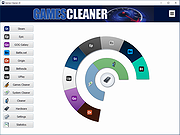 |
 |
Red Planet Rampage v0.5.3 Red Planet Rampage v0.5.3 👉 A dieselpunk western-themed arena shooter with modular guns, auctions, and multiplayer chaos. Red Planet Rampage is a free and open source dieselpunk western-themed arena shooter where players battle with wacky modular guns built from weapon parts. Set on a Mars overrun by cowboy-hat-wearing terraforming robots, it combines fast-paced movement, weapon-part auctions, split-screen play, AI opponents, and multiplayer action into a chaotic arena shooter experience. The story... The robots responsible for terraforming Mars have donned cowboy hats and started wreaking havoc with staged shootouts and competitions where they auction off rudimentary weapon parts assembled from scrap. Terraforming Inc. is still investigating the cause of this disturbance, but rumors point to a fateful upload of a western film. Features: • Modular weapons with over 600 different combinations • Auctions where players bid on weapon parts to build custom weapons • Online multiplayer with queue and friends-only lobbies through Steam • Splitscreen multiplayer • Multiple game modes and maps • Custom game modes • Movement with a high skill ceiling, including bunnyhopping and surfing explosions • AI players for matches when no other players are available • Keyboard, mouse, and gamepad support • Supports 1 to 4 players Supported operating systems: • Windows 10, Windows 11 Supported languages: • English Changes: v0.5.3 Balance changes Made it less likely for parts that have not been bid on in previous auctions to appear in the auction again. Brick barrel has been buffed with higher fire rate. Bugfixes Fixed a bug where having exactly one ammo left with stock + lazur or coil would make you unable to shoot after the previous shot animation had played out 😅 Switching away from the trash uplink extension in training mode should no longer crash the game. Click here to visit the author's website. |
|
673 | Aug 12, 2026 Hackerspace NTNU  |
|
Steam Cleaner v2.4 Steam Cleaner v2.4 Steam Cleaner is a tool that will remove large amounts of data left behind by Steam, Origin, Uplay and GoG. This tool can clear up gigabytes of data in a few seconds. There is no configuration needed, simply run it and it will detect all your installed games and then some. Changelog: Steam Cleaner v2.4 Signs the binary since it was having issues on Windows 10 with smartscreen. Adds Rainway button to the main UI. Click here to visit the author's website. |
|
6,292 | Jan 30, 2020 Andrew Sampson 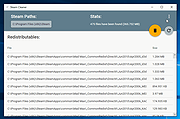 |
|
Steam Library Manager v1.6.0.1 Steam Library Manager v1.6.0.1 Steam Library Manager (SLM) is a tool to manage your Steam Libraries quick and easy. With SLM you can administrate all of your games and backups from one place. Drag and drop between libraries and backup folders with ease. Works with existing Steam Backups or opt to use SLM's open system for fast updates and quick access to game files. Benefits to using SLM over Steam Backup: Backups can be updated quickly. No need to recreate the entire backup from scratch. Backup files are open and easily accessible. Workshop content and mods such as ENB, ReShade, and SweetFX get backed up automatically. Faster backups, faster restores, works with or without Steam running. Compression is available for those who want to keep things lean. Built-in library cleaner for leftovers. SLM is licensed under MIT license which makes it completely free and 100% open source! Steam Library Manager (SLM) is not affiliated with, sponsored by, approved by, or otherwise related to Valve Software or Steam. Changes: [1.6.0.1] - 2019-09-10 Changed Updated translations Updated nuget packages Fixed Creating more than one SLM library fails SLM CRASHES AT STARTUP? Reset injection cache for Rivatuner statistics server or add executable to list of exceptions. Click here to visit the author's website. |
|
5,353 | Sep 11, 2019 Mert Ercan 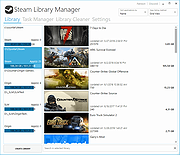 |
| Showing rows 1 to 4 of 4 | Showing Page 1 of 1 | 1 |
OlderGeeks.com Copyright (c) 2026
