|

|
Processed through Paypal No account required. |








Buy our over-priced crap to help pay the bills.



|
|
Processed through Paypal No account required. |
| Files | ||||
| File Name | Rating | Downloads | ||
 |
Speed-Up NVMe v1.0 Speed-Up NVMe v1.0 👉 Increase NVMe drive performance in Windows 11 up to 80%. Speed-Up NVMe is a portable utility that enables Microsoft’s newer native NVMe storage driver on supported Windows 11 systems by applying the required registry entries automatically. According to the developer, this can improve IOPS performance by up to 80% and reduce CPU cycles by about 45% on supported setups. The program also includes the registry files it applies, so you can review or revert the changes more easily. It is intended for supported Windows 11 consumer versions with the required updates installed, and the author notes that Windows 10 compatibility is not confirmed. Features: • Enables Microsoft’s newer native NVMe storage driver on supported Windows 11 systems • Portable utility with one-click apply and revert capability • Includes the registry entries used by the program in the Reg folder • Can improve NVMe SSD IOPS performance on supported systems • May reduce CPU usage during supported storage workloads • Helps expose NVMe devices under Storage Controllers instead of standard device handling after reboot • Useful for workloads such as database operations, file server metadata work, Hyper-V, virtualization, and large AI or machine learning dataset processing Supported operating systems: • Windows 11 24H2, Windows 11 25H2 • Windows Server 2025 Supported languages: English Changes: v1.0 12-29-25 Not Provided How to Use: 1) Download the Speed-Up NVMe ZIP file and extract it to any folder. 2) Right-click the executable and select Run as Administrator. 3) Click Enable NVMe Optimization (or equivalent option). 4) Restart Windows to apply the changes. To revert: 1) Run the tool again as Administrator. 2) Choose Restore Default Settings. 3) Restart Windows to apply the changes. Note: This tool modifies Windows registry settings to enable an undocumented NVMe driver. Use only on Windows 11 and at your own risk. Click here to visit the author's website. |
 |
986 | Mar 24, 2026 Sordum.org 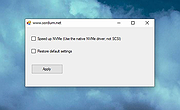 |
| Showing rows 1 to 1 of 1 | Showing Page 1 of 1 | 1 |
OlderGeeks.com Copyright (c) 2026
