|

|
Processed through Paypal No account required. |








Buy our over-priced crap to help pay the bills.



|
|
Processed through Paypal No account required. |
| Files | ||||
| File Name | Rating | Downloads | ||
 |
Rem-VBSworm v8.0.0 Rem-VBSworm v8.0.0 A small tool that will aid you to remove VBS malware (and unhide your files) from a machine or in a network. The tool is written entirely in batch. Instructions on using Rem-VBSworm You should run the script in the following sequence, at least on a normal machine: Plug in your infected USB (if any) and choose A, then B and afterwards C. After these steps, perform a full scan with your installed antivirus product or perform an online scan. Some tips and tricks: Using option A, the tool will attempt to clean the infection. It will also fix any registry changes made by the malware. (for example it will re-enable Task Manager should it be disabled). ! When you use option B, be sure to type only the letter of your USB drive! So if you have a USB drive named G:\, you should only type G This option will eradicate any related malware on the USB drive, as well as unhide your files (make them visible again). With option C you can download Panda USB Vaccine to prevent any other autorun malware entering your computer. With option D you have the possibility to disable or re-enable the Windows Script Host (WSH), to prevent any malware abusing it. I advise to end the script with Q as to ensure proper logfile closing. A logfile will open automatically, but is also created by default on the C:\ drive. (C:\Rem-VBS.log) When the tool is running, do not use the machine for anything else. (it takes about 30 seconds to run) If VBS malware is found, it will be automatically removed and a copy ... |
 |
6,869 | Nov 13, 2019 Bart Blaze 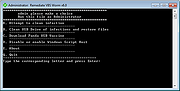 |
| Showing rows 1 to 1 of 1 | Showing Page 1 of 1 | 1 |
OlderGeeks.com Copyright (c) 2026
