|

|
Processed through Paypal No account required. |








Buy our over-priced crap to help pay the bills.



|
|
Processed through Paypal No account required. |
| Files | ||||
| File Name | Rating | Downloads | ||
 |
OpenPdfEdit v1.0.2 OpenPdfEdit v1.0.2 👉 View, edit, annotate, and organize PDF files on your computer. OpenPdfEdit is a free, open-source PDF editor for macOS and Windows. It lets you view PDFs, edit text and images, add annotations, redact content, fill and sign forms, reorganize pages, merge or split documents, and compare files. Documents are opened, edited, and saved on your computer rather than uploaded to a server. OCR and watermarking are available as optional paid tools. Features: • View and navigate PDF documents • Edit text and images in PDF files • Add annotations and markups • Redact sensitive content • Fill forms and place saved signatures • Reorder, rotate, and remove pages • Merge, split, and compare PDF files • Save and work with documents locally; files are not uploaded • Optional paid tools for OCR and watermarking Supported operating systems: macOS 10.13 or later (Apple silicon and Intel), Windows 10 64-bit, Windows 11 64-bit Supported languages: English, German, Spanish, Japanese, Korean, Portuguese, Chinese (Simplified), Chinese (Traditional) Changes: v1.0.2 10-12-26 Added the first Windows build. The Mac build now supports Intel Macs as well as Apple silicon. Saved signatures can be placed by tapping the page. Ticked form checkboxes retain their on-state when saved. Flattening now includes form fields without a drawn appearance. 👉 This download is for the Windows version (very bottom of page). All other download assets are below: Other Windows: OpenPdfEdit Installer.exe (Microsoft Store Installer) macOS: OpenPdfEdit_1.0.2_universal.dmg Chrome Edge Extension: openpdfedit-extension-1.0.1-chrome-edge.zip Click here to visit the author's website. |
 |
26 | Oct 15, 2026 OpenPdfEdit 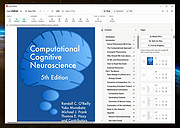 |
 |
PDFgear v2.1.19 PDFgear v2.1.19 👉 Free all-in-one PDF editor, reader, converter, OCR tool and AI assistant. PDFgear is a free PDF editor and management suite for viewing, editing, converting, creating, annotating, signing, organizing and protecting PDF documents. It allows existing PDF text and images to be edited directly, includes OCR for scanned documents, supports batch conversions and provides PDFgear Copilot for working with documents using natural-language commands. PDFgear does not require an account, places no watermarks on exported documents and does not impose file-size or file-number limits on its desktop software. Features: • View and read PDF documents with multiple reading and navigation options • Directly edit, replace, add and delete existing PDF text • Change fonts, font sizes, styles and other text formatting • Add, replace, reposition and edit images and other PDF objects • Add text boxes, hyperlinks and customizable shapes • Highlight, underline and strike through text • Add notes, comments, stamps, watermarks and freehand drawings • Fill interactive PDF forms • Add signatures and certificate-based digital signatures • Secure eSign for signing documents with greater security and confidence • Request signatures from multiple parties • OCR scanned PDFs and image-based documents • Extract text from selected areas with OCR • OCR supports more than 30 languages during PDF conversion • Convert PDFs to Word, Excel, PowerPoint, TXT, images and other formats • Create PDF documents from multiple file formats • Batch convert multiple PDF documents • Merge and split PDF files • Rearrange, rotate, crop, extract, duplicate, insert and delete PDF pages • Add customizable page numbers to headers or footers • Compress PDF documents • View and manage PDF attachments • Redact sensitive information • Manage PDF properties • PDFgear Copilot accepts natural-language instructions for PDF tasks • AI tools can summarize, analyze, translate, rewrite and proofread document content • Search and replace text in PDF documents • Dark mode for PDF viewing • Process ordinary PDF editing tasks locally on the computer • No account required • No ... |
|
2,474 | Aug 20, 2026 PDF Gear Tech PTE. LTD. 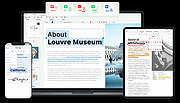 |
|
Word 2007/2010 Redaction Tool 1.2 Word 2007/2010 Redaction Tool 1.2 The Word 2007/2010 Redaction Tool can be used to redact text within Microsoft Office Word documents. Overview The Word 2007/2010 Redaction tool works by allowing users to redact a document using a two stage process: First, regions of text which should be redacted are marked within the document. Second, the marked document is redacted, and all marked text is replaced. Details The add-in adds a Redact group to Word's Review tab: Mark marks the selected content for redaction Unmark removes all redaction marks from the selected range Next moves the selection to the next redaction mark in the document (useful to see what content is marked) Previous moves the selection to the previous redaction mark in the document |
|
6,389 | Oct 24, 2019 tristand 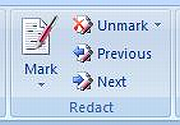 |
| Showing rows 1 to 3 of 3 | Showing Page 1 of 1 | 1 |
OlderGeeks.com Copyright (c) 2026
