|

|
Processed through Paypal No account required. |








Buy our over-priced crap to help pay the bills.



|
|
Processed through Paypal No account required. |
| Files | ||||
| File Name | Rating | Downloads | ||
 |
Multiple Reboot Scheduler v2.6.0.0 Multiple Reboot Scheduler v2.6.0.0 👉 Automates a series of Windows restarts and records how long each reboot takes. Multiple Reboot Scheduler is a portable technician tool that restarts a Windows PC several times, with a configurable pause between restarts. The sequence is intended to trigger Windows’ built-in boot tracing and optimization. It records the time taken by each reboot so you can see whether startup time improved. It can also run selected maintenance tasks before the sequence, preserve desktop icon positions, and sign the current user in automatically between restarts. Features: • Set the number of reboots and the delay between them. • View the timing history during the sequence and a results summary when it finishes. • Optionally defragment the system partition or process idle tasks before starting. • Back up and restore the desktop icon layout, either automatically or manually. • Set up automatic sign-in for the current user so the sequence can continue unattended. • Pause the countdown, enable a sound for its final 10 seconds, or cancel the sequence. • Run directly as a portable executable. Supported operating systems: • Windows XP, Windows Vista, Windows 7, Windows 8.1, Windows 10, Windows 11, 32-bit and 64-bit Supported languages: English Changes: v2.6.0.0 09-16-24 Not provided. Note: This file has one hit on VirusTotal. We have confirmed this to be a false positive. The file is safe. Click here to visit the author's website. |
No Votes | 72 | Sep 24, 2026 Carifred 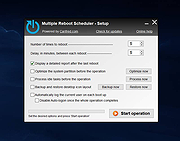 |
 |
Reboot Restore Rx Free 2.2 Reboot Restore Rx Free 2.2 Reboot Restore Rx prevents any changes made on your drive(s) by restoring a saved baseline every time the PC boots up. It is designed for small public access computing environments such as classrooms, libraries, kiosks, and internet cafes. Even when users download files, viruses, malware, or even try to delete registry keys, Reboot Restore Rx will restore the PC back to your desired state. Reboot on Restore Instantly reset to the baseline on startup or hard reset. One-Click Instant Update Update the baseline without restarting your computer. Reduce Maintenance Cost Drastically reduces computer maintenance, and can be used to protect tier one public access computing environments Reboot Restore Rx Version: 2.2 Last Updated: 10 May 2017 Fixes Secure Boot Issue for better compatibility with Windows 10 build 1607 & later Support Grub Linux bootloader. Adjusted the Uninstallation User Interface. New End User License Agreement (EULA) |
 |
7,185 | Nov 15, 2019 Horizon DataSys Corp.  |
| Showing rows 1 to 2 of 2 | Showing Page 1 of 1 | 1 |
OlderGeeks.com Copyright (c) 2026
